Community Homepage
Discussions
Categories
Quicken for Mac
Quicken Lifehub
Quicken Mobile
Quicken on the Web
Quicken for Windows
Support
Quicken Classic
Quicken Simplifi
Getting Started
Community Training FAQs
Using and Improving the Community
Connect and Engage
Announcements & Alerts
Announcements
Alerts, Online Banking & Known Product Issues
Product Ideas
Beta
Home
Quicken Classic for Windows
Business and Rental Property Tools (Windows)
How to put business transactions into business categories?
lacadwell
How do I put transactions into business categories? I am making new categories for my business. Everything keeps going into the personal categories. I make sure I have clicked business expenses/income but it automatically goes into personal. Help!
Find more posts tagged with
Accepted answers
All comments
Greg_the_Geek
Do you have Quicken Home& Business? Business
categories should be linked to a Schedule C tax item or have a business tag.
lacadwell
I have Quicken Deluxe 2019 which the business categories are listed. I make sure I am in the business/income category when I make a new category for business. When I go to the category list, what I put in for business has been put into personal expenses/income.
Greg_the_Geek
I don't think Quicken Deluxe 2019 supports business categories. From the Quicken web-site under Quicken Plans Home & Business, "
Separate and categorize business and personal expenses".
lacadwell
It says on the Quicken Deluxe 2019 description that this version easily categories personal and business which it does list business expenses/income and personal expenses/income. All of my stuff automatically goes into personal. I wanted to know 1. how to keep it from doing that. Is there a default setting and if there is how do I get to it. 2. how to switch the transactions over to business from the personal. Thanks
NotACPA
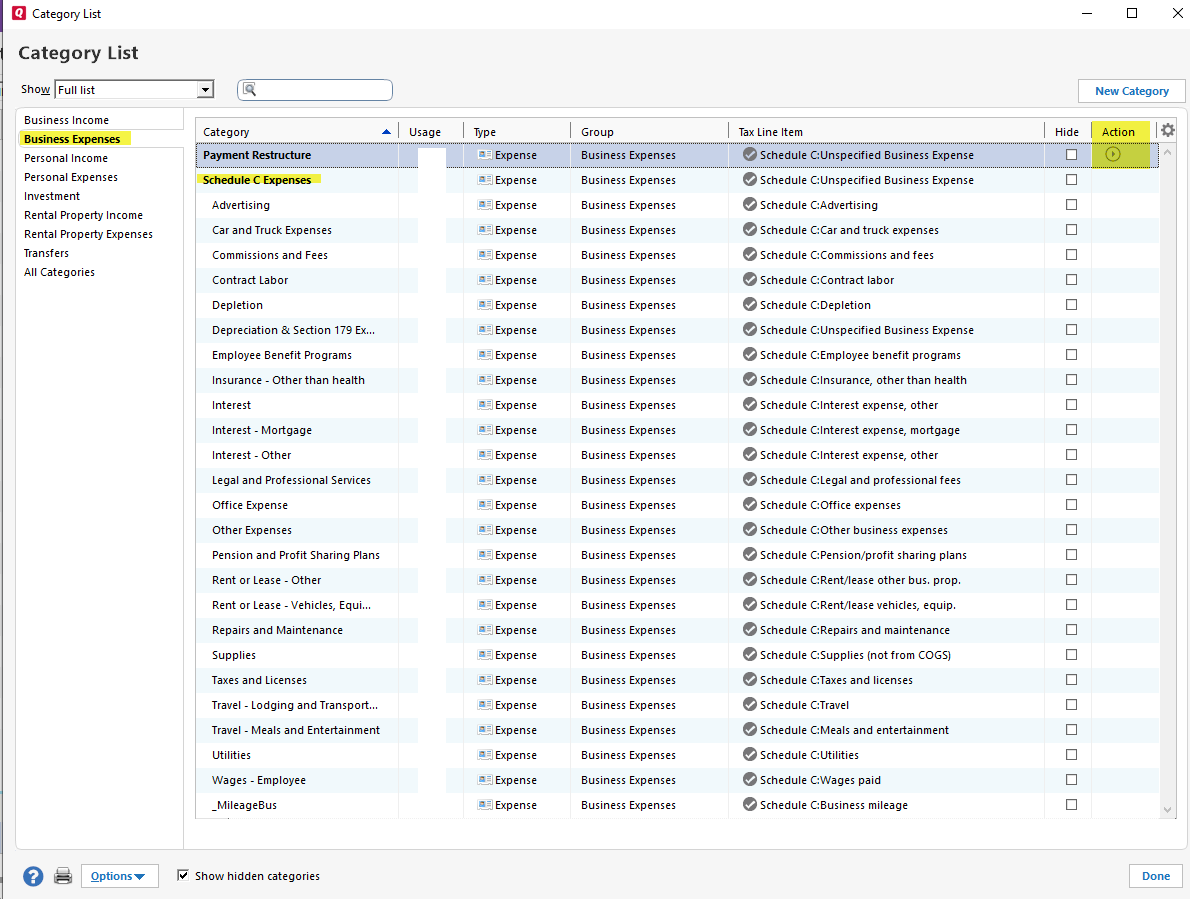
In Q, a category (no matter what it's name, or intended use) is ONLY a "business" category when it's tied to a business tax line.
So, you can set up your own tax lines in Deluxe, but Q won't recognize them a "business categories", and there's no business specific reports in Deluxe.
Scooterlam
FWIW, Here is how I structured schedule c expenses when I added a business. In the category list, as mentioned, you can tie a category to a tax line under the action column by clicking the arrow icon and selecting edit. Then, click the "Tax Reporting" tab, check the "tax related category" box and in the pull-down, select the appropriate tax line item you want associated with that category. I am using QW, Home and Business Version. Not sure about Deluxe.
FYI. There is no tax line for depreciation so I tied "unspecified business expense" tax line to my depreciation category.
Seems to work well for me to keep me organized.
Scott
Quick Links
All Categories
Recent Posts
Activity
Unanswered
Best Of