Hello @bjgross59
Thank you for reaching out on the community and telling us about your issue. I do apologize for the issues you're having. I believe you're using comenity bank as well. In this case since you're not receiving an error we should be able to try to deactivate/reactivate the account to give us some more information or fix the accounts.
First thing I'll recommend is to save a backup to revert back to just in case. You can find how to do so down below.
https://www.quicken.com/support/how-backup-or-restore-your-quicken-data
Next we'll try deactivating all of the accounts. You can do so by following the article listed down below.
https://www.quicken.com/support/deactivate-online-banking-services-quicken-account
Once all the accounts are deactivated go ahead and follow the article here on reconnecting the accounts.
https://www.quicken.com/support/reactivating-deactivated-account
Once you've had a chance to try this let us know how it goes. If you do get an error please let us know which one and we'll see what we can attempt next.
Thanks,
Quicken Francisco
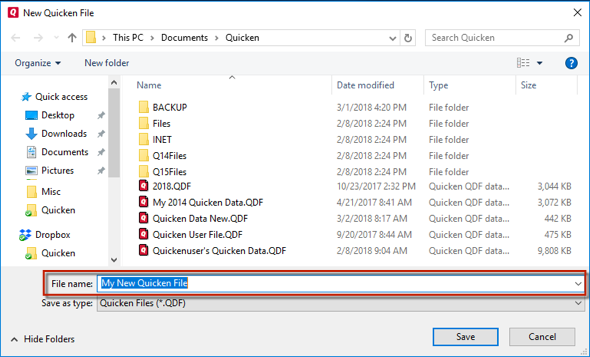
Don't use any of these characters: * ? < > | " : \ / (asterisk, question mark, left and right-angle bracket, pipe, straight quotation marks, colon, BACKSLASH, FORWARD SLASH). Also, don't add the .qdf extension; Quicken does that for you.
After adding accounts, see if you are experiencing the same problems in this test file. This will give us an idea if it's an issue with the server or specifically on the file. Once you get a chance et us know the results!Thanks,Quicken Francisco
@bjgross59 Thanks for the update. With not being able to connect on the test file as well it looks like we'll need to contact Quicken Support via chat or phone so that we're able to take a look at logs and see what exactly is going on. I'll leave our hours down below so you can find a time that works best for you.
Quicken Phone Support Current Hours of Operation:
Monday through Friday
5:00 am to 5:00 pm PDT
Quicken Chat Support Current Hours of Operation:
Monday through Sunday