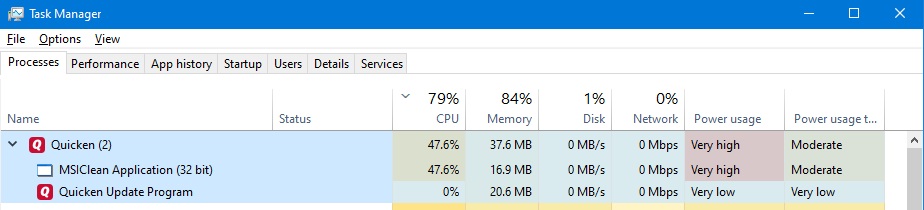
I updated to R48.9 this morning and have encountered multiple problems. I'm running Window 10. I want to revert to R48.8.
You can download it from here: https://assistant.quicken.com/patch/QW27.1.48.8MPatch.EXE
Close Quicken, then make a Windows Explorer copy of your .QDF data file first, and then run the R48.8 patch to revert to R48.8.
Running Windows 10. After updating Quicken to 48.9, the One Step Update starts and then Quicken crashes and the .QDF file is locked. I had to reboot to get the file released. I will try reverting to 48.8.
Updating to R48.9 HF1 hangs. Says it's optimizing, but doesn't end after 5 minutes. Had to 'kill' quicken. Will not upgrade until fixed.
24+ hours and still "Optimizing and executing files". I guess time to prepare to revert to previous. Good thing I make multiple backups everytime I exit quicken.
After a recent update, I have been unable to start Quicken.
after starting, it just locks with the mouse pointer as a blue spinner. Eventually windows will say app is not responding or allow me to kill it. while this is locked, I cannot access internet on Chrome, start windows Task manager or even shut down.
If I start Quicken with Ctrl-Shift the app starts but any attempt to open or even start a new data file results in the same locked behavior - so its clearly not an issue with any specific data file
Thus far i have done the following:
disable antivirus
uninstall & reinstall - including deleting the prgoram files x86 Quicken folder
restart
Start Quicken with Ctrl Shift, do the Validate file - app locks
Start Quicken with Ctrl Shift, do the Super Validate file - app locks
Start Quicken with Ctrl Shift, start new data file - app locks
Windows 11 Home Version 22H2 OS build 22621.1413 Experience Windows Feature Experience Pack 1000.22639.1000.0
Hello @raymondb,
Thank you for reaching out to the Community and telling us about your issue. I'm sorry to hear you're running into this problem. To clarify, when you say after an update, do you mean an update to Quicken or to Windows? When you did the uninstall/reinstall, did you have any antivirus, VPN, and/or firewall you may be using temporarily disabled? If not, I would recommend trying that. From what you're saying, the program will launch without a data file, but locks up as soon as you try to open any data file, even a new one. Does it let you restore a recent backup? Also, you mentioned that other things on your computer aren't working when Quicken freezes up. Are you having any other issues with your computer?
Thank you.
R48.9 crashes and when it does load takes 3 plus minutes!!
Hello All,
Thank you for taking the time to visit the Community to report this issue, though we apologize that you are experiencing this.
We have forwarded this issue to the proper channels to have this further investigated. If you are able to get into Quicken and pull up a data file, we request that you please navigate to Help > Report a problem and submit a problem report with log files attached in order to contribute to the investigation.
While you will not receive a response through this submission, these reports will help our teams in further investigating the issue. The more problem reports we receive, the better.
We apologize for any inconvenience!
(CTP-6224)
Having problem opening Quicken after trying recent update Updated Got a message that it was unable to complete update. Now cannot get Quicken to start. I get the message "unable to initialize Quicken run-time components. Restart Windows and try running Quicken again." I have tried numerous times and cannot open Quicken
Been running for quite awhile.
A recent (last day or two) Quicken update is causing my win 11 home pc to lock up upon startup of Quicken. At startup, I am prompted to enter password, then it locks up everything, forcing a hard resart of the pc. Tried uninstalling and clean reinstall. Anyone having this issue?
Same. Also saying my membership is expired, it isn't. Doesn't expire until May.
So frustrating! I was able to get a backup copy of my file to open, but because of the membership issue I can't download.
Same here. My Quicken file eventually opens (after 3-4 minutes of the blue spinning wheel), but during that period, the PC is not usable, as it is non responsive. I am running the latest version of Quicken (R48.9)
Same issue here. I launch Quicken in Windows 10, enter password, then get blue spinning wheel and computer is non-responsive. After 3-4 minutes Quicken finally opens and appears to work fine. Nothing else has changed on my PC, and after reviewing threads on this forum, seems other users are having the same issue. Thus, it does not appear to be my PC as the issue (or virus software, etc), and seems to be something going on with the R48.9 release.
jjamberg, yes exactly. It eventually opens with a different log in screen than I have seen before, then prompts me to sends a code to my mobile phone, that code opens the file. Uninstalled the program, reinstalled laterst version, same issue.
Having the exact same issue after receiving the latest update for Quicken this morning. Windows 10 Pro 10.0.19045.
Hello @edinsac,
After entering the data file password in Quicken Deluxe, the Quicken header and (File Help) menu items disappear and Quicken becomes a completely blank window—forever. When I close the window via rt click in bottom Win10 taskbar (there's no way to close normally) I get a "Quicken Windows is not responding" message. Reboot has made no difference. I have made sure Win updates are current. This started last night after Quicken backup. Of the many attempts, there was one time I was prompted to login with my Quicken ID before it locked on the blank screen. This last attempt has addded Quicken menu icons and then stalls out.
Quicken Deluxe V27.1.48.9, Win10, there is no VPN running, Avast One AV active
I've used Quicken since the early 90's and have never seen this. Quicken was the MOST reliable software I used. I had zero technical issues for years and years. I don't understand why, but the reliability seems to have changed after it was no longer an Intuit product. Lately I have to be concerned: Will a transaction split be filled with pages of duplicate line items I didn't enter? Will my Reconciled account balance change unexpectedly? Will another transfer become unlinked without my knowledge? And today, will I not even be able to use Quicken on the day I want to do my taxes? I'm usually able to find and fix issues or restore from a backup to work around problems, but I don't have much to work with here. Quicken team, please escalate these issues! Thank you!
@LJ Olson see this post earlier in this discussion for instructions on how to revert to an earlier version:
Did anyone who had trouble updating to R48.9 validate their data file first? Before I allow a Quicken update to install I always; 1) manual backup of the data file, 2)Validate the data file. If the validation shows no trouble I update Quicken. Have never had an update issue following this procedure.
CCleaner in my experience is NOT a good thing to run on Windows 10 or 11. It will damage your Windows installation. I would bite the bullet now and do a clean install of Windows at your soonest convenience.
What you descibe as to how your computer is working the answer is no it is not working normally. I used CCleaner once after Windows 10 had been out for 18 months and it was a disaster. While it worked fine on Windows Vista and Windows 7 (I skipped Windows 8). It basically ruined the Windows registry file and that is the root of the problem. While your computer may be booting up now the slow response time and having to do all of that "Voodoo" to get there indicates that your windows installation is damaged.
With a clean install (not a windows repair) you can start from scratch with a new fresh registry file and clean installations of all of your programs. I have been using PC's for 40 years, building my own from the ground up for the past 30) and in that time I have learned two programs (companies) to avoid at all costs, the first is CCleaner and the other is anything having to do with Norton and/or Norton Utilities.
You can create a bootable thumbdrive (at least 8Gb) from Microsoft with the latest version of windows on it.