Hello All,
Thank you for taking the time to visit the Community to report this issue, though we apologize that you are experiencing this.
We have forwarded this issue to the proper channels to have this further investigated. In the meantime, if you haven't done so already, we request that you please navigate to Help > Report a problem and submit a problem report with log files attached and (if you are willing) a sanitized copy of your data file in order to contribute to the investigation.
While you will not receive a response through this submission, these reports will help our teams in further investigating the issue. The more problem reports we receive, the better.
We apologize for any inconvenience!
Thank you.
(CTP-6881)
[Removed-Rant]
Actually it did import rates, but the latest rate it fetched was from 2008. I tested that feature in a new empty file and determined it does import rates, but only very old ones.
same here
Yes, I am getting the same error message today. Recommend using the Report a Problem feature in Quicken.
Thank you for your reply @Organone,
Unfortunately, the people who track contacts and issues reported through Quicken Support directly are in a different department from us, so we do not have visibility of that information. However, I can see that this issue does not currently show as a widespread issue since no internal alerts or internal trouble tickets have been released for it as of this time.
Which says a lot about Quicken given that several people have called Quicken support about the issues, used Report a Problem, and posted about it here… and yet there is no internal alert or trouble ticket.
Thank you for your reply,
I was able to replicate the issue and included my own logs, sanitized data file, and screenshot of the issue when I forwarded the issue to the proper channels.
The issue is affecting the US version of Quicken also; I just saw a discussion today with a couple customers who use the US version reporting the issue.
If you are not seeing the option in the US version of Quicken for Windows, you would want to make sure you have Multicurrency support enabled. You would find that setting under Edit>Preferences>Calendar and currency. Once that is enabled, then you should see the option to update currency in the same place (Tools>Currency List, Update button).
In the US version of Quicken for Windows, R 49.33, I am going to Tools>Currency List.
The Currency List window has an update button at the bottom right.
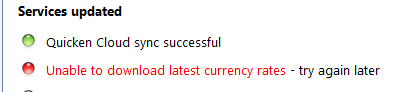
When I click Update, One Step Update runs and I get the same error you reported.
I hope this helps.
Same Ver. Same build on Windows 11. This is a serious problem and it's about time Q fixed it. New release new problems! [Edited-Readability]
[Merged Post]
As with Organone, the Currency Update feature under my Canadian subscription stopped working on May 26th and the error message "unable to download currency rates - please try again later" appeared. I also miss the Import feature and while the button still exists in the Canadian version it does not yield any results.
I'm using the Canadian version and I too have the same problem.
I use the Canadian version and I do see the Import button. I just tried using the Import feature for the first time to see what it does. Well, it goes through a process and claims to be importing CAD:USD history, but it is not obvious what it did or didn't do. My F/X history normally updates when I run One Step Update - until that recently stopped working. So, I have daily F/X history dating back years from an automated process; however, the last F/X rate update was May 26, after which the feature stopped working. Normally, F/X rate updates is a process that I don't think about - it just happens… but, that changed on May 26.
Thank you for your reply @DJS,
I forwarded the issue to the proper channels on 26 May.
I have the same problem with the Canadian version of Quicken. Seems to have stopped working around May 26 and gives an error message when using One Step Update (as other posts seem to indicate). Please fix it.
I am getting the same error message here. Interesting that the stock prices updating is working fine.
I too have the same problem - started to fail on May 29 but most recent updated currency was on May 25. Needs to be fixed. Perhaps it only matters if you have more than one currency. I have two - Canadian and US. Also there is no way to delete currencies I don't use. No delete button or any way to delete.
Hi, Same problem here. Error message - unable to download latest currency rates. Please fix the issue ASAP!
I have been having the same problem for at least 2-3 days (Q R49.33 US Version, Windows 11). This is quite problematic. And given that this seems widespread, the lack of a serious response is concerning.