Plagued by repetitive stack view warnings

Trees
Trees Quicken Canada Subscription Member ✭✭

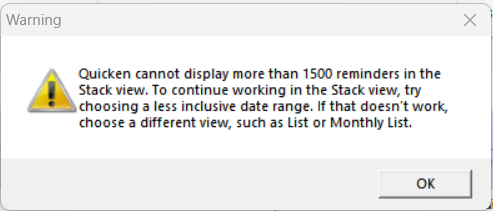
Regularly receive repetitive (and time consuming) warning which read
"Quicken cannot display more than 1500 reminders in the Stack View. To continue work in the Stack view, try choosing less inclusive date range. If that doesn't work, choose a different view, such as List or Monthly list."
How to end the warnings when this pops up in account registers showing even if only 2 reminders showing. It shows up on reminders tabs whether viewing list or calendar with 7 days or 14 days of max 1 month.


Answers

  • Quicken Anja
    Quicken Anja Moderator mod

    Hello @Trees,

    We appreciate you reaching out and telling us about this issue!

    Could you please provide a screenshot of what you are seeing? If needed, please refer to this Community FAQ for instructions on how to attach a screenshot. Alternatively, you can also drag and drop screenshots to your response if you are not given the option to add attachments.

    Thank you!

    -Quicken Anja
    Make sure to sign up for the email digest to see a round up of your top posts.

  • UKR
    UKR Quicken Windows Subscription SuperUser ✭✭✭✭✭

    "Quicken cannot display more than 1500 reminders in the Stack View."

    How many reminders do you actually have?

    And if you really do have > 1500 reminders … is there a reason why you have so many? … Just curious …

  • @Trees this error shows up when you restore a old data file that has reminder transactions. The 1500 doesn't refer to the number of reminders you have set up. It is the number of pending reminders awaiting some action from the user.

  • Trees
    Trees Quicken Canada Subscription Member ✭✭

    Definitely do not have 1500 reminders, Ha Ha. Maybe 60 reminders in my current list view

    Screenshot 2025-05-03 224621.png
  • Trees
    Trees Quicken Canada Subscription Member ✭✭

    So how do I convince Quicken that I do NOT have 1500 reminders or that I am not in stack view? Don't know what stack view is and nothing in help shows me what a stack view is

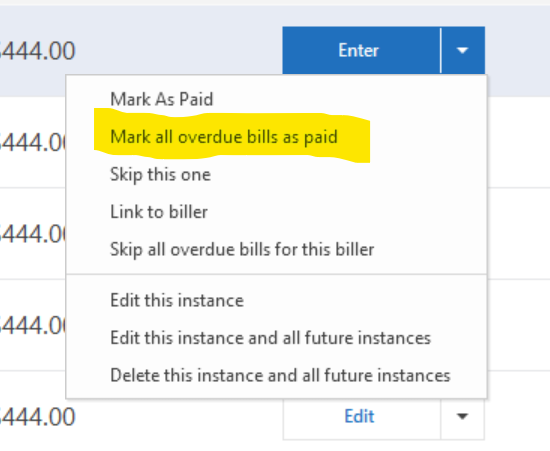
  • @Trees click on the drop down menu for each reminder and select "Mark all overdue bills as paid".

    image.png

    If that doesn't work then try "Skip all overdue bills for this biller".

  • @Trees you may only find those options on some of the reminders. Hopefully it won't take too long to check each one.

    Otherwise, if nothing works, deleting the reminders and resetting them up will resolve the issue.

  • UKR
    UKR Quicken Windows Subscription SuperUser ✭✭✭✭✭
    edited May 4

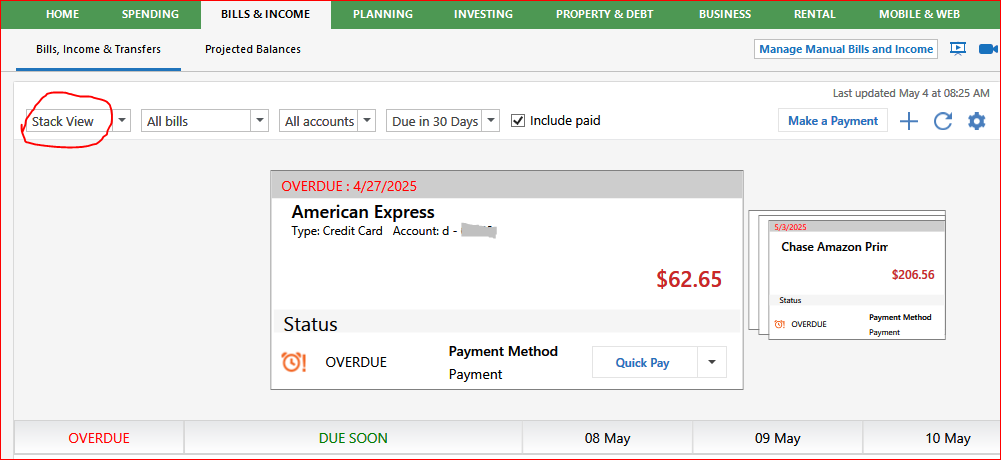
    Stack view is a view of your reminders that looks like several stacks of checks, e.g.,

    image.png

    Theoretically, if you have about 60 reminders and you set the Stack View to "Due in 30 days", there could be a need for 1800 slots in the Stack View. Reducing the "Due in [xx] days" selection to less than 30 days could help as a workaround.

    You select Stack View from the first selection field (circled in red).

    @CaliQkn 's suggestion to review and eliminate Overdue Reminders wherever possible might be helpful. I'd definitely look into that.

    Are there any reminders in the Stack View that have been marked overdue for many months?
    I had one stuck in the view, but not appearing anywhere else because I had voided an instance of a reminder long ago … this seemed to make it get hung with no resolution other than deleting the voided transaction.

  • Trees
    Trees Quicken Canada Subscription Member ✭✭

    Now that I see where to find a Stack View, I can see overdue reminders but nothing more than 4 or 5 days. I will see if I can reset some, but so far nothing out of the ordinary.

    Normally only view in 7 days or 14 day lists.

    Thanks for all the suggestions.

This discussion has been closed.