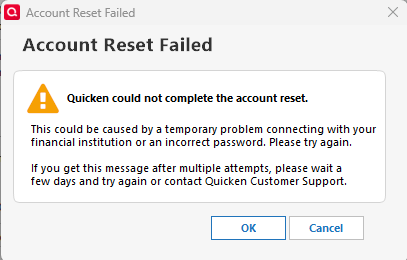
5/7/25 Direct connect stopped working. Tried to reset, the process seems to go through fine on the PNC side but Quicken does not respond.
Hello @Dan Gilmartin,
We appreciate you reaching out to let us know about this issue!
Could you please elaborate on what you mean by "Quicken does not respond"? For example, does the program freeze, display an error message, or does nothing happen after completing the process on the PNC side? Any additional details will help us better understand what’s going on.
Thank you!
This was a problem that went away eventually. The process of getting direct connect to establish a connection between quicken and PNC seems to fail after the bank web page says it's done. It happens occasionally. The process of connecting via direct connect does not complete and Quicken does not show that direct connect was successfully set up.
For the last couple of days, I have been unable to connect to PNC Bank through Direct Connect. Any ideas?
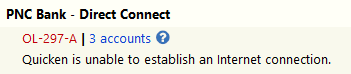
Here is what I am getting at 6:50 AM on 6/16/2025 for the PNC Direct Connect. All other accounts in Quicken went through the validation process and can connect to the appropriate financial institution, except the PNC Bank :
I had the same issue yesterday. It's best when this occurs to wait and see, do not perform a reset for this type of error as they normally clear themselves. I waited about an hour or so and performed an Update now and the download ran as usual.
Been having this same issue over the weekend and again this morning. Started on Friday, 6/13, I believe during my morning One Step Update. I've tried to Validate/Repair my file. That initially worked, but no new transactions downloaded. I'm inclined to "wait and see", but this periodic issue with PNC is a real pain.
Having the same issue with PNC since Saturday. Just failed again this morning 8:30 EST. No problem logging into the PNC site. It's a pain since I have payment to send out.
Have you attempted to run Update now from the register? This works most of the time when OSU fails. PNC has historically been VERY reliable with DC so hopefully this is a one-off situation. The worst thing you can do is run a reset or deactivate/reactivate as this should only be used when all else fails.
I went to Online Account, Online Services tab, Deactivate Account for each PNC account (Direct & Web Connect) & re-activated just the checking account under Direct Connect. It worked when I sent individual 'Pay Now' instructions, but failed during a One Step Update. After repeating the Deactivate/Reactivate task, One Step Update worked several times. Reminds me of the OLD method of fixing the PNC connection before the Reset Account button.
When PNC DC fails with an OL-297-A error code (which happens most of the time the last few days) I will usually do Update Now (Account Register > upper right Gear icon > Update Now) immediately after OSU stops running. Almost always Update Now has been successfully updating all of my DC-connected PNC accounts.