When assigning a Category default to top with transfers as well as categories
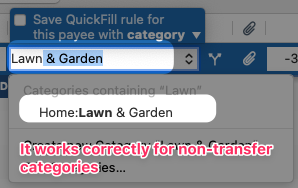
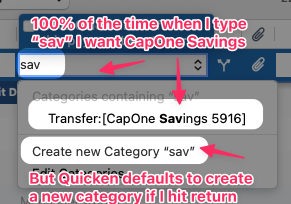
If I want to assign something to a category (say "Lawn & Garden") I can type "lawn" into the category and then hit "Return" and it does the right thing. But when assigning a line item to a transfer it defaults to "new category", so if I type "sav" for savings and hit return it makes a new category instead of assigning it to the only choice that comes up.
Please make the default category choice for transfers work like all other categories.
Comments
-
If instead of typing "sav" you type "cap" or "[cap" what happens then?
I can't test this myself, being a lowly Q Windows user … :-(0 -
I want to make sure I understand: it pops up the transfer transaction, and you can click it or mouse to it to select it. Are you just objecting that it doesn't default to that option so you can just press Return and have it selected?
I agree that's a bit inconsistent, but maybe they didn't want to make it easy to accidentally affect tow accounts at once with a transfer. Or, more likely: the ability to specify a transfer account in the Category field was added after the program was originally launched and they probably didn't go back to change the behavior of the category dropdown list for this scenario.
So I see the reason for this Idea request, and I agree it should be consistent. But for me, personally, the ability to select the correct choice with one mouse click or arrow-up on the keyboard would make this a pretty low priority compared to dozens of other features which have no work-around.
Quicken Mac Subscription • Quicken user since 19930 -
It only auto-selects the category if what you type matches the beginning of the category. So you would have to type "Transfer:[CapOne Sav" to get it to match that specific account.
It's the same with any other category. For example, if I type "Income" it doesn't automatically match any of the 14 categories I have containing that word because they all have something in front of it - none of them start with "Income"..
0
Categories
- All Categories
- 114 Product Ideas
- 35 Announcements
- 216 Alerts, Online Banking & Known Product Issues
- 21 Product Alerts
- 693 Welcome to the Community!
- 664 Before you Buy
- 1.1K Product Ideas
- 53.4K Quicken Classic for Windows
- 16.3K Quicken Classic for Mac
- 1K Quicken Mobile
- 808 Quicken on the Web
- 109 Quicken LifeHub