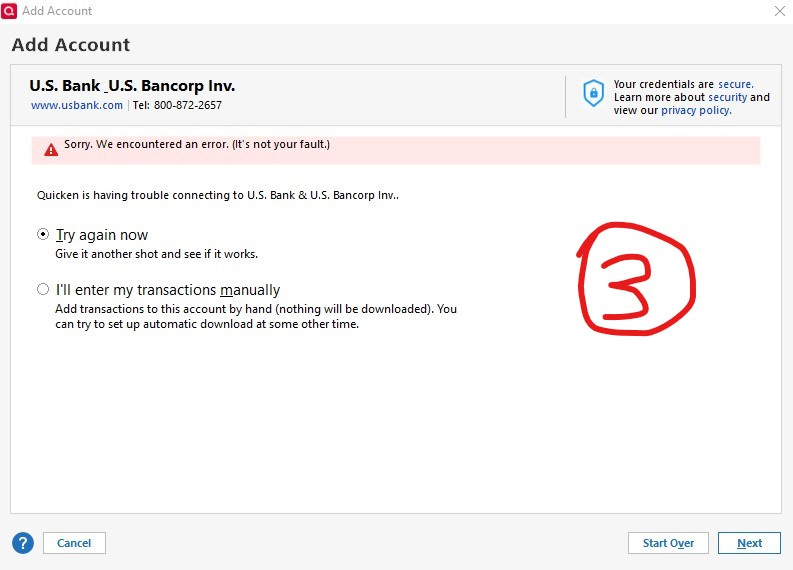
"U.S. Bank & U.S. Bancorp Inv." – "Sorry. We encountered an error. (It's not your fault.)
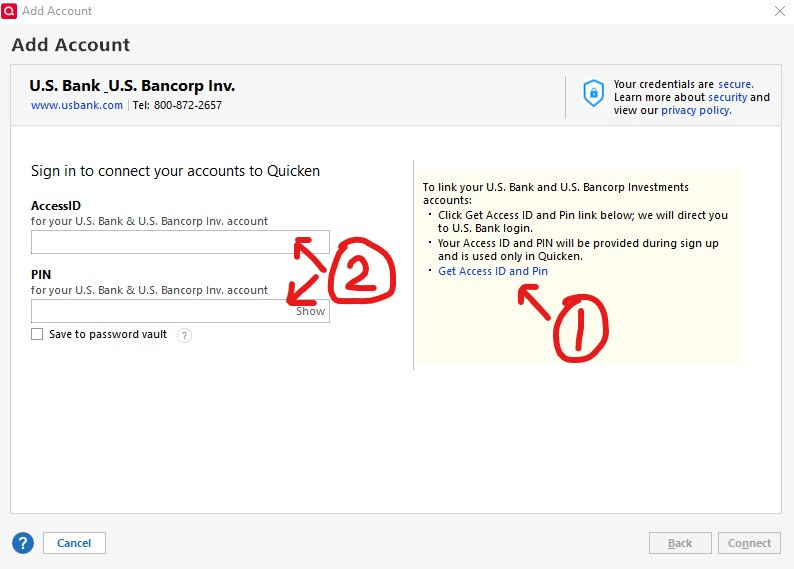
I have an IRA with "U.S. Bank & U.S. Bancorp Inv." and it used to sync properly for about a year, but apparently stopped syncing without warning approximately one month ago. I only just noticed it now because OSU did not indicate an error with the sync until today. However, upon review, I see two transactions from one month ago were never entered. In order to troubleshoot, I disabled the connection so that I could reconnect it. As you see in step one, I click on the link to get redirected to US Bancorp's Wealth Management page to obtain an "AccessID" and "Pin" via NinthWave to be entered into step two. Within 2-3 seconds of clicking "Connect", I receive the error "Sorry. We encountered an error. (It's not your fault.)" as seen in step three.
Best Answer
-
Good news, everyone! I just got a call back from the trouble ticket I opened on June 27th asking me to give it another try now, and sure enough they fixed it!
2
Answers
-
"It's not your fault" almost always indicates an error on the bank's servers. There's nothing you can do about such other than wait it out and/or report it to Q Support via the link at the top of this page.
This forum is user-to-user … and we can't help with this type of issue.
Q user since February, 1990. DOS Version 4
Now running Quicken Windows Subscription, Business & Personal
Retired "Certified Information Systems Auditor" & Bank Audit VP1 -
Hello @QknUser942820948,
Thank you for letting us know you're seeing this issue. Based on your screenshots, it looks like you're attempting to connect via Direct Connect, and getting this error. Typically, that error means that Quicken was unable to connect due to the financial institution rejecting the connection.
That can be caused by incorrect credentials, or by the financial institution requiring some sort of further authorization to connect. If you haven't already done so, I recommend reaching out to the financial institution for assistance with this issue.
I hope this helps!
Quicken Kristina
Make sure to sign up for the email digest to see a round up of your top posts.
1 -
Thank you @NotACPA and @Quicken Kristina.
I contacted US Bancorp and the representative I spoke with initially indicated that she had just received a similar complaint from another customer and that the issue must be with Quicken and to contact Intuit. Based on your responses above, I told her that the issue is actually more likely to be on the financial institution side, and I requested that she open a trouble ticket to investigate. After placing me on hold to determine whether that was possible, she eventually returned and agreed to have it investigated. She also asked that I email them screenshots. I'll update here as soon as I have an update from them.
2 -
@QknUser942820948 The banks ALWAYS claim that it's a Q problem … even when we've proven that the bank is at fault.
Congrats on getting the rep to finally have someone look into the issue.
BTW, I'm a USB customer also, but only for banking and card accounts … no investments. And I haven't had any problems with them since I switched to Direct Connect several years ago.
Q user since February, 1990. DOS Version 4
Now running Quicken Windows Subscription, Business & Personal
Retired "Certified Information Systems Auditor" & Bank Audit VP0 -
@NotACPA Thanks! Like you, my USB savings and credit card accounts work fine, but those accounts use a different connector ("U.S. Bank Internet Banking") than the investment side. Wish they were unified into one.
0 -
re: "Wish they were unified"
You might try taking a backup and then disconnecting your investment account and re-connecting it to "U.S. Bancorp Investments, Inc." helps any.
Don't know that it will help, but since you've got a backup it won't hurt.
Q user since February, 1990. DOS Version 4
Now running Quicken Windows Subscription, Business & Personal
Retired "Certified Information Systems Auditor" & Bank Audit VP0 -
Disconnect/reconnect is actually my standard troubleshooting practice. I should probably add "backing up first" to my standard practice, because "disconnected" is my current state after I disconnected earlier today and haven't been able to reconnect. I re-tried "U.S. Bancorp Investments, Inc." just now and as I experienced when I gave it a shot earlier today, it appears to mirror "U.S. Bank Internet Banking" in that only my savings and credit card accounts appear. Thanks for the suggestion, though!
0 -
@QknUser942820948 FWIW, I'm experiencing the exact same connection issue on the investment side (but not on the banking side).
1 -
Good to know, thank you! Unfortunately, I still haven't heard back on the trouble ticket I opened. Anxiously awaiting an update.
0 -
I have also been having this problem for a week and disconnecting and reconnecting accounts gives that "our fault" error. This has worked fine for months and works fine with non-investment accounts, so something has been broken on the investment side. I signed up for the id and pin and that also made no difference.
0 -
Yep, I am experiencing everything you described.
I have no idea if this will work, but if everyone on this thread called US Bank and opened up trouble tickets, with enough people that might incentivize them to prioritize this.
0 -
Good news, everyone! I just got a call back from the trouble ticket I opened on June 27th asking me to give it another try now, and sure enough they fixed it!
2 -
Can confirm it is fixed for me also.
1 -
@QknUser942820948 Awesome, thanks for the update. Working here, too.
1 -
Welcome!
0
Categories
- All Categories
- 56 Product Ideas
- 36 Announcements
- 225 Alerts, Online Banking & Known Product Issues
- 22 Product Alerts
- 703 Welcome to the Community!
- 671 Before you Buy
- 1.2K Product Ideas
- 53.7K Quicken Classic for Windows
- 16.3K Quicken Classic for Mac
- 1K Quicken Mobile
- 812 Quicken on the Web
- 111 Quicken LifeHub