Error downloading from Discover Bank

Toffee
Toffee Quicken Windows Subscription Member

It was working until end of June 2025. When I tried to add another account within the bank, Quicken had trouble adding it indicating there is a "pop up message" in the bank for me to respond to before it could proceed. There was no such pop up window, so that was the end of that. So I went through what was suggested which was to deactivate and restore the FI account. It gave the same message about the illusory "pop up msg". So now I have lost the entire FI download capability since I had deactivated it. What is QUICKEN's solution here?

Answers

  • Quicken Jasmine
    Quicken Jasmine Quicken Mac Subscription Alumni ✭✭✭✭

    Hello @Toffee,

    Thanks for reaching out!

    Upon further review, I can see that your latest connection attempt with Discover Bank returned an FDP-108 (CC-508). This error occurs when your financial institution has added either a new page to its website or a pop-up window that requires your action to bypass it. Below you can find instructions that should assist you towards a resolution. It is always recommended to save a backup before proceeding with troubleshooting steps (just in case). You can find these troubleshooting steps and more in this Support FAQ.

    To resolve this issue

    First, refresh your online account information in Quicken

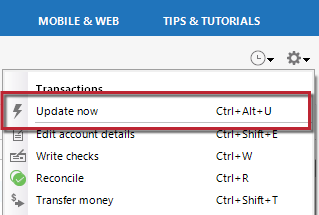
    1. From your account register, select the Actions gear icon at the upper right of your register (Ctrl + Shift + N).
    2. Then, select Update now.
    Update%20Now_0.png
    1. Follow the on-screen instructions to complete the update.
    2. Repeat these steps for each financial institution experiencing this error.

    Then, visit your bank's website

    1. Sign in to your financial institution's website.
    2. Navigate to the page you download your account information.
    3. When you encounter the new web page that requires your response, fill out the requested information and dismiss the screen. This could be a dialog requesting you accept terms of service or a special offer.

    Important: If you have the option to not display the page or ask you again, select that option. If you do not, the error may continue to occur.

    If the issue persists

    1. Close Quicken.  
    2. Click the Start button and select Control Panel.
      • Windows 10: the Control Panel is located in the Windows System folder in the Start menu.
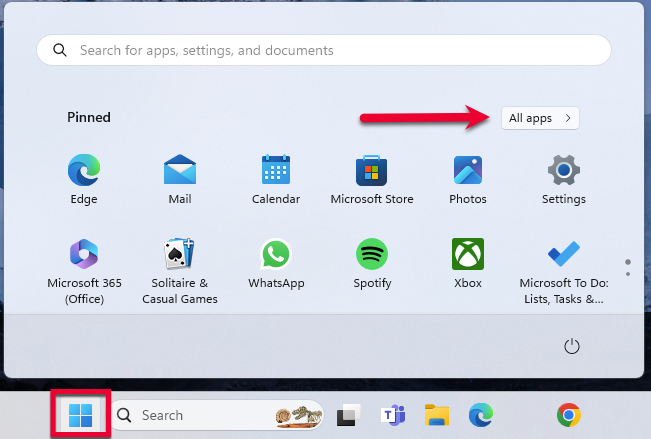
      • Windows 11: Go to the Start menu and select All apps.
    StartMenuAllApps.png

    Then, go to Windows Tools and select Control Panel

    1. Select Network and Internet > Internet Options.
    2. Under Browsing history, click Delete.
    3. Make sure there is a check next to Temporary Internet Files. The other checkmarks are optional.
    4. Click Delete.
    5. Then click OK when done.
    6. Log in to your financial institution's website and accept Cookies and any security measures, as requested by the site.
    7. Open Quicken and try your update again.

    I hope this helps!

    -Quicken Jasmine

    Make sure to sign up for the email digest to see a round-up of your top posts.

  • Quicken Jasmine
    Quicken Jasmine Quicken Mac Subscription Alumni ✭✭✭✭

    I have not heard from you yet, are you still experiencing this issue?

    Let me know!

    -Quicken Jasmine

    Make sure to sign up for the email digest to see a round-up of your top posts.

  • Quicken Jasmine
    Quicken Jasmine Quicken Mac Subscription Alumni ✭✭✭✭

    Hi @Toffee,

    Just checking in once more before this thread is closed due to low activity.

    Let me know!

    -Quicken Jasmine

    Make sure to sign up for the email digest to see a round-up of your top posts.

This discussion has been closed.