Brokerage Account Investment Dividends NOT appearing on Taxable Income YTD

kolbeman
kolbeman Quicken Windows Subscription Member ✭✭
edited August 13 in Investing (Windows)

I've added a taxable Income YTD box on my Quicken home tab. This provides useful information on my taxable income but it is missing dividend income from the quicken category '_divinc' from my taxable brokerage accounts. The information can be displayed using a report but I can't find a way to add it to the home page widget. Any suggestions?

I'm using Quicken Classic version R63.21 on Windows 11

Comments

  • NotACPA
    NotACPA Quicken Windows Subscription SuperUser ✭✭✭✭✭

    When you say "home tab", do you mean the Dashboard?

    Because I don't see a way to add an "Investment Income" widget. How did you do that?

    image.png

    Q user since February, 1990. DOS Version 4
    Now running Quicken Windows Subscription, Business & Personal
    Retired "Certified Information Systems Auditor" & Bank Audit VP

  • kolbeman
    kolbeman Quicken Windows Subscription Member ✭✭
    edited July 10

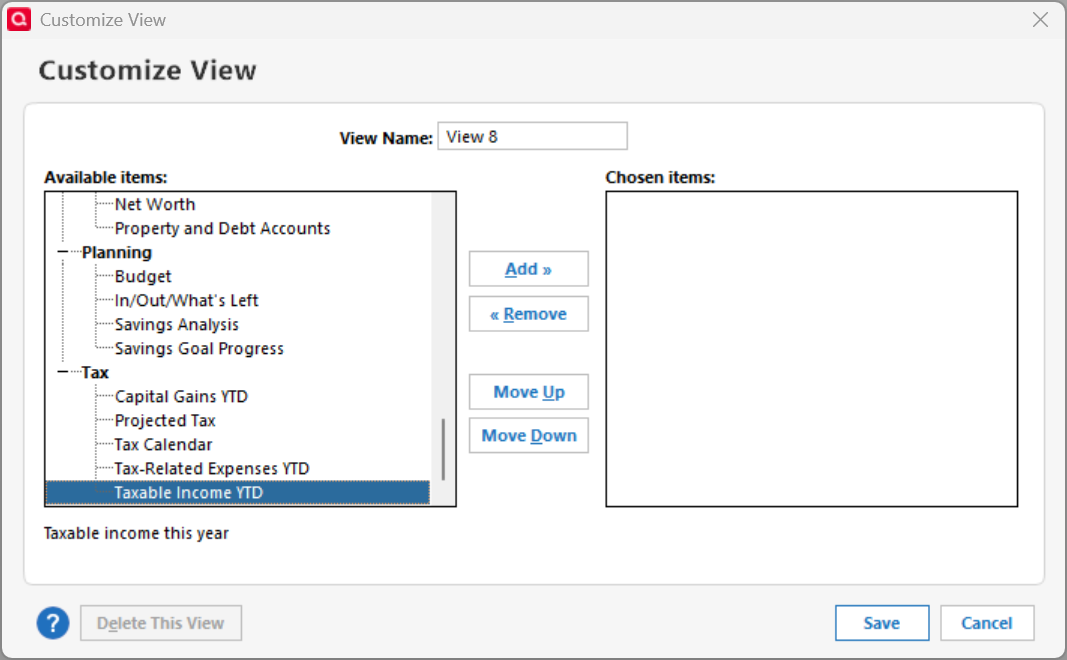
    It is a custom view or tab - not the first Dashboard tab. If you add a custom view a menu appears that gives you a choice to add items to the view. One of the view is called "Taxable Income YTD". This is the one not reporting taxable dividend income.

    image.png
  • NotACPA
    NotACPA Quicken Windows Subscription SuperUser ✭✭✭✭✭

    OK, I found it … and digging into it a bit, it seems that ONLY Taxable Accounts are included … with no apparent way to add/change what accounts are included.


    BUT, for my taxable accounts, it seemed accurate.

    I started with an 'Investment Income" report, and played around there until I could match the widget's numbers.

    Q user since February, 1990. DOS Version 4
    Now running Quicken Windows Subscription, Business & Personal
    Retired "Certified Information Systems Auditor" & Bank Audit VP

  • kolbeman
    kolbeman Quicken Windows Subscription Member ✭✭

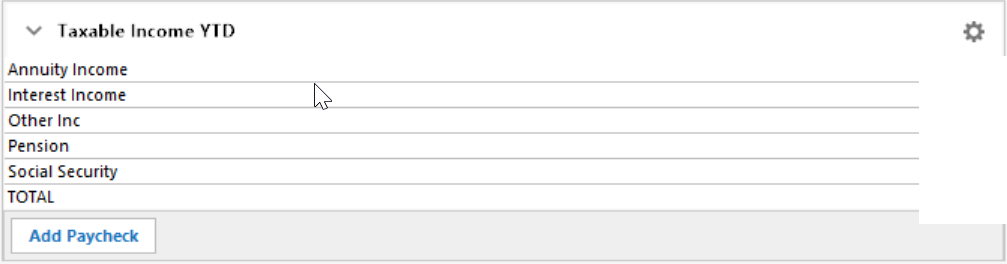
    It not an issue of accuracy for me. The Quicken reports for _divinc work fine and I don't doubt their accuracy. However - the Taxable Income YTD does NOT include any line for dividends at all. It is completely missing. I want to include this in the widget but there doesn't seem to be a way to do this. The _divinc has a Schedule B tax line assigned to it - so why doesn't it appear? Here's what is displayed.

    image.png
  • Jim_Harman
    Jim_Harman Quicken Windows Subscription SuperUser ✭✭✭✭✭

    For me, the Taxable income YTD panels, both on the Home Page and on the Planning > Tax Center page, include a _DivInc line that appears to be correct.

    If you go to the Reports > Tax and open the Tax Summary report, does it have a _DivInc section that shows the dividends received?

    If not, check the following:

    • On the Account details page for your taxable accounts, Account type is Brokerage, not IRA, 401(k), or another tax deferred account type
    • Tax Deferred is not selected
    • On the Security detail page for each security in the taxable accounts, Tax free is not selected.

    Please let us know what you find.

    QWin Premier subscription
  • kolbeman
    kolbeman Quicken Windows Subscription Member ✭✭

    Jim- Thanks. Yes, the Tax Summary report shows the _DivInc income. I have confirmed the accounts are type: Brokerage and Tax Deferred is not selected. I checked a few individual securities and the tax free is not selected in the individual security view.

  • q_lurker
    q_lurker Quicken Windows Subscription SuperUser ✭✭✭✭✭

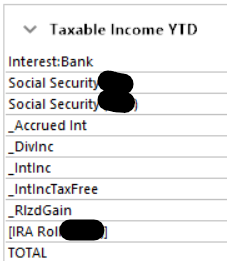
    I have had that pane on my primary view for years. It has always included the various investment income streams as shown below.

    image.png

    You might try a separate test file to see if it behaves similarly, in which case you might need to re-install Quicken.

    I did not see if you tried deleting and re-adding the Taxable income selection. I can add that selection to a new view without any such issue.

  • kolbeman
    kolbeman Quicken Windows Subscription Member ✭✭

    I created a test file and added my brokerage accounts. Sure enough, the _DivInc category appears when I add Taxable Income YTD under a new tab in the new Quicken file.

    In the original, troublesome Quicken file, I also deleted and restored the view without any change per your suggestion. There is consistency but without the _DivInc displayed and those other investment categories shown on your screenshot. So, what does this mean? Seems like the Quicken install must be okay. I previously completed a file validation and repair without any effect.

  • kolbeman
    kolbeman Quicken Windows Subscription Member ✭✭

    I didn't mark this question as answered - but it appears someone did. I still have the issue per the thread discussion. Thanks to all who have provided a response and suggestion. I do appreciate it.😀

  • Jim_Harman
    Jim_Harman Quicken Windows Subscription SuperUser ✭✭✭✭✭
    edited July 13

    If the post was set up as a Question, "Answered" just means you have received one or more replies to a question..

    "Answered" with a check mark means you have accepted the answer.

    QWin Premier subscription
  • @kolbeman if you add a test taxable brokerage account with dividend transactions to your current data file, do the dividends show up in "Taxable Income YTD"?

    If so, then a possible fix would be to create a new taxable brokerage account, move all the transactions to the new account, and then delete the "old" empty account.

  • kolbeman
    kolbeman Quicken Windows Subscription Member ✭✭

    Thank you @Jim_Harman on explaining how this forum works. @CaliQkn I'll have to give your suggestion a try and see what happens. Thanks.

This discussion has been closed.