I don't want to use online services.

dansclan28
dansclan28 Quicken Windows Subscription Member

I've been using quicken for years and recently bought the Classic DELUXE Windows and Mac version. After installing it, I imported my files from the Mac I have been using. All seemed well at first, until I started editing my accounts. I couldn't edit anything on the right side of the editing window! Quicken thinks I want to use online services. I do NOT! (There isn't any web site information in the "Home Page" web site address.) I prefer using paper statements to balance all of my accounts. When I click the online services tab, it wants me to use my most recent statement to create the account all over again. And mess up my balance.) All I want to do is be able to update my account information. I never want to go online. Even though I have never activated online services, how can I deactivate this feature?


Best Answers

  • Quicken Anja
    Quicken Anja Moderator mod
    Answer ✓

    Hi @dansclan28 ,

    Thanks for reaching out! I understand you're looking to use Quicken strictly offline without any online services, and I’m happy to help clarify how to do that:

    • To deactivate online services for any accounts that may have been unintentionally connected:
      - Go to Tools > Account List
      - Click Edit next to any account showing an online connection
      - Navigate to the Online Services tab
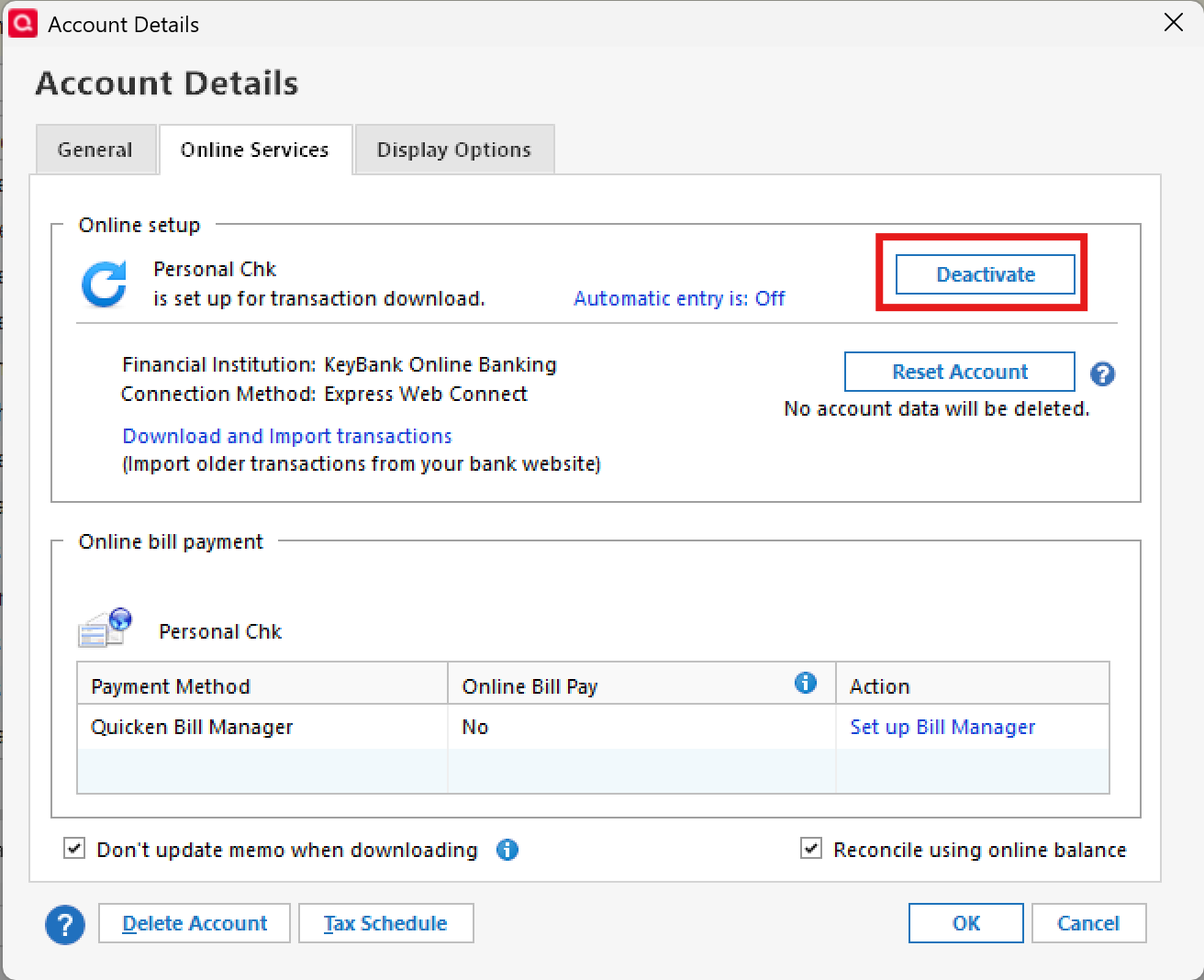
      - Click Deactivate to disconnect it from online features image.png
    • To turn off Quicken Cloud sync (Mobile & Web features):
      - Go to Edit > Preferences > Mobile & Web
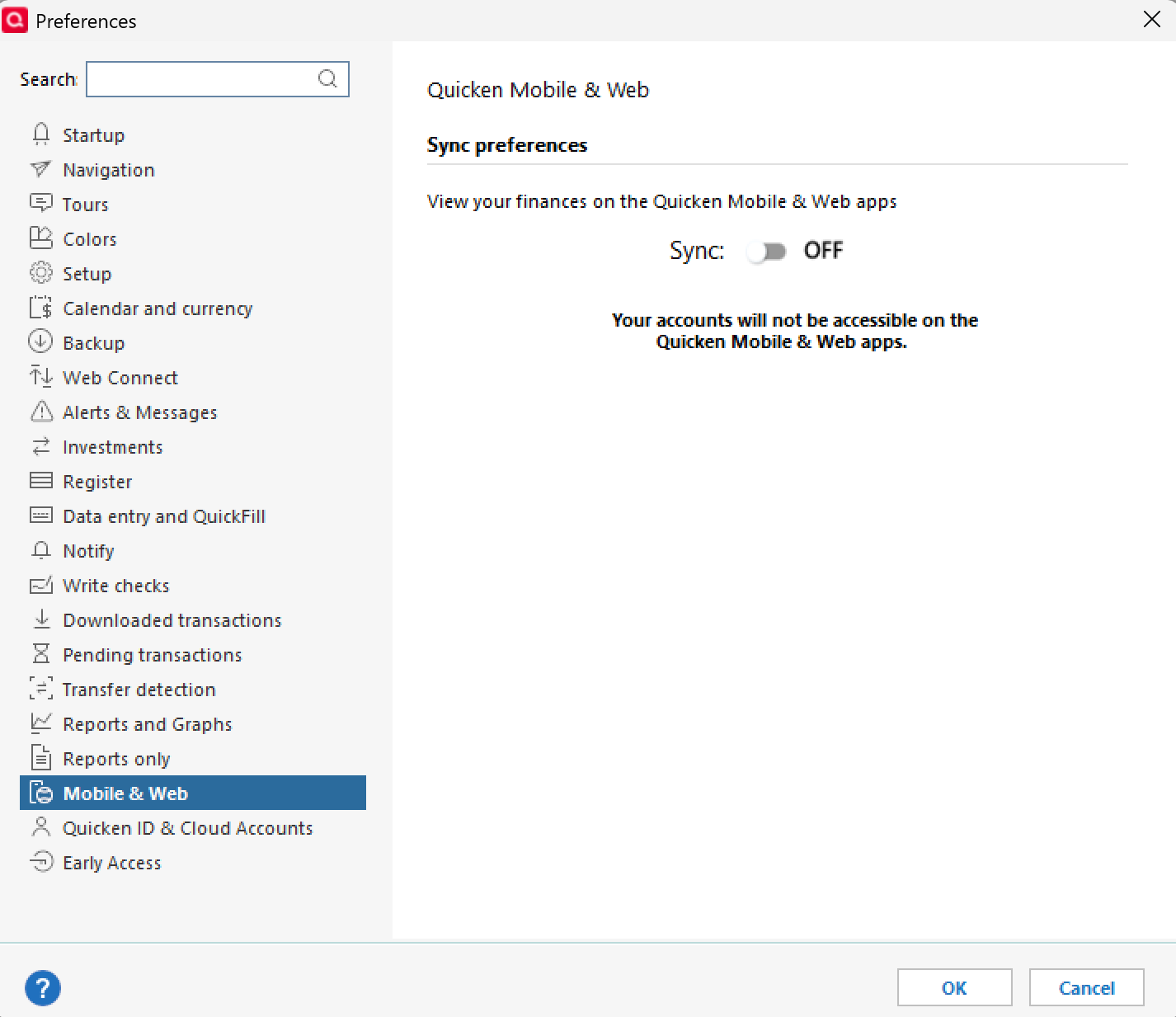
      -Click the toggle button to turn sync OFF image.png
    • Yes, all Quicken Classic subscription tiers, including Deluxe, fully support manual use. You are not required to set up or use any online connections if you prefer to enter transactions and reconcile manually using paper statements.
    • Regarding the subscription label:
      Quicken is now sold as an annual subscription—we no longer offer a one-time purchase model (this was discontinued after Quicken 2017). That said, even if your subscription expires, you’ll still be able to access and use your data manually in Quicken Classic Deluxe. Just note that an inactive subscription will display a banner at the top of the screen, which can only be removed by renewing your subscription.

    For more details on what happens when a subscription ends, here’s a helpful article on our Data Access Guarantee.

    Hope this helps!

    -Quicken Anja
    Make sure to sign up for the email digest to see a round up of your top posts.

  • UKR
    UKR Quicken Windows Subscription SuperUser ✭✭✭✭✭
    Answer ✓

    And if I may add, …

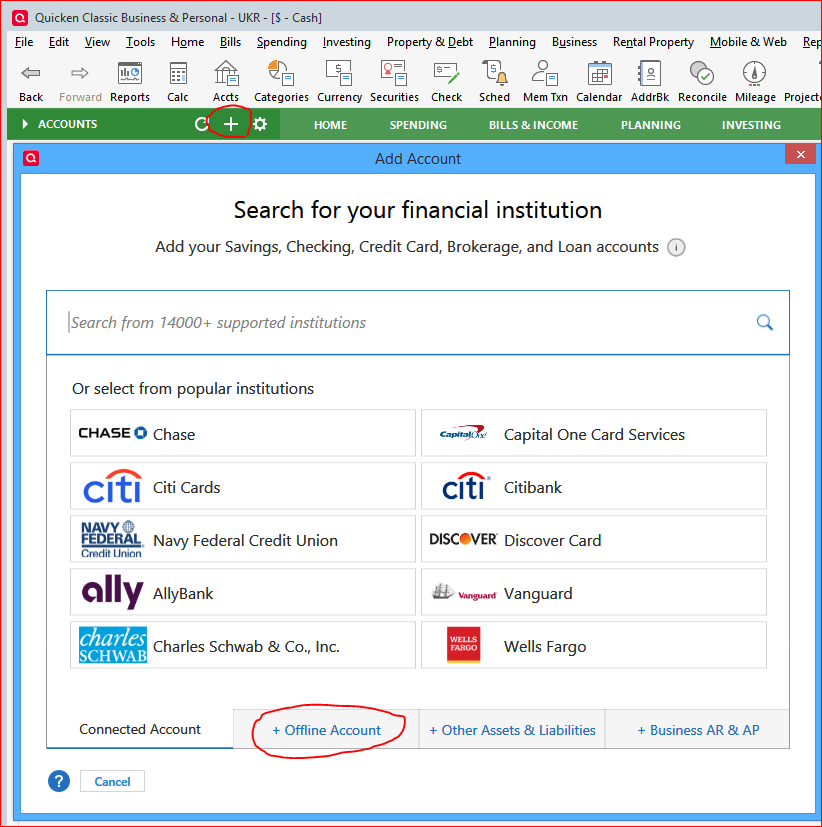
    If you want to add a new banking or investment account register to your Quicken for Windows as a manual, offline account be sure to always select the Offline Account Tab after starting the Add Account process (by clicking the "+" icon in the Account Sidebar title or selecting Tools Menu / Add Account)

    image.png

    Selecting a bank name from the list above or entering a bank name in the Search field will attempt to create an online-connected account … and you don't want that, you said …

Answers

  • dansclan28
    dansclan28 Quicken Windows Subscription Member

    I just notice in my previous post that I am a Quicken Windows Subscription Member. I don't want to subscribe. How can I change this and use the software locally.?

  • Quicken Anja
    Quicken Anja Moderator mod
    Answer ✓

    Hi @dansclan28 ,

    Thanks for reaching out! I understand you're looking to use Quicken strictly offline without any online services, and I’m happy to help clarify how to do that:

    • To deactivate online services for any accounts that may have been unintentionally connected:
      - Go to Tools > Account List
      - Click Edit next to any account showing an online connection
      - Navigate to the Online Services tab
      - Click Deactivate to disconnect it from online features image.png
    • To turn off Quicken Cloud sync (Mobile & Web features):
      - Go to Edit > Preferences > Mobile & Web
      -Click the toggle button to turn sync OFF image.png
    • Yes, all Quicken Classic subscription tiers, including Deluxe, fully support manual use. You are not required to set up or use any online connections if you prefer to enter transactions and reconcile manually using paper statements.
    • Regarding the subscription label:
      Quicken is now sold as an annual subscription—we no longer offer a one-time purchase model (this was discontinued after Quicken 2017). That said, even if your subscription expires, you’ll still be able to access and use your data manually in Quicken Classic Deluxe. Just note that an inactive subscription will display a banner at the top of the screen, which can only be removed by renewing your subscription.

    For more details on what happens when a subscription ends, here’s a helpful article on our Data Access Guarantee.

    Hope this helps!

    -Quicken Anja
    Make sure to sign up for the email digest to see a round up of your top posts.

  • UKR
    UKR Quicken Windows Subscription SuperUser ✭✭✭✭✭
    Answer ✓

    And if I may add, …

    If you want to add a new banking or investment account register to your Quicken for Windows as a manual, offline account be sure to always select the Offline Account Tab after starting the Add Account process (by clicking the "+" icon in the Account Sidebar title or selecting Tools Menu / Add Account)

    image.png

    Selecting a bank name from the list above or entering a bank name in the Search field will attempt to create an online-connected account … and you don't want that, you said …

This discussion has been closed.