Vanguard account number doesn't match Quicken one-step update
@Jim_Harman - the previous thread on this topic (linked below) was closed so I have to ask you this in a new thread.
I thank you for the steps you provided. I've been haunted by this issue for a VERY long time (years) and have always just worked around it and hoped I was doing it correctly. I contacted Quicken support today about OSU messages indicating downloaded transactions from Vanguard that weren't showing up, and they made me deactivate and re-add all my Vanguard account (7) which brought the problem back again.
In your steps, you reference an "outage" and say to look at a backup from before that outage to affirm the "old" account numbers. What if I have no idea when Vanguard switched my accounts (the 2 problematic ones) from old numbers to new numbers - how do I find those "old" account numbers? (You say they'll begin with 2 digits and a "V" - but mine might begin with "AVV" ?)
Also - any idea if there's any way to get Vanguard to stop sending down data to Quicken for an account that apparently no longer exists (doesn't show up when I log into Vanguard.com) ?
Thank you - as always - for any help you can provide.
Quicken Classic Premier (Windows) R64.23 Build 27.1.64.23
Comments
-
The old account numbers that you need to use when connecting to Vanguard via Direct Connect are the ones that Vanguard used for their brokerage (not mutual fund only) accounts until 2009, when they converted from using Pershing as their clearing broker to their own system, called Vanguard Brokerage Services.
If you have old statements from that time, the Pershing account numbers should be listed on them. Alternatively, Vanguard might be able to tell you what the old Pershing numbers were.
My guess would be that the mystery account you refer to is one of the ones that is trying to use the old account number.
Please let us know what happens.
QWin Premier subscription1 -
Vanguard, being not terribly (at all) helpful, said "As I do not have access to your Quicken files, I am unable to determine the corresponding account to the account ending in XXXX. Do you have the full account number that is being reported on your Quicken downloads, or can you provide any additional details about the holdings that are in the account to assist with identifying this account?"
(As if I thought they could access my Quicken files!🤨)So I created a new Quicken file, connected to Vanguard and added my accounts from Vanguard - but chose to NOT add all the accounts I could identify, and to ONLY add the one account that I can't identify.
I thought I remembered that there would exist, somewhere, a log file, produced by Quicken, that might show my account number, once I connected the account and/or did a one-step-update.
I don't know where to look for that log file, though. Any help?
[Edited - Removed Partial Account Number]
Quicken Classic Premier (Windows) R64.23 Build 27.1.64.23
0 -
Hello @EmKay,
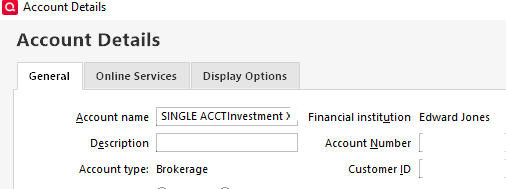
Once you connected the unfamiliar account in your Quicken, were you able to view the account number by clicking the Settings gear (near the upper right), selecting Edit account details, and then viewing the General tab?
If you cannot view the account number there, you should be able to access log files by navigating to Help>Contact Support>Log Files.
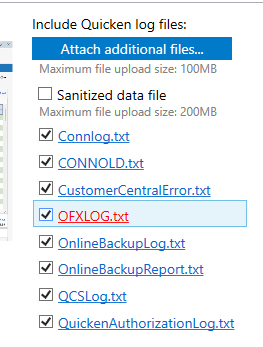
If you're not able to view the logs there, then another place to view the log files is to navigate to Help>Report a Problem. The log files listed on the right side are blue links that you can click on to view the log.
When I tested with my account (connected via Direct Connect), I was able to find it in the OFX log in the ACCTID field.
I hope this helps!
Quicken Kristina
Make sure to sign up for the email digest to see a round up of your top posts.
1 -
Thanks, @Quicken Kristina - I was able to get Vanguard the account number held in the account's details screen, and I saw that the the OFX log had the same account #. Thanks for the helpful info.
Quicken Classic Premier (Windows) R64.23 Build 27.1.64.23
1 -
You're welcome!
If you need further assistance, please feel free to reach out!
Quicken Kristina
Make sure to sign up for the email digest to see a round up of your top posts.
0
Categories
- All Categories
- 56 Product Ideas
- 36 Announcements
- 225 Alerts, Online Banking & Known Product Issues
- 22 Product Alerts
- 703 Welcome to the Community!
- 671 Before you Buy
- 1.2K Product Ideas
- 53.7K Quicken Classic for Windows
- 16.3K Quicken Classic for Mac
- 1K Quicken Mobile
- 812 Quicken on the Web
- 111 Quicken LifeHub