Can I Disable the Automatic Edit Next Entry Behavior?

AGGSpeaker
AGGSpeaker Quicken Mac Subscription Member ✭✭

Not sure when this behavior was introduced. I just know it wasn't always there. If there's a hidden setting somewhere in Quicken Classic for Mac I'm all ears. The issue is thus:

I want to edit a transaction. I double-click to enter EDIT mode, make my changes, hit enter key to save.

But then Quicken automatically goes to the register entry below it and places that entry EDIT mode, as if I want to edit that transaction as well, which I don't want to do 99.8% of the time. If I hit Enter again, making no changes, it's back to normal. I can hit the Escape key to accomplish this as well. But really what I want to is to hit Enter on the keyboard to save a change and have Quicken just stop there. No need to place the entry below it in Edit mode. Is there a magical toggle checkbox somewhere I'm unaware of?

Answers

  • Quicken Jasmine
    Quicken Jasmine Quicken Mac Subscription Alumni ✭✭✭✭

    Hello @AGGSpeaker,

    Thanks for reaching out!

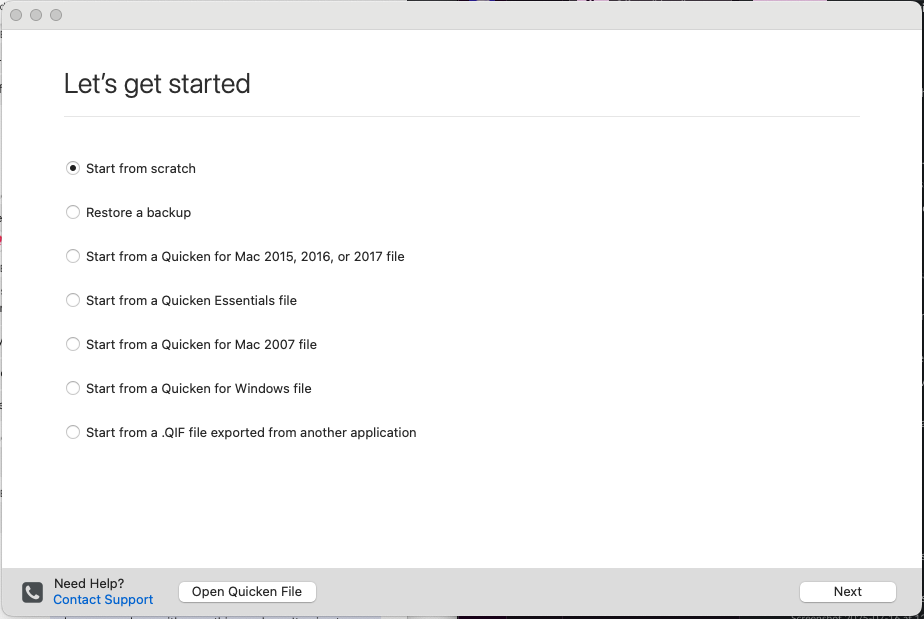
    First, I suggest that you create a Test File to see if the same behavior occurs after editing a transaction. You can create a Test File by navigating to File > New > Start from Scratch. You can label the file as you choose (ex., "Test File"). From there, please proceed to download online transactions or create manual ones and proceed to see if the issue occurs.

    Screenshot 2025-07-16 at 12.41.00 PM.png

    Let me know how it goes!

    -Quicken Jasmine

    Make sure to sign up for the email digest to see a round-up of your top posts.

  • AGGSpeaker
    AGGSpeaker Quicken Mac Subscription Member ✭✭

    I'm confused by this response. Are you acknowledging that "No, this isn't the intended behavior. It's a bug and/or unintended application behavior. Replicate it in another file instance and see what happens then get back to us to submit the issue." OR, are you saying "Yes, this might be totally fine test it out and let us know."

  • jacobs
    jacobs Quicken Mac Subscription SuperUser, Mac Beta Beta

    @AGGSpeaker I can't replicate what you're describing. When I double click a transaction to Edit it, make changes (or not), and press Enter, the register shows the just-touched transaction as highlighted; it does not move down to the next transaction, nor open it for editing. I can click on a transaction and then repeatedly press Enter, and it will simply toggle between opening that one transaction for editing and showing it as a highlighted transaction. Both the Return key and the Enter key (I have an extended keyboard with both) behave identically.

    So… a few questions:

    • Is the transaction you're editing, or the one it jumps to after the edit, a split transaction? If you try this with non-split transactions is the behavior the same?
    • Do you have an Apple keyboard or a third-party keyboard? Is it a keyboard with both Enter and Return keys? (Some keyboards might send a different code for "Enter" than "Return".) Do you get the same results pressing both Enter and Return?
    • Is your register sorted in descending Date order, or some other order? (I haven't found that any other order result in what you're experiencing; I'm just looking for possible clues.)

    I can't speak for @Quicken Jasmine, but I'm inferring that she wanted you to try a test file just to see if the behavior was the same as what you're seeing in your regular data file. It's a common troubleshooting technique to isolate whether a problem is specific to a particular file or not.

    Quicken Mac Subscription • Quicken user since 1993
  • AGGSpeaker
    AGGSpeaker Quicken Mac Subscription Member ✭✭

    @jacobs Thank you for the thoughtful reply and suggestions. Seems that it's not intended behavior. Your keyboard question was interesting. Sadly not the issue. It is indeed a third party Logitech full-size keyboard with number keys. Both keys are "Enter" and I just ran a test. The behavior is identical regardless of which I use. Main or the numeric keypad. So I dragged out my old school native USB Mac keyboard and tested again. Typing this on it now. Same result. Double click a transaction, make a change (issue is same regardless of what field value is altered). So next I went with an old "dummy" Quicken file I have that's a single account with 2 entries. Low and behold, the issue does NOT take place there! It's only happening in my primary Quicken file. Go figure. Not sure what to do next though. Here's a link to a shared video on my Google Drive showing it in action on a bunch of uncategorized Amazon purchases in a CC account. First transaction edit is me using a standard mouse double click to edit the transaction, then changing a category. After that every action you see if me doing nothing but hitting the Enter key a single time.
    https://drive.google.com/file/d/1JqGbwxr5zzcVPDcwXo26fWm3sAqTWTdi/view?usp=share_link

  • jacobs
    jacobs Quicken Mac Subscription SuperUser, Mac Beta Beta

    Very interesting. I was next going to suspect something in a Quicken preferences file and suggest you try resetting it, but since you found the issue doesn't exist in your test file, it's clearly not a preferences file setting (which would affect all Quicken files).

    In your video, you have the register sorted by Payee. I tried that and did not get the results you are seeing, but I'm wondering if it behaves the same if you are sorted in normal date order. (I'm guessing the answer is yes.) I thought maybe there was something special happening because you were categorizing uncategorized transactions, but I tried that and otherwise mimicking your register setup, and I could not get the Enter key to move down the transaction list.

    I'm still pondering this, but I'm kinda stumped at the moment!

    Quicken Mac Subscription • Quicken user since 1993
This discussion has been closed.