Budgeting a Mortgage Payment (Principal transfer to paydown loan + Interest)
Hi, I've been reading some old posts and wondering how I might solve this (I can't seem to find if it has or not). I currently have a Loan Account which is my Home Mortgage. This loan payment hits my checking account and splits the transaction into Mortgage: Interest and an Account Transfer to paydown the Loan Account of Home Mortgage. My issue is that I'm trying to correctly categorize both of the budget transactions and account for my "expense" of paying down the loan and interest expense. However, Mortgage: Principal is not tracking the "Loan Account Transfer" and when I try to budget the Loan Paydown on an Account Transfer, it's taking the full mortgage payment from my register (both principal and interest). I'm reading that maybe a transaction cannot be budgeted as a categorized split transaction of expense and account transfer…is that really still true? I was wondering, if that's still and issue…can I have an Account Transfer automatically create/copy a transaction into or "as" Home: Mortgage: Principal (which is a "budgetable expense")
Answers
-
In accounting, only the Interest component is an expense. The principal amount is a reduction in what you owe.
What you owe, the principal, was an expense when you took out the loan. To count the principal payment as an expense would be double-counting.
What you need to look at is a "Cash Flow" report, which will reflect the outlaws whether they're expenses or transfers.
Q user since February, 1990. DOS Version 4
Now running Quicken Windows Subscription, Business & Personal
Retired "Certified Information Systems Auditor" & Bank Audit VP0 -
If you wish to include the Transfer to [Mortgage account] as an expense in your Planning Tab / Budgets view then you need to
- click on Manage Budget Categories
- select Transfers out in the left half of the popup view Select Categories to budget
- select the mortgage account from the list of "TO [account names]"
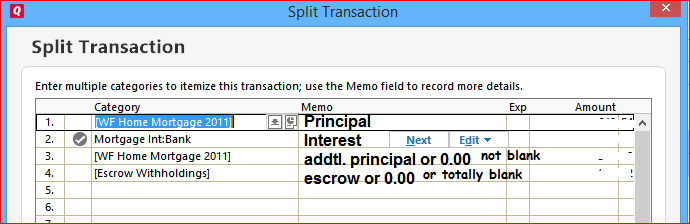
The mortgage principal amount (and optional additional principal amount) will now show in your budget as an expense. This assumes that your mortgage payment transaction Splits are defined similar to this image:
Category "Mortgage:Principal" can only be used if the mortgage account is activated for transaction downloading from the mortgage holder / bank. In that case, there is no mortgage account register available in Quicken und therefore it's also not possible to perform a checking-to-mortgage account transfer transaction.
0
Categories
- All Categories
- 56 Product Ideas
- 36 Announcements
- 223 Alerts, Online Banking & Known Product Issues
- 22 Product Alerts
- 701 Welcome to the Community!
- 671 Before you Buy
- 1.2K Product Ideas
- 53.7K Quicken Classic for Windows
- 16.3K Quicken Classic for Mac
- 1K Quicken Mobile
- 813 Quicken on the Web
- 111 Quicken LifeHub