Merrill Lynch Investments changed to EWC, failure updating from direct connect.
I'm attempting to update to EWC but getting a failure. I login to Merrill then:
Quicken Services says "Your accounts have been authorized successfully!"
When it takes me back to Quicken "Sign in to Merrill Lynch Investments bank failed. Try again."
Tried this several times with no success. Help is appreciated.
Answers
-
I have tried several times today with the same result. This is clearly a Quicken connection problem.
0 -
have tried several times today also the same result.
Tried deauthorizing, and reauthorizing to sign in but still fails
0 -
Hello @Ed V, @vince, & @Paul123,
Thank you for letting us know about this issue. To troubleshoot, please make sure to pause/temporarily disable any browser extensions, especially ad blockers and popup blockers. If the issue persists, please try using a different browser (you can do this by setting a different browser as your default). Do not use Brave or DuckDuckGo, since they are known to have this issue.
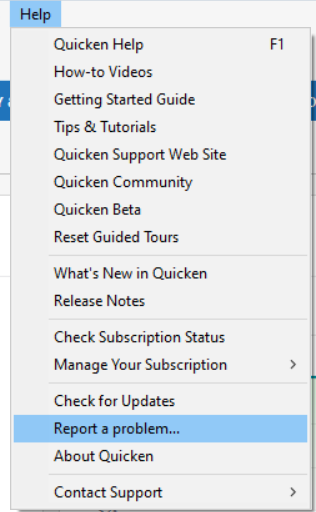
I forwarded this issue to the proper channels for further investigation and resolution. Thank you for sending problem reports with log files attached @vince and @Paul123. @Ed V, if the troubleshooting above does not resolve the issue for you, please navigate to Help>Report a Problem and send a problem report with log files attached.
While you will not receive a response through this submission, these reports will help our teams in further investigating the issue. The more problem reports we receive, the better.
Please let me know how it goes!
(CTP-13806)
Quicken Kristina
Make sure to sign up for the email digest to see a round up of your top posts.
0 -
I am getting the exact same failure as described in the initial (top) report. I've tried three times today… no luck.
2 -
Hello @SKeyser,
Thank you for letting us know that you're also seeing this issue. If you haven't already tried the troubleshooting steps in my earlier post, please give them a try.
If the troubleshooting does not resolve the issue, then to help our teams investigate and resolve this issue, please navigate to Help>Report a Problem and send a problem report with log files attached.
While you will not receive a response through this submission, these reports will help our teams in further investigating the issue. The more problem reports we receive, the better.
Thank you!
Quicken Kristina
Make sure to sign up for the email digest to see a round up of your top posts.
0 -
Sigh. There has never been an EWC+ transition that didn't have issues.
I have two of them:
- My ML accounts: when I try to reauthorize or deactivate/authorize, I'm not presented with my 4 accounts (and I selected them on ML's permission page). I'm shown only a single account I don't recognize. I select "Don't add to Quicken" for that odd one and none of the accounts are activated.
- My spouses ML accounts: For that login, I get the "Sign in to Merrill Lynch Investments bank failed. Try again." as reported above.
I've submitted a log file for failure 1.
2 -
Hello @jtemplin,
Thank you for letting us know you're also impacted by this issue, and thank you for sending the problem report with log files attached.
I do notice our internal tools show a successful refresh. Were you able to get connected successfully after that first failure?
Thank you!
Quicken Kristina
Make sure to sign up for the email digest to see a round up of your top posts.
0 -
A correction. I now recognize the odd account. Let me try again:
I deactivated the 4 personal ML accounts.
I try to activate them by selecting my IRA account and begin the Activate One Step Update dialog.
I click on the Sign In button.
I log in to the ML webpage with my user/password. I have to answer one of my challenge questions.
I select the 4 accounts I want. I leave a 5th one (an LMA credit card I never use so I don't track it).
I click Continue and give final permission. I'm told the accounts were authorized successfully.
But now in Quicken, I get the Sign in to Merrill Lynch Investments bank failed. Try again."In my previous message, instead of selecting the IRA account, I had selected my CMA account. On the ML web page, I selected the 4 accounts I wanted, but was only presented with the LMA credit card when returning to Quicken to complete the account mapping.
So, I got different results when I selected different accounts from which to launch Activate One Step Update.
2 -
No. For grins, I wanted to see what happened when I told the Activate One Step Update to go ahead and create that LMA credit card. It did create the account which is probably what you're seeing. But I couldn't activate the other 4 accounts. I wasn't even presented with them to map them to my existing accounts, which is very strange because I explicitly selected the 4 accounts from the ML website page.
I deleted the LMA credit card account and left all my ML account deactivated for now.
1 -
This is a similar error message that I sometimes get with other financial institutions when trying to authorize or reauthorize an account for EWC+. What usually has worked for me:
- Temporarily disable all browser extensions/add-ons.
- Temporarily change the Privacy setting in the browser to Standard.
Usually, this resolves the authorization/reauthorization issue for me.
Quicken Classic Premier (US) Subscription: R65.15 on Windows 11 Home
1 -
Thank you for your reply @jtemplin,
Thank you for clarifying and providing the additional information about how choosing a different account to authorize impacts which accounts you see available to connect.
Thank you!
Quicken Kristina
Make sure to sign up for the email digest to see a round up of your top posts.
0 -
FYI, I've just submitted my problem report.
1 -
I tried both those things and still got the message "Sign in to Merrill Lynch Investments bank failed. Try again." Thanks for the suggestion, though.
1 -
When I try to authorize my Merrill Lynch I click Continue and give final permission. I'm told the accounts were authorized successfully by Merrill Lynch. But in Quicken, I get the Sign in to Merrill Lynch Investments bank failed. Try again." Merrill Lynch also links to my BOA accounts on their websit and if I authorize the BOA accounts along with the Merrill Lynch Acoounts the BOA accounts go through but they do not show up when I try to link them to my existing BOA accounts. also my Merrill lynch accounts do not show up. If I do not check the BOA accounts and just check the Merrill Lynch accounts when I reauthorize Merrill Lynch. I get the message in Quicken, " Sign in to Merrill Lynch Investments bank failed. Try again
Also I do not understand when you say "If the issue persists, please try using a different browser (you can do this by setting a different browser as your default). Do not use Brave or DuckDuckGo, since they are known to have this issue." Do you mean my default browser?
0 -
Hello All,
There is now an alert for this issue. To be notified of any updates, once available, and know when the issue is resolved, I recommend bookmarking the Community Alert linked below.
If you do not see the bookmark ribbon, please make sure that you are signed into the Quicken Community.
Hello @weikosteve,
Brave and DuckDuckGo are browsers known to not work well with the authorization process, which is why I recommend against using them when troubleshooting issues with authorizing/connecting Express Web Connect+ accounts. However, considering how widespread this issue is, it is more likely that you are being impacted by the widespread issue.
Thank you!
(Ticket #11864435/CTP-13807)
Quicken Kristina
Make sure to sign up for the email digest to see a round up of your top posts.
0 -
For the uninitiated, when you log into your ML account, you are able to see your BOA accounts. And when you log into your BOA account, you can see your ML accounts. It's one of the nice integrations you get when you are a BOA/ML customer.
You know, I didn't select my BOA accounts when trying to reauthorize my ML accounts. I figured because the BOA accounts were already authorized long-ago for EWC+ using their own BOA login, I was afraid I was going to create duplicate accounts or downloads by selecting them during ML reauthorization.
So a legitimate question would be now that both BOA and ML are using EWC+, what should we do:
a) authorize BOA accounts with our BOA login and our ML accounts with our ML login?
b) or should we authorize BOTH BOA and ML accounts using our ML login?
c) or should we authorize BOTH BOA and ML accounts using our BOA login?0 -
having same issues..got reauthorization message, tried several times, but no success. then deactivated on my merrill accounts and now merrill accounts wont link. ugh….quicken please get this fixed…
0 -
I too am encountering this failure. I spun in circles without any resolution for multiple sign-on tries before giving up. Why aren't these updates tested before rolling them out. I'm begging you to get this fixed; it is VERY IMPORTANT to me.
Thank you.
Ken
0 -
I have the reauthorization message for Merrill Lynch for the 4 accounts I have with them. It does not show the 2 Bank of America accounts I have. When I go through the process at Merrill Lynch it shows I can choose all 6 accounts with Merrill Lynch/Bank of America. I chose them all and went back to Quicken and only the 2 Bank of America accounts showed up to link to any current accounts I have. I had to rename the accounts exactly as they were downloaded from Merrill Lynch, or they would create new accounts. The 4 Merrill Lynch accounts did not show up to link with my accounts. When I did link them with my 2 current Bank of America accounts, the credit card account was incorrect and was off by a lot. I had to restore from a previous backup, and when I did try again the same thing happened. I am hoping it is figured out before I try again.
0 -
I am failing in a different way. When reauthorizing the Merrill accounts, I sign in and am greeted with a screen that says 'No eligible accounts'. I have several Merrill login credentials for various accounts/relationships. This is happening for all of them.
0 -
This morning I was asked to update to the new connection method for my Merrill and Bank accounts. I did. Accounts were duplicated. I was ask to re-accept lots of reconciled transactions. And in the end existing accounts were there, new accounts were there and balances were completely wrong. Make sure you have a good backup!
0 -
I went through the re-authorization process with Merrill. Everything working well, OSU performs fine. But every time I start Quicken it is prompting me to re-authorize. I just skip by it but annoying. True for two separate Quicken files I maintain for two people both of which have Merrill access.
0 -
This content has been removed.
-
Update- I decided to try it again. During the authorization process you get a dialog that asks about adding account to Quicken. My first try I selected "add" which in hindsight was probably wrong. This time I tried to select "ling to existing". In the pop-up that listed existing accounts I could select my Merrill accounts. But for the Bank of America credit cards the existing accounts were not in the list. I stopped there.
0 -
The other thing I noticed is the the Merrill reinvestment transactions have become worse. They were bad before because they came in as three transactions, but now they came across as one, but without the share information required to save the transaction correctly.
1 -
When I get these kinds of errors, I try once a day to see if the problems have been fixed. I did so this morning and was able to successfully reauthorize my accounts. Some things to note:
- DO A BACKUP BEFORE YOU MAKE ANY CHANGES TO YOUR QUICKEN FILE. That way, if things go wrong, you can restore and try again.
- When presented with the window in Quicken on how to map your accounts, my existing accounts weren't automatically selected. DO NOT take the default of adding the account to Quicken or else you'll get a duplicate account. You must select the option to link to an existing Quicken account and pick the correct account. I'm already seeing posts where folks are complaining about duplicate accounts. I think Quicken could help here by changing "Add to Quicken" to "Add as a new account in Quicken".
- Once you've mapped your accounts, you may get downloaded transactions that match existing transactions. Accept the matches. Don't delete the matched transactions.
- I noticed in my CMA account, cash seems to be handled differently now. After the EWC+ conversion in that account, there was a mismatch with the number of shares in "ML Bank Deposit Program". Before EWC+, monthly interest got swept into "cash" (I don't track cash in a separate account). Now it looks like those monthly interest transactions are going into "ML Bank Deposit Program". I manually entered a buy transaction to essentially convert the existing whole-dollar cash amount into "ML Bank Deposit Program" shares. I'll have to keep an eye on this at the end of the month to see how new end of month interest transactions behave (increase cash? or increase "ML Bank Deposit Program" shares?). I've been a Merrill customer for over two decades, and sometimes when there's been some kind of system change, end of month interest transactions get downloaded differently. It will be painful if I have to manually enter sales of "ML Bank Deposit Program" when my portfolio gets rebalanced and spends cash. Under Direct Connect, using cash for this purpose was transparent and trouble-free. We shall see.
Note: I only authorized my ML accounts. I left my BOA accounts alone because they were already authorized long ago for EWC+ using their BOA login(s). The BOA accounts were already working fine.
Jon T.
P.S. Quicken users were prompted to make the EWC+ change yesterday, on a Friday. Why this day was chosen when support is limited on weekends is puzzling to me. When I was an IT manager, we'd never pick a Friday for a major system change.
1 -
I think Quicken could help folks avoid these kinds of mistakes by changing the label on the "Add to Quicken" option to "Add as new account in Quicken." Too many times, I see folks picking the former thinking "Adding" means to add to an existing account when it means the latter. I wonder if folks simply don't realize that the link option is lurking in the dropdown if they'd only click on it.
I think that dialog box could be much friendlier. I might enter a suggestion on that.
1 -
Thanks! This was very helpful. The same thing happened to me, regarding account being duplicated on Quicken. I'm now in the process of using my backup to get rid of the duplicate account.
0 -
Today, I had to reauthorize my accounts due to the new connection requirements. Fractional shares are not being downloaded correctly.
In all instances, the fractions are being omitted from the download. For instance,
A transaction to sell 17.685 shares in a mutual fund (as reflected on the Merrill Lynch site), downloaded as a sell of 17 shares.
Is there anything I can do to correct this download error?
0 -
Oh no! This is terrible news. It was previously a pain, but workable. I have considered moving accounts away from Merrill altogether due to the time wasted to clean up these transactions, but this may force me to do it. I am a bit surprised considering their popularity as a broker that this is an issue they continue to have.
A data point on the reauthorization process: I have both Merrill and BoA accounts that I accumulated over time. I decided to "deactivate" online services from my BoA accounts before starting the Merrill reauthorization process. During the reauthorization, I saw all of my Merrill and BoA accounts appear, and I chose to "link to existing". Things seem to be working as expected, aside from the Merrill transaction detail issue.
0
Categories
- All Categories
- 56 Product Ideas
- 36 Announcements
- 223 Alerts, Online Banking & Known Product Issues
- 22 Product Alerts
- 701 Welcome to the Community!
- 671 Before you Buy
- 1.2K Product Ideas
- 53.7K Quicken Classic for Windows
- 16.3K Quicken Classic for Mac
- 1K Quicken Mobile
- 813 Quicken on the Web
- 111 Quicken LifeHub