Merrill Update for Connection Method Changes Settings

MangoMan
MangoMan Member ✭✭✭✭

After updating all my Merrill accounts for the new Connection method, ALL of my Merrill accounts display the Simplified Positions Tracking Method window instead of the normal Register.

ISSUE: From the Portfolio Window, I click on an Account and where I used to get the transaction register I instead get a window displaying 4 cards - Security, Top Movers, Portfolio by Security, and Value over Time. This happened to all my Merrill accounts, but not my other brokerage accounts.

FIX: To get back to the transaction register - for each account - you have to do the following:

Go to Account Register > upper right Gear icon > Edit Account Details > General tab > select Complete - Positions and Transactions (in the Tracking Method box). You'll get a detailed message about making the switch back - Select YES and then OK - take about 15-20 seconds to switch.

Thanks Quicken and Merrill for the extra work, once again (including the ongoing 3 transactions for dividend reinvestments 🤬😠) to try to fix the problem with no useful online help or easy way to find a fix.

Comments

  • Quicken Jasmine
    Quicken Jasmine Quicken Mac Subscription Alumni ✭✭✭✭

    Hello @MangoMan,

    Thanks for reaching out.

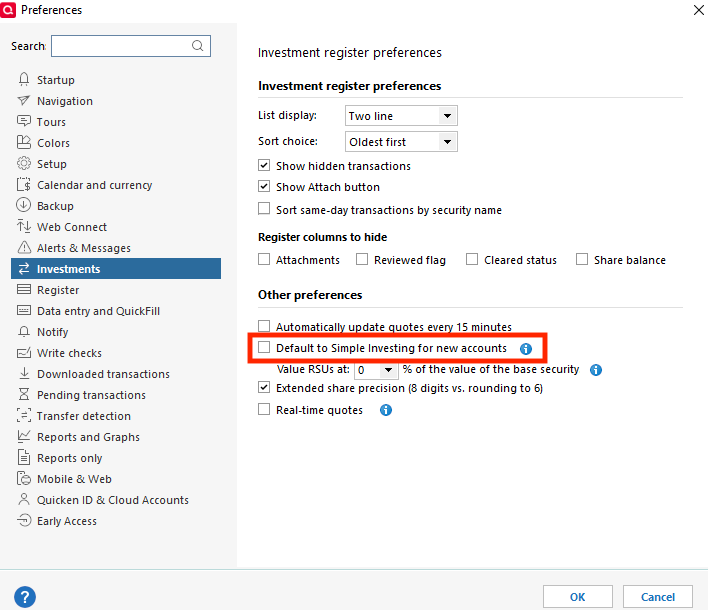
    First, could you please navigate to Edit > Preferences > Investments. To see if the setting for "Default to Simple Investing for new accounts" is selected?

    Screenshot 2025-07-21 at 10.55.59 AM.png

    Let me know!

    -Quicken Jasmine

    Make sure to sign up for the email digest to see a round-up of your top posts.

  • MangoMan
    MangoMan Member ✭✭✭✭
    edited July 27

    Quicken : Jasmine

    It is checked, but I didn't make this change. Was there any instruction sent to users to tell them the new connection method would treat existing accounts as new?

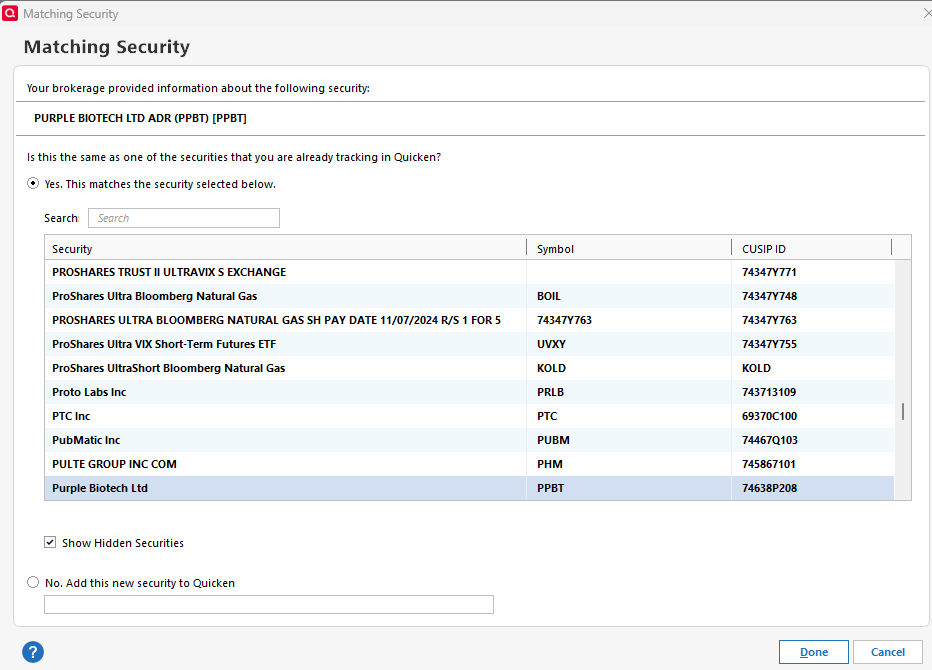
    Today, after doing a One Step Update, several of my accounts are asking about Matching Securities, for many of my existing securities with no changes and downloading a bunch of old transactions into the register that had previously cleared, treating them as New. I have to now go through each one of them and check and individually Delete them (which is a pain in the [Removed - Language]). 😡

  • Quicken Kristina
    Quicken Kristina Quicken Windows Subscription Moderator mod

    Thank you for your reply,

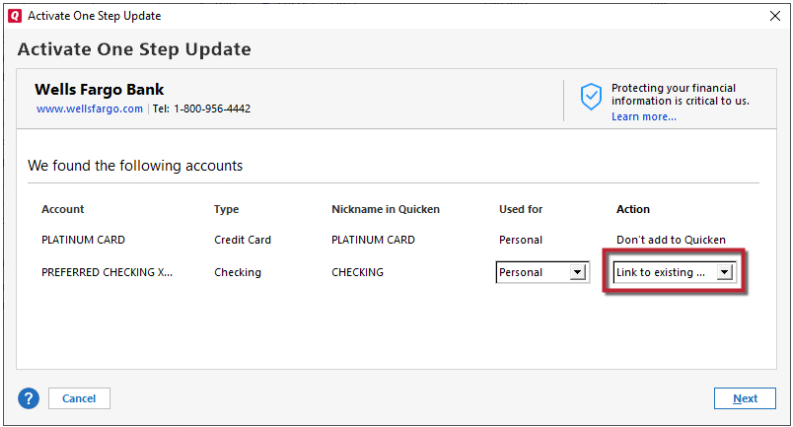
    Usually, Quicken is fairly good about recognizing the correct account to link to after authorizing/reauthorizing your accounts. Sometimes it does guess wrong or see the account as new, which is why it's important to review the Add/Link screen and make corrections as needed.

    Link to Existing.png

    Are you seeing the correct options to link to? If not, then what is happening?

    The issue you mentioned seeing today with securities being seen as new and transactions redownloading as new are likely a result of the change in connection method. The data is coming to Quicken in a different format, which can cause this behavior.

    Thank you!

    Quicken Kristina

    Make sure to sign up for the email digest to see a round up of your top posts.

  • MangoMan
    MangoMan Member ✭✭✭✭

    Q: Are you seeing the correct options to link to? A: I think they were all correct or I adjusted as needed. I don't remember.

    I am continuing to see the other issue. For shares I have bought or sold today that I already own, for example, I am being asked if they match.

    image.png
  • MangoMan
    MangoMan Member ✭✭✭✭

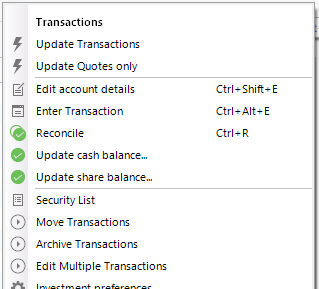
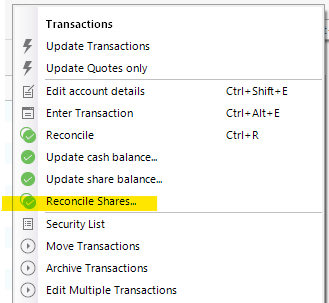
    Another issue I am seeing is that the Reconcile Shares option is now missing for the Merrill accounts.

    image.png image.png
  • Quicken Kristina
    Quicken Kristina Quicken Windows Subscription Moderator mod

    Thank you for your replies,

    The issue you're seeing with it wanting to confirm the holdings are the same is likely due to the change in connection method resulting in the data being sent in a different format. Once you confirm the holdings are the same, does it ask about the same holdings again, or does it remember? If it does ask about the holdings again, is it showing the same name every time, or is the name that downloads for the holdings different every time?

    For the issue with the reconcile shares option not showing up anymore, I recommend that you contact Quicken Support directly for further assistance, as they have access to tools that we can't access on the Community, and they're able to escalate as needed. The Quicken Support phone number can be found through this link here. Phone support is available from 5:00 am PT to 5:00 pm PT, Monday through Friday.

    Thank you!

    Quicken Kristina

    Make sure to sign up for the email digest to see a round up of your top posts.

  • MangoMan
    MangoMan Member ✭✭✭✭

    Q: Once you confirm the holdings are the same, does it ask about the same holdings again, or does it remember?

    A: I have not been logging it, but will watch for it and report back. It appears to do it for any new trades or dividend reinvestment transactions. Also, I have several different Merrill accounts so I might be seeing the same security confirmation request for each account as that security pops up in a downloaded transaction.

    Q: If it does ask about the holdings again, is it showing the same name every time, or is the name that downloads for the holdings different every time?

    A: Again, I'll need to make a record and report back.

  • Quicken Kristina
    Quicken Kristina Quicken Windows Subscription Moderator mod

    Thank you for the follow-up,

    Please let us know what you observe! Also, could you please confirm what account types you're seeing these issues with (IRA, Brokerage, 401k, etc.)?

    Thank you!

    Quicken Kristina

    Make sure to sign up for the email digest to see a round up of your top posts.

  • MangoMan
    MangoMan Member ✭✭✭✭

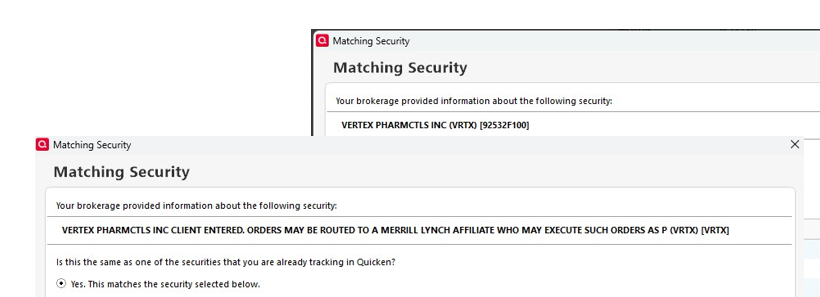
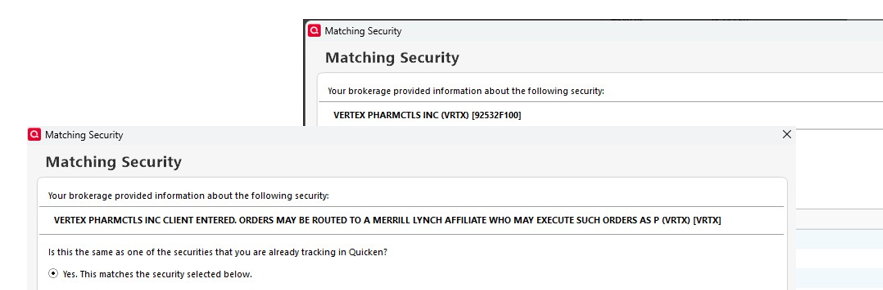
    These are IRAs. Today it asked me twice about 2 securities and some others where there was activity. For the 2 securities it asked me this morning and again this evening. The brokerage information (name) provided is different for STAA and VRTX. Example below:

    image.png image.png
  • Quicken Kristina
    Quicken Kristina Quicken Windows Subscription Moderator mod
    edited August 10

    Thank you for the follow-up @MangoMan,

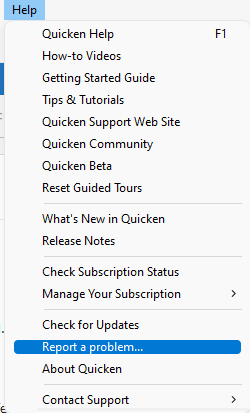
    I reported this issue to the proper channels for further investigation and resolution. To help with the investigation, please navigate to Help>Report a Problem, and send a problem report with log files attached.

    Report a problem QWin copy.png

    While you will not receive a response through this submission, these reports will help our teams in further investigating the issue. The more problem reports we receive, the better.

    We apologize for any inconvenience!

    Thank you.  

    (CTP-13847)

    Quicken Kristina

    Make sure to sign up for the email digest to see a round up of your top posts.

  • MangoMan
    MangoMan Member ✭✭✭✭

    Ok - Not possible to report the problem when the "Matching Security" window is displayed, but I'll take a screenshot.

This discussion has been closed.