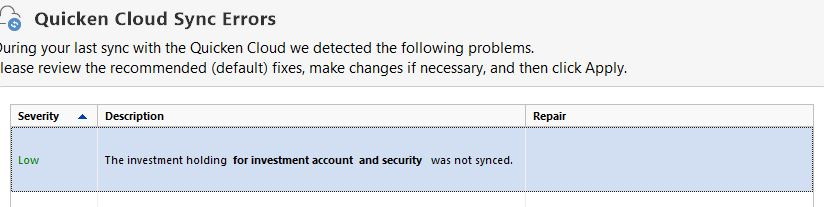
Why do I keep getting the below cloud sync error
About 2 weeks ago I started getting this error every time I cloud synced:
"The investment holding for investment account and security was not synced.
I am attaching a screen shot
Answers
-
Hello @dumb bunny,
Thanks for reaching out!
Before we jump into steps, I have a few quick questions to help narrow things down:
- Are you actively using Quicken Mobile or Web, or is Cloud Sync just running in the background?
- When this message pops up, does it always say the same investment account and security, or is it vague like the one in your screenshot every time?
- Have you recently added, deleted, or edited any of your investment accounts or securities?
- If you open that investment account in your register, do you notice any placeholder transactions (they’ll usually be gray and labeled “Placeholder”)?
- Outside of Cloud Sync, is the account still downloading transactions and updating correctly when you run One Step Update?
Let me know!
-Quicken Jasmine
Make sure to sign up for the email digest to see a round-up of your top posts.
0 -
I haven't heard from you yet. Are you still experiencing this issue?
Let me know!
-Quicken Jasmine
Make sure to sign up for the email digest to see a round-up of your top posts.
0 -
Checking in once more before this thread is closed due to no activity.
Let me know!
-Quicken Jasmine
Make sure to sign up for the email digest to see a round-up of your top posts.
0 -
This thread has now been closed. Please begin a new discussion if you need further assistance.
Thank you!
-Quicken Jasmine
Make sure to sign up for the email digest to see a round-up of your top posts.
0
Categories
- All Categories
- 56 Product Ideas
- 36 Announcements
- 223 Alerts, Online Banking & Known Product Issues
- 22 Product Alerts
- 701 Welcome to the Community!
- 671 Before you Buy
- 1.2K Product Ideas
- 53.7K Quicken Classic for Windows
- 16.3K Quicken Classic for Mac
- 1K Quicken Mobile
- 813 Quicken on the Web
- 111 Quicken LifeHub

