American Express Balance Issue Still Exists - Quicken Classic for Windows

WillyG
WillyG Quicken Windows Subscription Member ✭✭

I still have a balance issue on American Express Downloads. I have attached two photos of the issue - one showing the "account list" that appears on the side of the screen, the second the balance information on the account register.

As you can see the balance in the account list shows $78.89, while the balance in the account register is a credit of "$21.11. As you can also see from the account register there are no "pending" transactions.


Screenshot 2025-07-27 091956.jpg Screenshot 2025-07-27 091919.jpg

If the balance in the account register was $0, then the balance in the account list would be $100. This has been going on for awhile and I haven't had any luck fixing it no matter what I have done. I don't want to delete the account as I have many years of history that I want to preserve.


Comments

  • Quicken Kristina
    Quicken Kristina Quicken Windows Subscription Moderator mod

    Hello @WillyG,

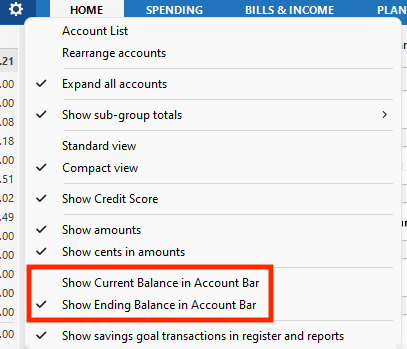
    Thank you for letting us know you're seeing this issue. When did you first notice this issue? Is the account bar (on the left side of the screen, by default) set to show the current balance, or the ending balance? You can check this by clicking the gear icon near the upper right of the account bar and seeing which option has the checkmark by it.

    Screenshot 2025-07-27 at 3.46.03 PM.png

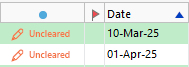
    Do you have any manually entered transactions or transactions automatically entered into your register that haven't cleared the financial institution yet? They will usually have a red pencil icon and the word Uncleared showing in the status column. Uncleared transactions will reflect in the Ending balance, which, depending on what the Account bar is set to show, could cause the difference you are seeing.

    Screenshot 2025-07-27 at 4.03.29 PM.png

    I look forward to your reply!

    Quicken Kristina

    Make sure to sign up for the email digest to see a round up of your top posts.

  • mshiggins
    mshiggins Quicken Windows 2017 SuperUser ✭✭✭✭✭
    edited July 28

    @Quicken Kristina the OP has 5 other posts on this issue dating back to 2022 when the issue presumably started. Here is the oldest post:

    These previous discussions did not get very far in troubleshooting before being closed. Perhaps calling support might be a better approach to getting the issue resolved?

    Quicken user since Q1999. Currently using QW2017.
    Questions? Check out the Quicken Windows FAQ list

  • WillyG
    WillyG Quicken Windows Subscription Member ✭✭

    @Quicken Kristina - It doesn't matter which of the selections I make the account balance does not change in the account list. There are no pending transactions for this account.

  • Quicken Kristina
    Quicken Kristina Quicken Windows Subscription Moderator mod

    Thank you for your reply,

    Has this issue been going on since 2022, as indicated by the earlier discussion @mshiggins found? If so, then you may want to reach out to Quicken Support directly for further assistance, as they are able to provide real-time troubleshooting and escalate the issue as needed. The Quicken Support phone number can be found through this link here. Phone support is available from 5:00 am PT to 5:00 pm PT, Monday through Friday. 

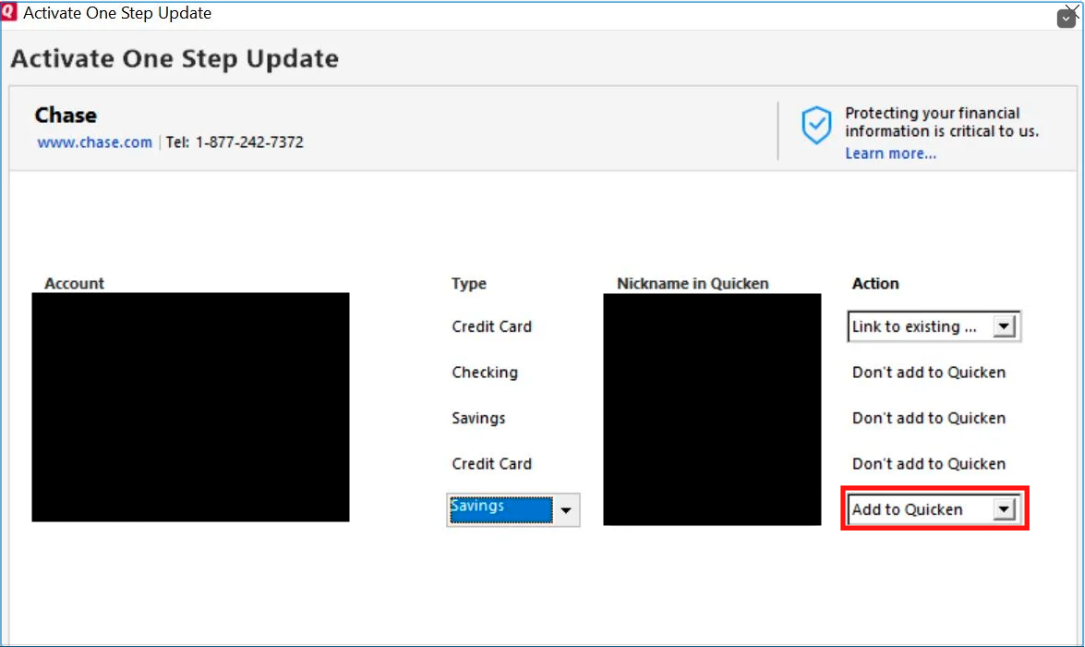
    If contacting Support is not a viable option, or you prefer to troubleshoot on the Community instead, then to test if this may be a file specific issue, I recommend that you backup your Quicken file, deactivate the problem account, then try adding the account as new instead of linking to the existing account.

    Add account option.png

    Thank you!

    Quicken Kristina

    Make sure to sign up for the email digest to see a round up of your top posts.

  • WillyG
    WillyG Quicken Windows Subscription Member ✭✭

    I did as suggested, I deactivated the existing account and added a new version. To keep my historic data, I just compared the downloaded information and deleted the duplicates from the existing account. The register and the account list balance now is the same. The only thing I can think of is that the error occurred when the newer download version was implemented by Quicken/Amex because that is when it became an issue.

    Thanks for all the suggestions.

  • Quicken Kristina
    Quicken Kristina Quicken Windows Subscription Moderator mod

    Thank you for the follow-up,

    I'm glad to hear the balances are now displaying correctly!

    If you need further assistance, please feel free to reach out!

    Quicken Kristina

    Make sure to sign up for the email digest to see a round up of your top posts.

This discussion has been closed.