Revisitng-IRA Distribution from my JPM IRA Account

Don32@
Don32@ Member ✭✭✭

@CaliQkn - Back in June you and Boatnmaniac were knd enough and trying to assist me with my issues" Taking monthing distrubtions from my JPM IRA Account." I stated "When JPM does this, they sell the security to give me a gross amount. JPM splits out the Federal and State taxes within the IRA, and the net goes into my checking account."

I have been using Quicken since the beginning of time and maybe I am making this more complicated then it should be.

I the 9904 IRA Account JPM withholds both Federal and State. This withdraw goes into my CU Saving account. If I am following you correctly I need to setup a reminder in the savings account with the gross amont of $6,493.52, a line items for state- 324.68, and Fed 1168.84 Leaving me the net of $5,000. This will go into the tax planner. What is being show in the IRA itself does not go into the tax planner even though I have the catagory set to _401FedWithholding?


Tagged:

Comments

  • Jim_Harman
    Jim_Harman Quicken Windows Subscription SuperUser ✭✭✭✭✭

    You should not have a Category in the IRA, it should show as a WithdrawX with the taxable account as the destination.

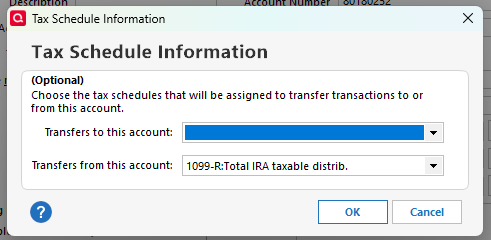
    If you go to the Account Details for the IRA, click on Tax Schedule and set Transfers from this account like this

    image.png

    the total amount of the distribution should appear in the Tax Planner and tax reports.

    QWin Premier subscription
  • Don32@
    Don32@ Member ✭✭✭

    but how do I show it in the deposit side?

  • Jim_Harman
    Jim_Harman Quicken Windows Subscription SuperUser ✭✭✭✭✭

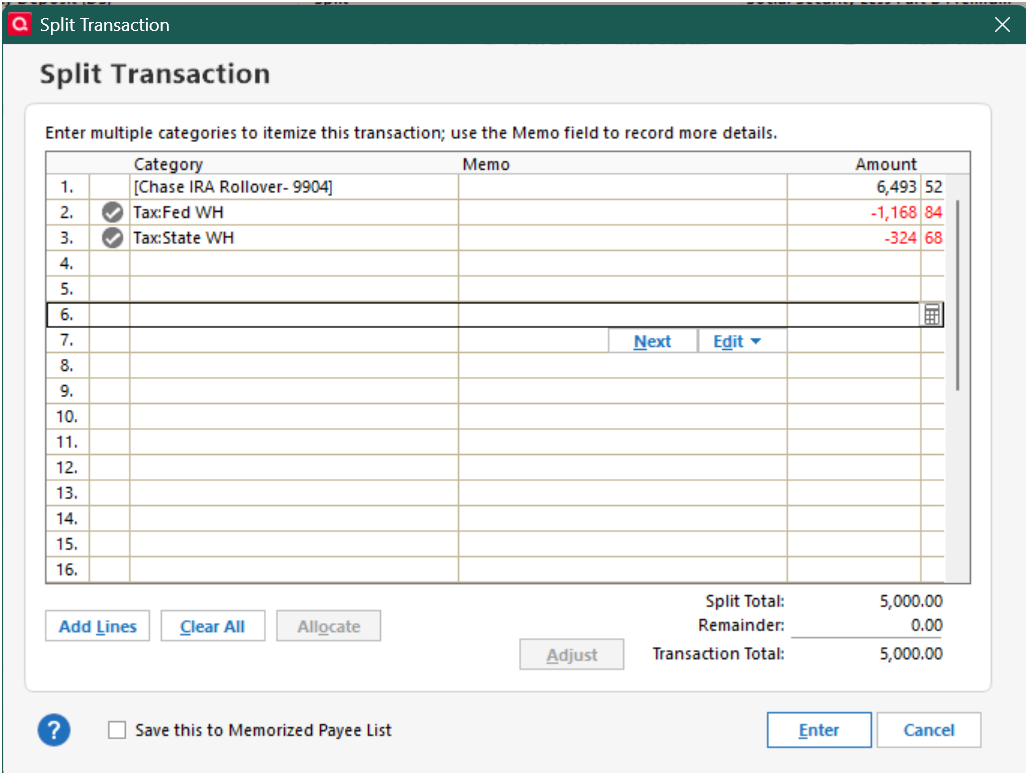
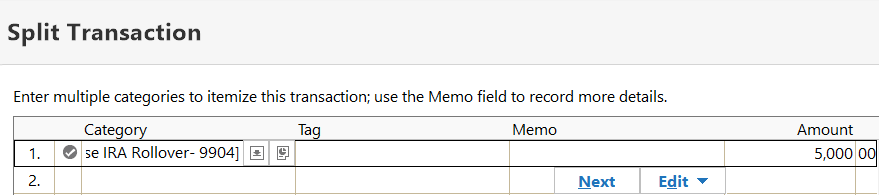
    In the income Reminder, which will make each month's deposit transaction when you accept it, you should have a split transaction with the full amount on one line and the Category as [Chase IRA Rollover - 9904} as the Category. The other lines of the split should have the withholding amounts, entered as negative numbers, so that the total is the net amount deposited.

    Here are my full instructions for entering IRA distributions:

    =====

    It can be tricky to record IRA distributions such as RMDs to a taxable account in Quicken so that the tax implications are captured correctly.   

    There are no built-in Categories for IRA tax withholding; you must set them up yourself. I use these:

    • Tax Fed:Fed IRA WH with a tax line item of 1099-R:IRA federal tax withheld
    • Tax State:State IRA WH with a tax line item of 1099-R:IRA state tax withheld

    In the IRA, click on the gear at the top right and select Edit account details. Click on Tax Schedule and set Transfers out to "1099-R:Total IRA taxable distrib." If you don’t see the Tax Schedule button at the bottom of the Account Details dialog, click on View in the top menu and select “Tabs to show”. In the list of tabs, select Planning.

    Enter one or more Sold transactions for the securities that were sold. This will put a cash balance in the account equal to the total amount of the distribution, including any taxes that were withheld.

    If no taxes are withheld from the distribution, you can simply enter the distribution in the IRA as a transfer to the receiving account.

    If taxes are withheld from the distribution, the process is more complicated because you must record the gross distribution as well as the withholding(s) in the receiving account. To do this, go to the receiving account and:

    1)  Enter a Deposit transaction for the net amount of the RMD as a positive number.

    2)  Split the Category:

    • Line 1 of the split:  Category = the IRA account name in [square brackets] for the gross amount as a positive number. This will create a transfer from the IRA.
    • Line 2 of the split:  Category = the Fed tax withholding category that you use, as a negative number.
    • Line 3 of the split:  Category = the State tax withholding category that you use, as a negative number.
    • Total of the split:  Must equal the net amount of the deposit.

    If the deposit is made to a banking account between Jan. 1 and April 15, you will see a dialog titled “Confirm Your Contribution Tax Year”, even though this is a distribution and not a contribution. Select the current year, not the default of the previous year, and click on OK. This seems to be a bug.

    If you receive the distributions regularly, you can save repeated manual entry by setting up this transaction as an Income Reminder.

    If taxes were withheld, you must delete or not accept any downloaded transactions in the IRA for the net distribution and the withholding.

    With this setup, the taxable income will be shown in the Tax Planner and the “1099-R Total IRA Taxable distrib.” and any tax withholding in the withholding sections of the Tax Schedule report.

    QWin Premier subscription
  • [Deleted User]
    edited July 31

    @Don32@ it looks like you have a good understanding of how an IRA distribution should be set up. It seems like Quicken users each have their own variation to how to set this up on Quicken.

    Here is how I set up my own IRA distributions -

    In your JPM IRA, there would be three withdrawal transactions that will be downloaded from JPM when a distribution occurs -

    1. The net amount of the IRA distribution - (5,000.00) - this would be the amount JPM transfers to your CU savings account.
    2. The federal tax withholding amount - (1,168,84)
    3. The state tax withholding amount - (324.68)

    EDIT - forgot to add that these transactions should be categorized with a generic withdrawal category without any tax categories attached to them. Something like "IRA Withdrawal" or "IRA Distribution". The tax categories get used in the deposit transactions in the CU Savings account.

    These transactions will not show up in the tax planner (if the account is coded as "Tax deferred").

    In your CU Savings account in Quicken, you will have a split transaction that will net to 5,000.00

    1. The gross IRA distribution amount (6,493.52) with a distribution category (and the appropriate tax related category). This should be a positive amount.
    2. The federal tax withholding (1,168,84) with a fed tax withholding category (and the appropriate tax related category). This should be a negative amount.
    3. The state tax withholding (324.68) with a state tax withholding category (and the appropriate tax related category). This should be a negative amount.

    The distribution and withholding categories you use is anything you want, just so long has they have the appropriate tax related categories assigned to them. The tax related item can be verified or edited when you edit the category.

    For the gross IRA distribution the tax related category should be "1099-R Total IRA gross distrib,"

    For the fed withholding the tax related category should be "1099-R federal tax withheld"

    For the state withholding the tax related category should be "1099-R state tax withheld"

    The easiest way to set up a reminder transaction for this IRA distribution it to create the split transaction in your CU Savings account, and then right click the transaction and select "Add Reminder". Then you should be able to edit the reminder with the appropriate details. The date of the reminder should be the same date that JPM withdraws the amounts from your IRA.

    Ultimately, each month, the amounts withdrawn from your JPM IRA (net IRA dist, fed WH, state WH) should equal the net monthly (reminder) amounts (gross IRA dist, less fed and state WH) deposited to your CU Savings account.

    As I mentioned, there are different ways you can do an IRA distribution so it show up properly in the tax planner. The way I described above is the best way I have found for myself.

  • Don32@
    Don32@ Member ✭✭✭

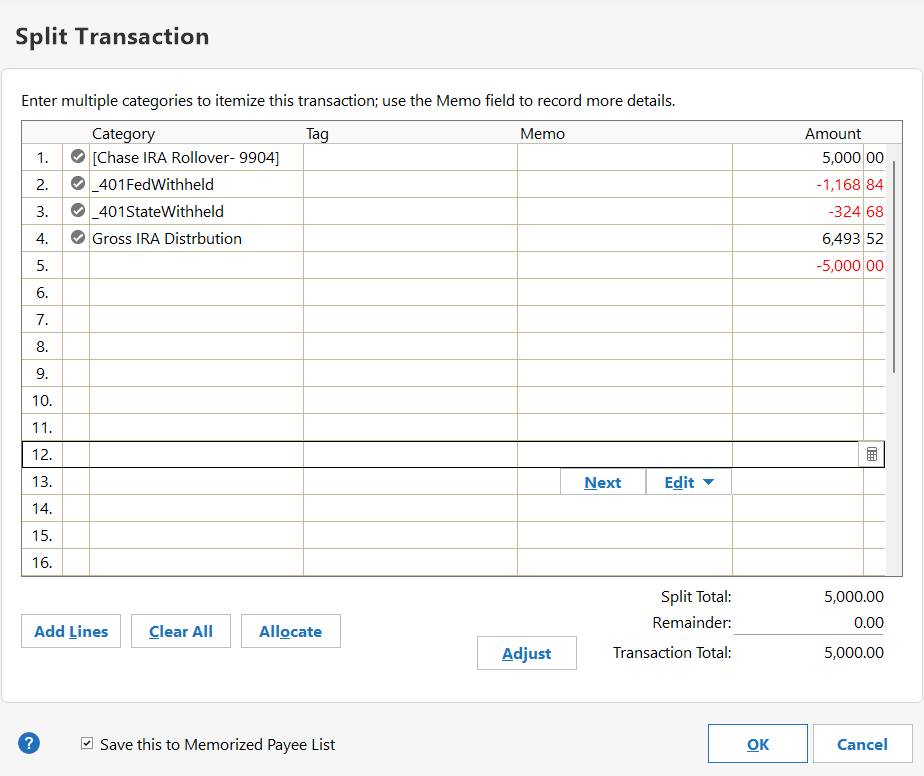
    Does this look correct? What do I do if anything with the -5,000. BTW thanks for you help.

    IRA DIST CAT.png
  • Q97
    Q97 Quicken Windows Subscription Member ✭✭✭✭

    Try making the amount on the first line $6493.52 and delete the 4th line.

  • @Don32@ yesterday, @Jim_Harman and I presented two different ways to enter an IRA Distribution in Quicken. Although different, they both get to the same result.

    The other thing that is important (for either method) is that you use the correct fed and state withholding categories. This entails creating fed and state withholding categories. The important thing is to make sure the appropriate tax categories are attached.

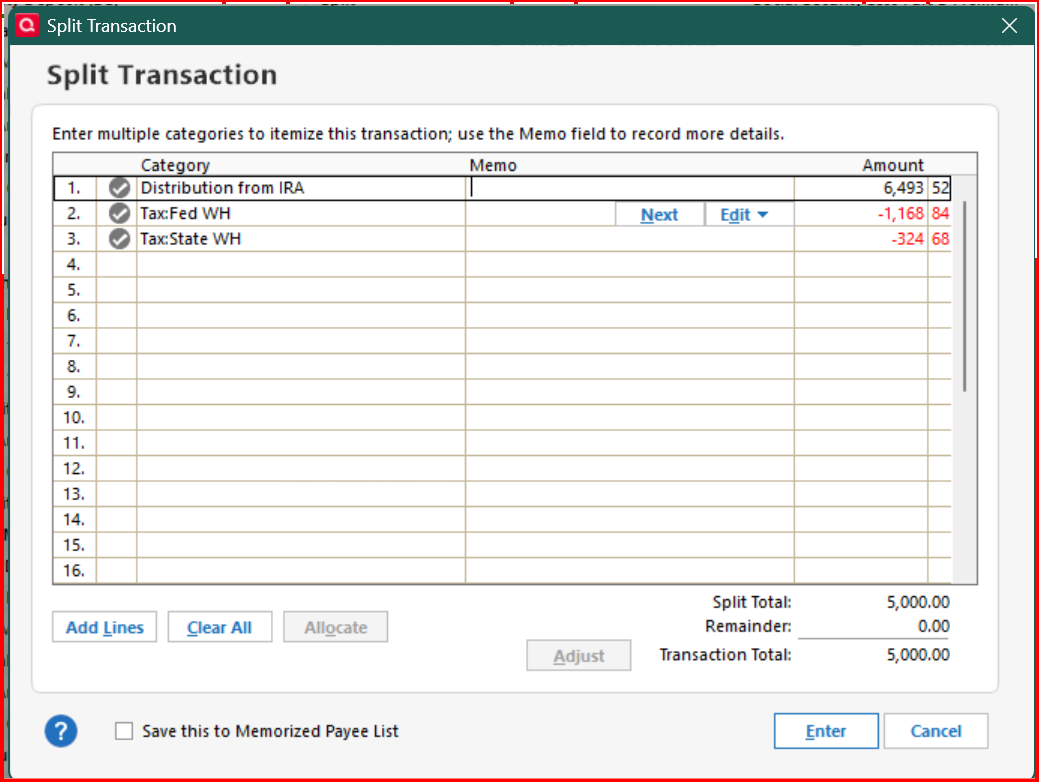
    Here is what the splits should look like -

    Jim's Method -

    image.png

    My Method -

    image.png

    The difference is the first split line. For Jim's method, the first line is a transfer from the IRA, which means you will need to delete the transactions that were downloaded from JPM for the distribution in the IRA.

    In my method, you don't need to delete the transactions downloaded to the IRA.

    What ever method you use it is important to use a category that has the appropriate tax category attached to it.

    image.png

    For my method, you would also need to set up an IRA Distribution category with the appropriate tax category assigned -

    image.png
  • Don32@
    Don32@ Member ✭✭✭

    Both of you are using the gross amount. All of my tax withholding are done by JPM. JPM transfers to me the net proceeds. I see what you both are doing, but I am still not following along on how you get the funds into the deposit side without effecting the brokerage account.

  • @Don32@ In Jim's method, the first line of split transaction is the transfer from the JPM IRA to the CU Savings account.

    In my method there is no transfer, just offsetting entries in each account.

    Bottom line, the only reason why it's done this way, for either method, it to have the distribution show properly in the tax planner.

    The transactions in the JPM IRA do not show in the tax planner because it is a not a taxable account. In order to show the tax related transactions in the tax planner, the transactions need to be done in a taxable account (CU Saving account).

  • Jim_Harman
    Jim_Harman Quicken Windows Subscription SuperUser ✭✭✭✭✭

    I agree with @CaliQkn's explanation. The two methods are equivalent.

    With my method, the IRA ends up with one WithdrawX transaction which transfers the gross amount to the taxable account. This replaces the 3 downloaded Withdraw transactions, which add up to the same amount. Quicken knows the correct tax treatment for the transfer from the IRA's Tax Schedule setting for transfers from the IRA.

    With @CaliQkn's method, you keep the downloaded Withdraw transactions in the IRA and give them a Category like "IRA Distribution," with no Tax line item. In the taxable account, the line in the split Deposit for the gross amount gets a Category that has the correct tax line item for the gross distribution. Because they are separate transactions rather than a transfer, you must make sure the total amounts are the same on both sides.

    It comes down to which set of transactions makes the distribution clearer to you.

    By the way, there is an active Idea post requesting that Quicken make it easier to record IRA distributions. It has 214 votes and has been in the Planned state for two years now. Hopefully we will see an improvement some day.

    QWin Premier subscription
  • Don32@
    Don32@ Member ✭✭✭

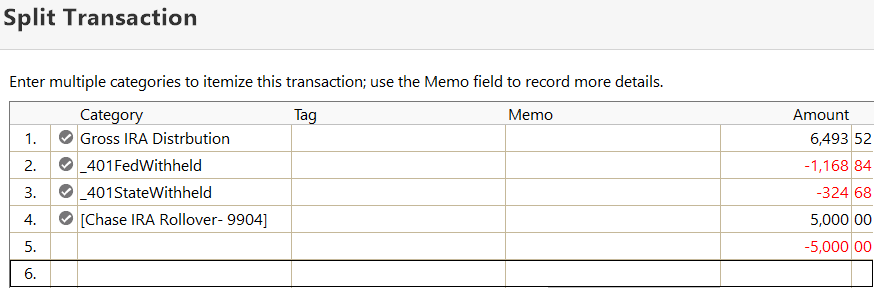
    Guys, You have been a major help for me on a number of issues. This one I am still missing something. In my JPM Account stocks are sold to give me a gross Cash Amount. The Federal and State Taxes are withheld by JPM. This give me a Net Cash Amount that is transferred into my WPCU Account. If I am following, I need to add a line for the Gross (line 1), Fed(Line 2), State(Line 3), leaving the net that was transferred from the brogage account (Line 4). THis give me a -5,000 balance (Line 5). What am I missing here?

    Net Amount.png Adjustments.png
This discussion has been closed.