No longer able to reconcile share balance in a brokerage account?

nhttip
nhttip Quicken Windows Subscription Member ✭✭
edited September 2 in Investing (Windows)

Has this been recently removed? The reconcile shown just does it for all transactions, there was a separate menu choice for recon on the shares balance (it still does this automatically after a download, but I can't do it manually now).
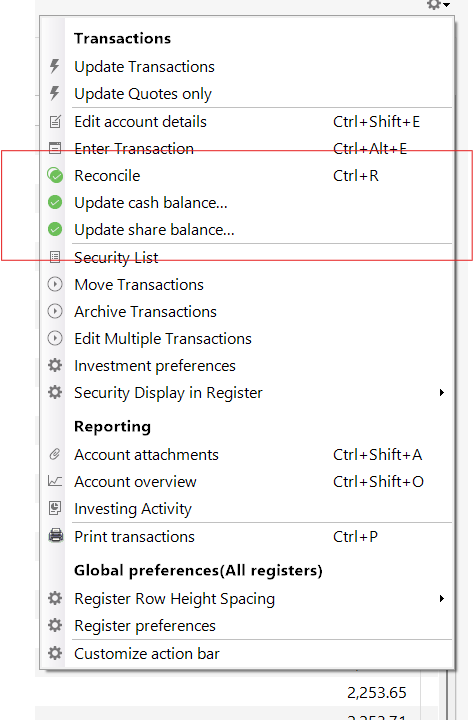
image.png

EDIT: This is a Merrill Lynch Brokerage account, maybe the recent connection change did something to this?


Comments

  • Quicken Kristina
    Quicken Kristina Quicken Windows Subscription Moderator mod

    Hello @nhttip,

    Thank you for letting us know that you're no longer seeing an option to reconcile shares with Merrill Lynch. Due to the nature of this issue, it is recommended that you contact Quicken Support directly for further assistance as they can walk you through troubleshooting steps in real-time and escalate the situation as needed.  The Quicken Support phone number can be found through this link here. Phone support is available from 5:00 am PT to 5:00 pm PT, Monday through Friday.

    I apologize that I could not be of more assistance! 

    Quicken Kristina

    Make sure to sign up for the email digest to see a round up of your top posts.

  • jimshu1
    jimshu1 Quicken Windows Subscription Member ✭✭✭✭

    Not sure if I should post in this thread or start a new one? I have three Fidelity accounts that I use Quicken to update. I have for years. Two of the accounts now show a position "removed", but the dollar balances are correct. The same position exists in Quicken in the 3rd account and is still there. On Fidelity, all three accounts show the position.

    Guess I'll see tomorrow if this gets straightened out.

    Quicken Deluxe for Windows 11 Pro. Latest subscription version. I've been a user for decades.

    - Jim S.

  • Quicken Kristina
    Quicken Kristina Quicken Windows Subscription Moderator mod

    Hello @jimshu1,

    Thank you for letting us know you're seeing this issue. If it persists tomorrow, I recommend that you start a new discussion providing the details of the issue. Based on the information you have provided so far, the issue you are seeing is different from the issue the original poster in this thread is encountering. For information on starting a new discussion, see the post linked below:

    I hope this helps!

    Quicken Kristina

    Make sure to sign up for the email digest to see a round up of your top posts.

This discussion has been closed.