Abundant Attachments

westmorelandplayers
westmorelandplayers Quicken Windows Subscription Member ✭✭

Quicken Classic Deluxe - Windows 11 Enterprise

version R63.21

I drag a single attachment (PDF) from my file folder to an entry in the register. I then create another entry and drag an attachment (PDF). When I return to an earlier register entry that has an attachment, I'm seeing ALL THE ATTACHMENTS for that session. I end up having to delete the ones that are unrelated to that entry.

Another error is the opposite. If I make a change to a prior entry (reassign category, add a tag, etc), oftentimes the attachment disappears.

I'm very frustrated.

Comments

  • Quicken Jasmine
    Quicken Jasmine Quicken Mac Subscription Alumni ✭✭✭✭

    Hello @westmorelandplayers,

    Thanks for bringing this issue to our attention!

    A few questions that might help us get to the bottom of it:

    1. Are you using cloud sync (Quicken Mobile or Web)? If so, do you notice this issue happening more after syncing, or is cloud sync turned off?
    2. Do you have "show attachments in line" turned on in the register? Sometimes this setting can affect how attachment thumbnails are rendered—though it shouldn’t affect where they’re saved.
    3. Is this happening across multiple accounts or just within one account’s register?
    4. When you add attachments, do you do it only by dragging them in, or have you also tried the paperclip icon > “Add Attachment” method? Curious if both methods behave the same.
    5. Have you run a Validate & Repair on your file recently? If so, did it show any warnings or corruption messages related to attachments?

    Looking forward to your response!

    -Quicken Jasmine

    Make sure to sign up for the email digest to see a round-up of your top posts.

  • westmorelandplayers
    westmorelandplayers Quicken Windows Subscription Member ✭✭

    A few answers that might help you get to the bottom of it: 😉

    1. Are you using cloud sync (Quicken Mobile or Web)? It is turned off.
    2. Do you have "show attachments in line" turned on in the register? I don't know what nor where this is. My columns are: Date, Check#, Payee, Memo, Category, Tag, Attachment, Payment, Clear, Deposit, and Balance.
    3. Is this happening across multiple accounts or just within one account’s register?I’ve only noticed it in one register. To be fair, I don’t use it very much in the other registers.
    4. When you add attachments, do you do it only by dragging them in, or have you also tried the paperclip icon > “Add Attachment” method? I've done it both ways. I am pretty sure that it's only happening when I drag.
    5. Have you run a Validate & Repair on your file recently? Nope. Should I?
  • Ducksoup_SD
    Ducksoup_SD Quicken Windows Subscription Member ✭✭✭✭

    Ten years ago, I gave up on Quicken (Windows) attachments and just started keeping all of them in a folder, with a shortcut on my desktop. It keeps your Quicken file smaller, so all of it's file operations (loading, backing up, verifying, etc) are faster. You can create subfolders for each company or category with any organization you like (and subfolders in them, any organization you find useful - receipts, statements, warranties, company docs, etc), and any recent attachments won't disappear if Quicken crashes before a backup. When I stopped attaching to Quicken, my file size was reduced by over 80%, so all processing was faster. My take: save time, get rid of the frustration, and just keep the files in a separate folder. It may take a little longer to find the attachment you need for the rare correspondence, but that's a small fraction of the time you use to manage and input attachments in Quicken instead of your own folders.

  • Quicken Kristina
    Quicken Kristina Quicken Windows Subscription Moderator mod

    Thank you for your reply,

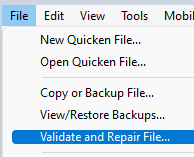
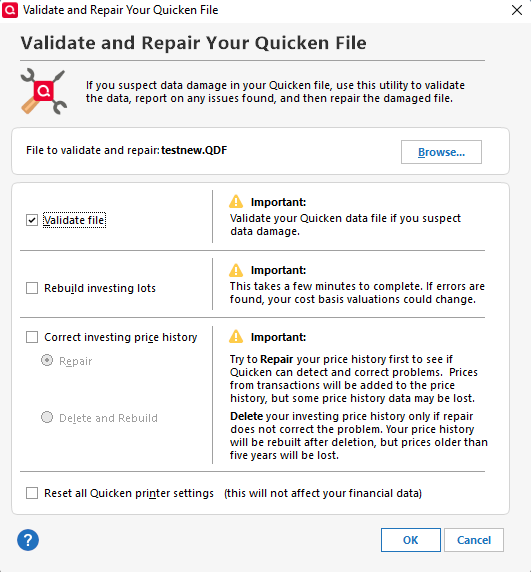
    Since I'm not able to replicate the issue you describe, I recommend validating your file to check for file-specific issues. Please save a backup file prior to performing these steps. 

    1. File
    2. Validate and Repair File... Screenshot 2025-08-08 at 5.05.53 PM.png
    3. Validate File Screenshot 2025-08-08 at 5.06.51 PM.png
    4. Click OK
    5. Close the Data Log
    6. Close Quicken (leave it closed for at least 5 secs)
    7. Reopen Quicken and see if the issue persists.

    Please let me know how it goes!

    Quicken Kristina

    Make sure to sign up for the email digest to see a round up of your top posts.

This discussion has been closed.