Graphs again ... (Q Mac)
Lots of people asking for graphs. Yeah I know there are "canned" graphs on the dashboard but they are not really modifiable at all. If I create a report on the 20 different insurances I need to spend $ on here in south FL - the report is great and for the most part I'm a "tables guy" as well, but every once in a while as many have observed, a graph is really nice since it quickly "tells a story." (As others have observed - to show a family member. Or in this case a governor!) I've seen "on the roadmap" going all the way back to 2023. Any chance we can bump this up in priority? In looking through the release notes, I mean colors and emojis on tabs and categories is nice and fun and all, but I think most would agree that spending dev hours and sprint cycles on that as opposed to being able to create a report and hit a graph button to visually represent your data — is far more important to the average quicken user than a classic "nice to have" like colored tags. People who gravitate towards that stuff are probably in mint and lighter weight tools anyway. C'mon, get graphs out of the backlog! 😎🙏

Comments
-
@lindycorp It's a fine thought, but I'll just let you know that posting your wishes for development priorities here isn't likely to be ready by the developers or product management.
The Quicken Mac development ream is pretty small — a couple designers, a handful of programmers — and some of them are specialists on features like database queries, reports, user interface, etc. So some features that get delivered, at times, are not necessarily the absolute top priorities but things which mesh with the availability of certain members of the development team with specific skills/areas of specialty.
Beyond that, the issue is that if you asked 100 Quicken Mac users what their top priorities are, you'd likely get at least 25 different answers. 😂 The developers do use various tools to try to assess what users are most interested in: periodic survey questions, feedback from beta testers, data from their customer service team, etc. — but the list of requested features is pretty extensive. My observation over the years has been that they more often work on things which can't be done at all more often than things which enhance existing functionality.
Quicken Mac Subscription • Quicken user since 19930 -
I get it. But to be real, right now if I have a report and want to turn it into a graph … I "can't do it at all." And as others have pointed out it's a pretty basic feature that in fact is in the Win-Doze version. As such, it's a product gap. Maybe I'm just screaming into the void but … 🤷♂️
0 -
But to be real, right now if I have a report and want to turn it into a graph … I "can't do it at all."
You can export the selected data and create a graph in a spreadsheet program. Obviously that’s not as nice as having the functionality built into Quicken Mac… but is is doable.
it's a pretty basic feature that in fact is in the Win-Doze version. As such, it's a product gap.
What’s “pretty basic” or not is pretty hard for us as users to assess. You might want one particular graph, and a simple solution might suit you — but many people are looking for many different types of graphs of various data. So designing and building a solution which satisfies many users is likely not a simple as you may think it is.
As for “it’s in Windows”, I could point to dozens of feature requests seeking equivalence with the Windows counterpart. Adding graphs to Quicken Mac is marked as “Planned” by the Mac development team, so this appears to be on their roadmap for development— just not as high on the list as you’d like it.
Maybe I'm just screaming into the void but … 🤷♂️
No problem with screaming into the void; I was just trying to give you a realistic set of expectations so you’re not constantly frustrated by lack of action or response. 😀
Quicken Mac Subscription • Quicken user since 19930 -
» I was just trying to give you a realistic set of expectations so you’re not constantly frustrated by lack of action or response. 😀 »
I appreciate that … and I won't be frustrated or surprised I realize they'll do it when they think it makes the most sense. From a product management perspective (a big part of my background) I just want to call out that is an obvious product gap, and the average user of Quicken really expects/wants it to be there.
0 -
Given I'm now paying $76 annually to support Quicken Classic for Mac, I expect features like this to show up sooner rather than years later.
0 -
Given I'm now paying $76 annually to support Quicken Classic for Mac, I expect features like this to show up sooner rather than years later.
@Will Fiveash If you asked 1,000 Quicken Mac users what their top 3 priorities would be for Quicken Mac, you'd likely end up with a list of 75 to 100 features across those users. And the wishlist would be even bigger if you expand to the entire Quicken Mac user base of hundreds of thousands of users. The problem is that we all don't agree on a small common list of key features which are missing; we collectively want a huge list of features. And the Quicken Mac development team is small and can crank out only a small number of significant updates per year.
If you haven't seen the post, the Quicken Mac product manager is inviting users to set up a call with her to hear your pain points and most pressing wishes. If you're willing to spend a little time on a Zoom call, you can make your case to the key person in charge!
Quicken Mac Subscription • Quicken user since 19931 -
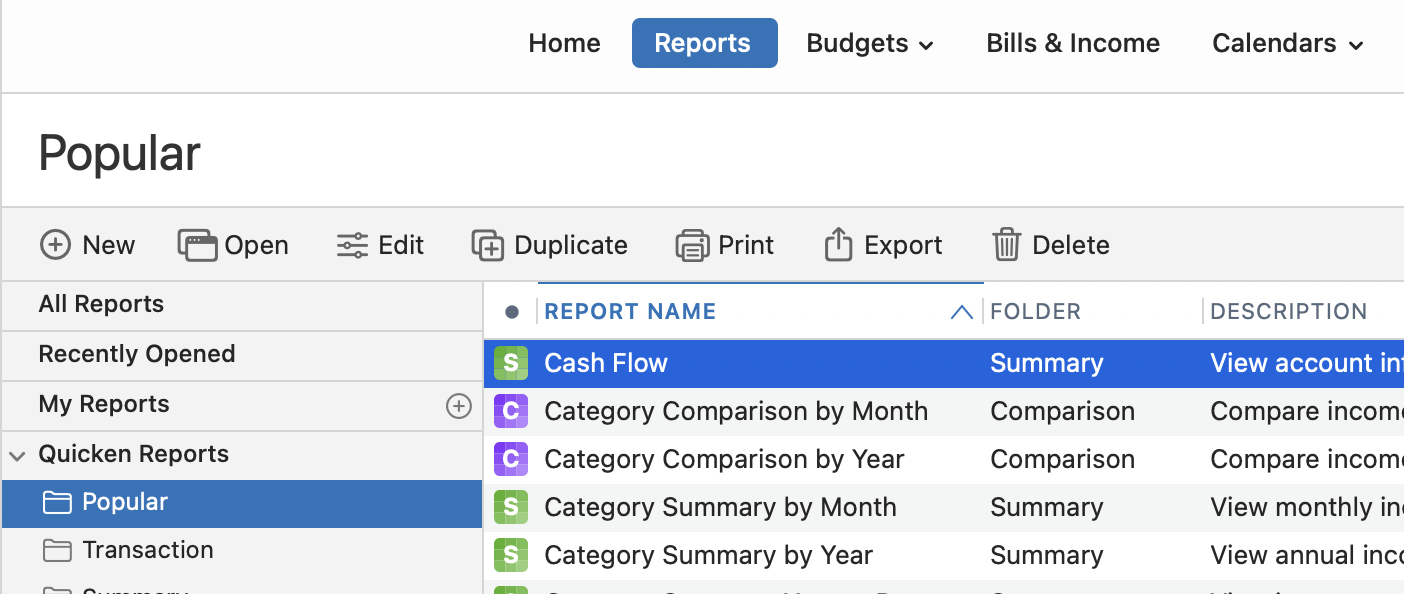
I came here after being frustrated with not being able to generate graphs, period. I'm using Mac Quicken Classic Deluxe, and there's nothing in the menus for creating reports in Graph format. I have "Reports" and that's it, and it only creates spreadsheet formatted results. I've reviewed the Quicken tutorial and looked around online. It seems to be an option only made for Windows? What am I missing?? This is a screenshot of what I see: "Reports" and not "Reports & Graphs", and there aren't any sub-menu options.
0 -
There are no graphs you can create like a custom report, so you’re not missing finding anything. There are graphs in various places in the program, like the Home and Investing Dashboards, the Portfolio screen, the Bills & Income screen, the Watchlist. But there is no capability to define your own graphs.
The developers have indicated more graphs are planned for the future. In the meantime, you can exports a custom report as a CSV file, open it in Excel or Numbers, and generate a graph.
Quicken Mac Subscription • Quicken user since 19931 -
Speaking from very recent experience, creating a meaningful graph in Apple Numbers is non-trivial. While I'm a much more experienced computer user than the average person (software engineer at IBM, Sun and Oracle 1990-2017), I am a novice at using Numbers, especially the charting features. In my recent attempt to chart expenses by year in a bar graph I found it easiest to modify the Quicken exported .cvs file with a text editor to remove certain lines and remove the minus signs on the numeric values. Certainly not straightforward. Personally, I look forward to Quicken for Mac providing useful charts in reports for this reason.
1 -
I agree wholeheartedly. I'm also not a Numbers user, and that's because it's very limited and fussy. Any exported Quicken CSV requires deleting not just rows and columns of 'header' data but also the inserted and useless formatting symbols that prevent immediate graph translation. These are the blank spaces and hyphens automatically put in front of sub-categories - why?? These create problems for processing the data in CSV/XLSX files for any user. You need to do not just deletions, but also "Find and Replace", which are tedious steps. It's this type of end-user extra work that demonstrates how Quicken has a very limited interest in, and apparently has never botherered to, consider exported file uses and Mac-centric customers.
1 -
Reading your reply, it occurs to me that the Quicken for Mac devs could modify the way the CSV is produced so it is more compatible with Numbers charting. This could be another export option so the original csv export would not have to change and this could be done faster than having to implement charts/graphs into Quicken reports. While I do want to see Quicken natively provide charts, I'd be happy if the devs could make export csv more usable in the near term.
0 -
@Will Fiveash @Lorelei P. In case you might find this helpful… I was a longtime Excel user, and when I stopped having access to my work license of Excel after retiring, I found myself a bit lost trying to get oriented to Numbers. Then I discovered LibreOffice — an open source, free application which offers very faithful renditions of the Microsoft Office suite, including Excel, Word, Powerpoint and more. It is a single click to download, a click to install, and then just a little time getting oriented to the LibreOffice equivalents (Calc, Writer, and Impress). It's not a 100% equivalent to the MS apps, but close enough that I can do any spreadsheet work I need to pretty easily. Did I mention it is free? 😉 And actively developed and updated. I have been very happy using LibreOffice as my replacement to Microsoft Office, in lieu of retraining my brain to use the free Apple Numbers, Pages and Keynote.
Quicken Mac Subscription • Quicken user since 19930 -
I got an idea. Why not just introduce basic graphing functionality in the app? And honestly, the offer to set up a "zoom call" lol seems mostly like a troll. Your link jacobs did not work and honestly, why a zoom call when the request from the community is basically crystal clear. (Definition of wasted time is a "meeting that could have been an email.") Yes, not everyone agrees on exactly what they want. So friggin' what - give them line charts and bar graphs and like I said, 75% including I'm guessing those on this thread will be perfectly satisfied. Enough with the theatrics. Time to deliver Quicken.
1
Categories
- All Categories
- 56 Product Ideas
- 36 Announcements
- 223 Alerts, Online Banking & Known Product Issues
- 22 Product Alerts
- 701 Welcome to the Community!
- 671 Before you Buy
- 1.2K Product Ideas
- 53.7K Quicken Classic for Windows
- 16.3K Quicken Classic for Mac
- 1K Quicken Mobile
- 813 Quicken on the Web
- 111 Quicken LifeHub