Update UI and use AI for benchmarking

Jeff76
Jeff76 Quicken Windows Subscription Member ✭✭✭✭
edited August 10 in Display/UI

I took a tour this weekend of [Removed - 3rd Party Software], which the young folks use and its UI is fresh and has awesome Sankey diagrams which I and others have been suggesting to Quicken for years.

Quicken is much more AI robust and has a lot more reports and capabilities. With over 2 million users Quicken could use AI to do benchmarking on spending and assist more with investment goals and portfolio rebalancing for it users. It should also think about updating its UI and dashboards.

5
5 votes

Reviewed · Last Updated

Comments

  • Jon
    Jon Quicken Mac Subscription SuperUser, Mac Beta Beta

    What is "IA"?

  • jtemplin
    jtemplin Member ✭✭✭✭
    edited August 10

    I don't think this is going to get much traction because 1) you've bundled two very large asks into a single suggestion, and 2) both of them are very broad. What kinds of spending benchmarks are you asking for? What specific improvements do you want to see in the UI and on the dashboards?

    You will get more attention if you provide specific use cases for what you want. Generalities aren't actionable by developers.

  • jtemplin
    jtemplin Member ✭✭✭✭
    edited August 10

    I'm also at a loss to understand what the big deal is about Sankey diagrams. What does it show you that a pie chart with drill-down capability won't? ELI5.

  • Jon
    Jon Quicken Mac Subscription SuperUser, Mac Beta Beta

    @jtemplin I don't get it either. They're pretty to look at but I don't see anything useful in them.

  • Jeff76
    Jeff76 Quicken Windows Subscription Member ✭✭✭✭
    edited August 10

    Oops, thanks @Jon, I switch acronyms in my head all the time, I would have never made it in the military.

    As for Sankey charts, they tell a very powerful story in one screen shot, where and how much something is coming in and where and how much something is going out in a glance. One Sankey chart tells more than four pie charts combined.

    As for @jtemplin other comments, I agree I was a pretty general. With AI benchmarking, you could for example compare how your spend in certain areas compares to others, assuming one would find that information helpful and you and others are willing to share that information on an aggregate level. Lastly, I suspect a good developer would have some ideas how to freshen up a UI/dashboard to give it a cleaner look.

  • Chris_QPW
    Chris_QPW Quicken Windows Subscription Member ✭✭✭✭

    Sankey diagrams have been suggesting in the past I don't think they have ever gotten more than a couple of votes.

    which the young folks use and its UI is fresh

    And that is the way it is always going to stay. First off, any new software has the advantage that it new and as such they can use the GUI APIs/standards that are available at the time. Quicken doesn't have such a luxury. It is a 40+ year old program that has gone through many different GUI APIs over the years, and it shows it. Many parts of Quicken have different generations of GUI APIs. Here is the double edge sword of a program with a lot of features and not a really large company to back it up, when a new GUI API standard comes out, they can't rewrite the whole program in that new API.

    What makes it even more of a pain is that "new isn't always better" or even "agreement", which is partly due to the GUI API itself and the time the developers have to make tweaks. For instance, Quicken Inc has replaced a lot of the old forms that have columns. But they went from where the customer could change the size of the column, to auto sizing. Auto sizing doesn't work in all cases, but having to size everything is a pain, and even more the developers have to have a system for remembering the sizes of all those columns (something that Quicken has lacked in a lot of places for long time).

    For as long as I can remember people have been asking for Quicken to be "modernized", and after every time it has been done, I see more complaints than complements. The Quicken user customer base absolutely doesn't agree on what is "modern", and that even goes for the general Windows community. If everyone agreed on that then every time Microsoft released a new version of Windows (or Apple for that matter) everyone would be praising how is so much more improved from the last version. That doesn't happen.

    Quicken is much more AI robust 

    The only thing that might be "sort of AI" in Quicken is its guessing at categories, which frankly isn't all that good. For someone starting out it might be a good starting point, but quickly people should be switching to renaming rules and memorized payees, which aren't AI.

    Given the state of AI, the most likely skill level of developers at Quicken Inc in the area of AI, and the general "it doesn't fit" into the Quicken code I would vote against any AI being put into Quicken if I had a vote on it. I can't think of anything that would make Quicken worse than that.

    It should also think about updating its UI and dashboards.

    Sounds good until you get into the real world, where there are restrictions on the time that a small company like Quicken Inc can spend on any given project.

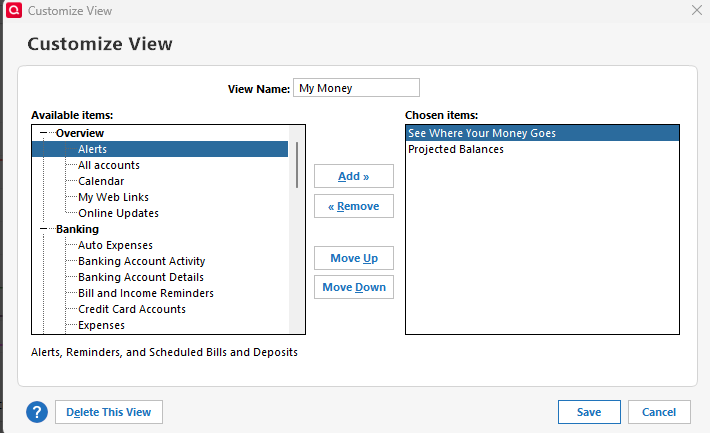
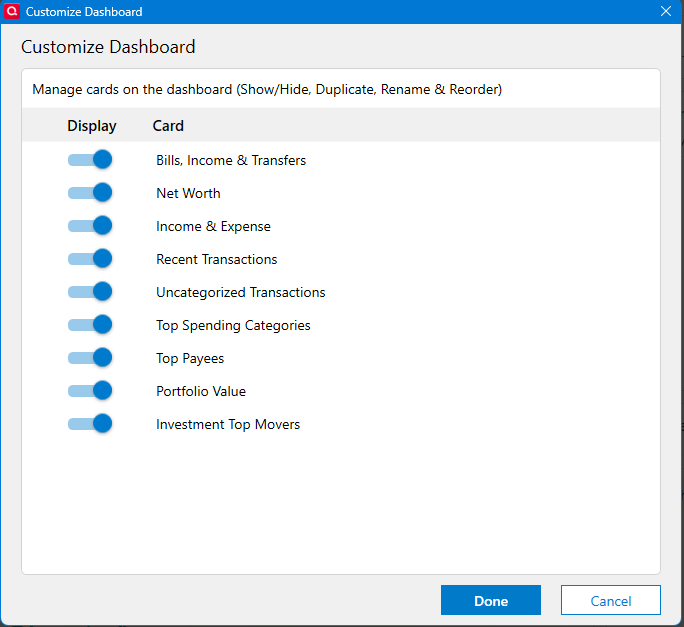
    Want an example "dashboards".

    "Old Classic":

    image.png

    Look how many choices you have.

    Now the "modernized" version:

    image.png

    And as a software developer I can tell you that they don't work to "Make Quicken modern". No more than "Quicken is broken, fix it" kind of statements. No more than a statement like "Get some stuff at the grocery store" would be for the average person.

    Signature:
    This is my website (ImportQIF is free to use):

    http://www.quicknperlwiz.com/

  • Jeff76
    Jeff76 Quicken Windows Subscription Member ✭✭✭✭

    Hmm, thanks @Chris_QPW very insightful to hear a software developer's perspective. My only counter, is the Model T experience…..Quicken is a great product, I recommend it all the time to co-workers, friends, and family…but it needs to always be looking for ways to advance their product and attract younger users.

  • Chris_QPW
    Chris_QPW Quicken Windows Subscription Member ✭✭✭✭

    I agree, but I think that Quicken Inc has a different plan for the younger users, Simplifi(mobile/web) and Quicken Business & Personal (note that is on is mobile/web only, not "Classic").

    Signature:
    This is my website (ImportQIF is free to use):

    http://www.quicknperlwiz.com/

  • Phil Burton
    Phil Burton Quicken Windows Subscription Member, Windows Beta Beta

    In past years, I have written letters to the Quicken CEO suggesting specific UI improvements based on my own experience Here are some of them:

    Expandable Windows - It is awkward to review a long list of items in a window that can’t be expanded either horizontally or vertically to show more of the total list, as in this window.

    Delete Reports folder even if it contains reports. - Right now it's necessary to delete all the contents first

    Save new or revised report into same folder with one mouse click

    Add reconciliation report for credit cards. - RIght now I have to use the report for checking or savings account.

    Want single view of payees - Right now Quicken has separate list and menu items for adding memorized payees, setting payment amounts and frequency, setting address. It is confusing to find the window to make a particular change.

    Managing payees - It is difficult to delete a payee whose initial letter is not one of the first in the alphabet, because it is necessary to scroll down many pages for payees whose name starts with a letter towards the end of alphabet.

    Use a collapsible list, one for each letter or a small group of letters of the alphabet.

    Can’t insert/delete lines for address when writing checks - When I need to change the address, I can’t simply insert/delete a line to the existing address. If I need to insert a line, I am forced to delete all the remaining lines below the line I wish to enter.

    Some additional items.

    Correct "Is this the next scheduled payment for (account).

    Copy/past multiple address lines in one operation - Classify investment advisor funds as investments, even if I don't need to track individual securities. Having to classify such funds as "banking" distorts some asset reports.

    Allow mass delete of entries in Securities list - Now each security must be deleted one at a time.

    On step operation to remove all the entries in all accounts for a selected range of dates

    Been using Quicken (and TurboTax) since DOS days in 1990s. Now using Quicken subscription on Windows.

  • Chris_QPW
    Chris_QPW Quicken Windows Subscription Member ✭✭✭✭

    @Phil Burton You will probably get better traction working with the system. Throwing out a lot of ideas in a thread that isn't really related to your ideas isn't really going to do anything.

    I will note that I know that some of these are already ideas that can be voted on (at the same time I note that this forum makes it hard to find these ideas to vote on).

    Signature:
    This is my website (ImportQIF is free to use):

    http://www.quicknperlwiz.com/

  • Phil Burton
    Phil Burton Quicken Windows Subscription Member, Windows Beta Beta

    @Chris_QPW

    I have tried to work within the system. I have sent two letters to Quicken management, each about 5-6 pages long. including screen shots, a problem statement and the desired outcome. I wasn't tried to "design featrues." That's what engineers and UI designers do. Once I had an hour long call with the CEO, and then followups with a product manager. I was focusing on the UI. No real results. So I am a bit jaded, nay, cynical, now about Quicken software development.

    Reading Eric Dunn's recent letter, it seems to be that Quicken Classic is being "harvested" to fund the development of other products, while not reinvesting enough into Classic.

    To be clear, I don't read this website on a daily basis, partly becaue of the cumbersome way to gain access. "Looks like you are new here." Huuuuh. I have been a Quicken customer for over 30 years now.

    Been using Quicken (and TurboTax) since DOS days in 1990s. Now using Quicken subscription on Windows.

  • Chris_QPW
    Chris_QPW Quicken Windows Subscription Member ✭✭✭✭

    No, I don't think you are jaded, and I certainly understand the frustration. And even though I wouldn't really call it "harvesting to fund other projects" I would more call it "Where to you think the future for Quicken Inc is? Desktop applications? It is pretty clear to me, that Quicken Inc doesn't believe that. So, yes they are going to be putting more and more resources into that instead of Quicken Classic. Note that when they changed to name to Classic, I and others pointed out that usually means (this is the old product that we will work to replace).

    In a nutshell, I made the suggestion not because I have a high confidence that it would work, more that I have a high confidence that random posts of lots of suggestions in one post are guaranteed to fail.

    I have been surprised though that they have put in some changes lately that have been requested for many years. So, it isn't "impossible".

    BTW in a few cases I consider some of your suggestions as "This shouldn't be needed to be suggested". As in good GUI design should have told them for instance that people need multiple select for a lot of these things and resizing of anything other than a basic one off dialog should be resizable windows. And another is if you have "columns" the user should be able to control their sizing and the program should remember what the user set. In someways their "modern updates" have gone backwards in functionality.

    Signature:
    This is my website (ImportQIF is free to use):

    http://www.quicknperlwiz.com/