Messed Up File - How to Fix/Save

ThePeck
ThePeck Quicken Windows Subscription Member ✭✭

I love Quicken but have had no amount of problems. First it was having the file on a Google Drive/OneDrive folder. Backups would sync incorrectly. So I kept having to discard and rebuild it. The register won't refresh and will have massive duplicate transactions if I'm doing a big renaming and categorizing. I'll close and reopen and balances are all over the place.

I want to delete everything and just start fresh but keeping my bills and accounts setup. I suppose I could just delete all transactions and do a sync.

I'm kinda frustrated because I don't know what I'm doing wrong. To fix huge errors in amounts going back a couple years I just have to find a point where it might have screwed up and add a reconciled amount to bring my balance in-line with the true balance.

Is having too many syncing accounts cause problems?

I can be great for weeks, maybe months, correctly checking the transactions, everything matches. Then at some point transactions change. Could be months or years back it seems. Without trying to go back and pull old account reports, which I probably don't have or hard to get. I just choose to manually change an amount.

Answers

  • RalphC
    RalphC Quicken Windows Subscription Member ✭✭✭✭

    Too many accounts to sync is not an issue, but do you have Mobile & Web enabled?

  • Jim_Harman
    Jim_Harman Quicken Windows Subscription SuperUser ✭✭✭✭✭

    To expand on @RalphC s comment, if you do not use Quicken on the Web or the mobile apps, you should leave the Sync setting at Edit > Preferences > Mobile and Web turned off (slider to the left.)

    Also some of the problems you describe may be caused by Quicken changing your accounts' opening balances. It does this by modifying the Opening Balance transaction, usually the first transaction in the account's register. This sometimes occurs when you disconnect and reconnect or reauthorize online accounts. To help recover from this, I record the correct opening balance in the Memo field of that transaction.

    QWin Premier subscription
  • ThePeck
    ThePeck Quicken Windows Subscription Member ✭✭

    @RalphC & @Jim_Harman

    I do have mobile Sync turned on. I only use it for taking pictures of receipts to attach to transactions that have already been entered in Quicken. That did cause a problem once, with my file. I assume I scanned to many recipts and when I went back to my Desktop to Sync it, it just hung. I let it run overnight, but it still didn't finish so I had to force it closed. And each time I tried to reopen it, it would get hung up again. I finally had to delete the Mobile/Web files and redo it.

    Is this a known issue with Quicken of changing the opening balances? And also id there a known issue with modbile/web sync? Actually the phone app is quite horrible. It will sometimes get hung up when trying to save with the picture/attachment and have to force it closed also.

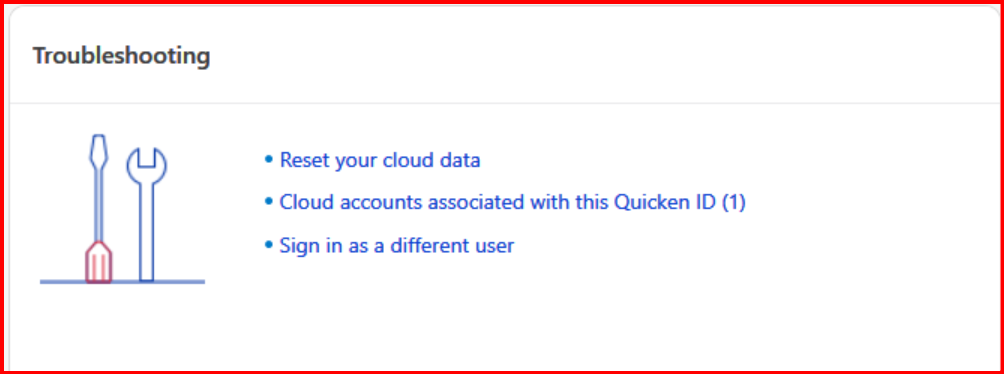
  • @ThePeck if you have sync turned on and use it, have you tried these troubleshooting options?

    image.png

    Click on the Mobile & Web Tab to get to these options.

    Here are more details on these troubleshooting steps -

    https://info.quicken.com/win/reset-all-my-data-on-the-quicken-cloud

    https://info.quicken.com/win/how-do-i-sign-in-as-a-different-user

    With the second option "Cloud accounts…" you can delete old unused cloud files (but not the current one in use).

  • ThePeck
    ThePeck Quicken Windows Subscription Member ✭✭

    @CaliQkn Yes, I used the Reset I think when the Desktop Program was hanging up when trying to Sync, or I deleted them. It was awhile ago so I'm speculating on what I did. Would this be causing the balances changing or the duplicate transactions showing up?

  • [Deleted User]
    edited August 11

    @ThePeck possibly, but usually syncing issues cause transactions to be deleted or disappear from the desktop account register, rather than duplicate transactions.

    Some of the balance issues could be what @Jim_Harman described with opening balances. Otherwise, your balancing issues could be the result of duplicate transactions.

    You don't need to have sync turned on to scan receipts or use attachments. They are saved locally to your data file. Turning sync on allows you to view your attachments on your mobile devices or web. If you do not view attachments on your mobile devices or web, I would recommend turning sync off.

  • Jim_Harman
    Jim_Harman Quicken Windows Subscription SuperUser ✭✭✭✭✭

    To answer your questions, yes both syncing and changes to opening balances are longstanding and widely reported issues.

    QWin Premier subscription
  • ThePeck
    ThePeck Quicken Windows Subscription Member ✭✭

    Fix When? lol I seem to remember before Quicken was a service, and it was just a program, it seemed more stable. Since it's now subscription-based, I've been let down by it.

  • ThePeck
    ThePeck Quicken Windows Subscription Member ✭✭

    Really? I thought I had to have it sync. I'll look into it. I might just turn it off and look into a Neat Scanner, I had one before.

  • @ThePeck turn sync off and try scanning a receipt. I think it will still work.

  • Jim_Harman
    Jim_Harman Quicken Windows Subscription SuperUser ✭✭✭✭✭

    That would be scanning the receipt with your PC, not taking a picture with your phone.

    QWin Premier subscription
  • @ThePeck sorry I didn't realize you were taking pictures of the receipts rather than scanning them. Sorry about that. For taking pictures with your phone, you would need to have sync turned on.

  • chip.gilbert
    chip.gilbert Quicken Mac Subscription Member ✭✭✭

    @ThePeck do you have the data file local now? If using it in Google drive that is a problem, or are you mentioning it that you did stop that as the first issue?

This discussion has been closed.