Quicken enters wrong "last paid" transactions
I have three policies with the same insurance company, each with different payment schedules.
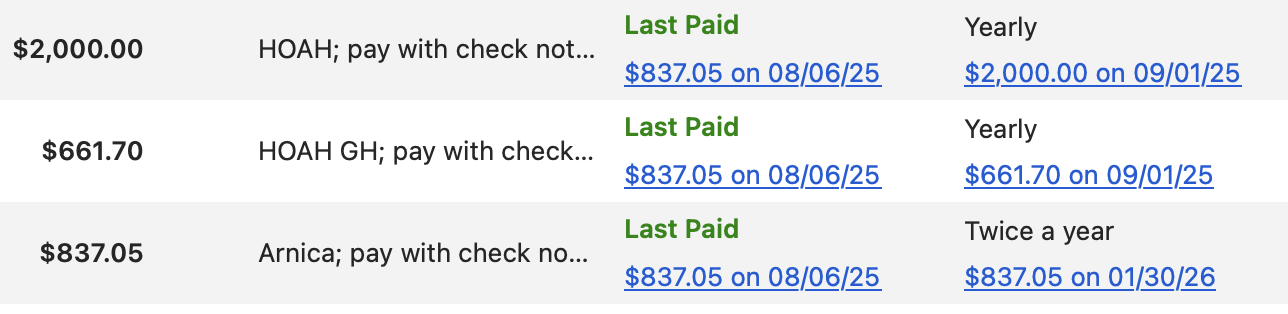
I want to have three separate bills listed in Bills & Income. But each time I try to add a bill for one of the policies, Quicken automatically enters the transaction (in Last Paid) from a different policy. As the screenshot shows, I paid $837 on one policy, but the other two policies both show the same $837 as Last Paid. All three bills link to the same transaction when they should link to three different transactions.
Is there a way to tell Quicken to link to the correct transaction here?
Thanks
Answers
-
Can you change the payees so they have distinct names? If you're connecting these bills to bill pay that probably isn't an option but that works for me with my 3 Citibank cards.
0 -
Yes, thanks. That works. I don't use billpay, so… I guess I'm glad of that.
0 -
It sounds like the choice of Quicken Mac to make the Payee name linked to all the transactions with that name has some "interesting" ramifications at this level.
Signature:
This is my website (ImportQIF is free to use):0 -
Windows version doesn't do that? You're right, it causes confusion if I'm not paying attention. And it seems like something Quicken could easily fix. I spend too much time correcting their auto-entered "last paid" amounts.
0 -
I'm afraid that if I'm correct about the cause, then it would be extremely hard to fix. It is right down to the database level. It was a design choice the developers made way back when they rewrote Quicken Mac starting in 2007.
Take the category field as an example. In the database there is record that has information like the name, and such. In every transaction they have a link back to this field. This is true of both Quicken Mac and Quicken Windows. The result is say I have a category like "Food" and I want to change it to "Dining". I can change it in one place (the category list) and it now is changed for all transactions that used "Food", because it is just a pointer back to that one category record.
Now contrast that with the payee field. In Quicken Windows there is a payee field in every transaction (no pointer back to a central payee record). So, there isn't a central "payee record"/list. You can't go to one place and change the payee name and have it change in all the transactions. What you have to do instead is a find and replace on all the transactions.
In Quicken Mac they decided to make the Payee field just like the Category field. And that is the reason it behaves like that.
Signature:
This is my website (ImportQIF is free to use):0
Categories
- All Categories
- 56 Product Ideas
- 36 Announcements
- 225 Alerts, Online Banking & Known Product Issues
- 22 Product Alerts
- 703 Welcome to the Community!
- 671 Before you Buy
- 1.2K Product Ideas
- 53.7K Quicken Classic for Windows
- 16.3K Quicken Classic for Mac
- 1K Quicken Mobile
- 812 Quicken on the Web
- 111 Quicken LifeHub


