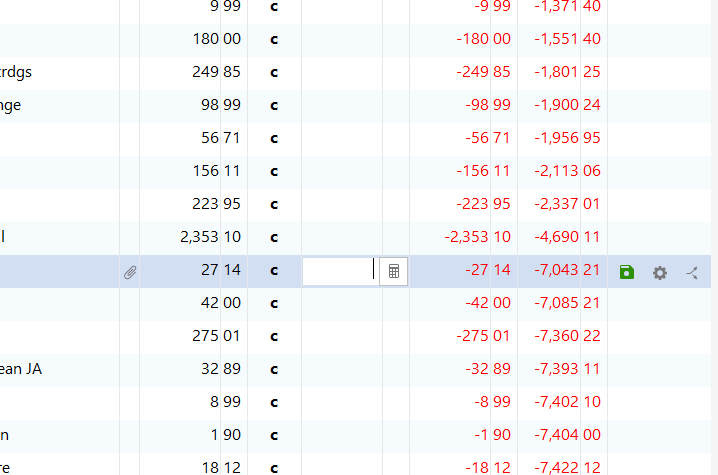
The balance column on my Quicken financial software can't add!!!
A charge of $27.14 adds $3,400 to the balance due. What's the point of having a financial bookkeeper?
Have you tried to delete, and then re-input that transaction?
Since the other calcs seem to be correct, I suspect that something's wrong with the 1 transaction.
Also, have you tried taking a backup and then Validating your Q data file?
It looks to me as if your account register is not correctly sorted by Date in ascending order, with newest transactions at the bottom. Quickly checking some of the numbers, the math seems to work correctly when going from bottom to top.
Filtered register? Unexpected register sort order? "Missing" data? Unusual Running Balance? Did an unexpected mouse click mess up your register? Could it be that your account register in Quicken is
Filtered register? Check the filter settings (on top of the register). Is the register filtered in any way to only show selected transactions? If so, click the Reset button to reset the filters. To show all transactions in the register, the Filter settings should be: "All Dates", "Any Type", "All Transactions".
Date Range filter selection excludes the dates you're interested in? Check the Date Range filter to see if it prevents you from seeing the dates you're interested in. For example, a Date Range = "This Year" won't show you last year's transactions
Only Search results shown? Is there any text in the Search box at the top of the account register? If there is text and a (red) X, click the X to reset the register from showing only search results back to normal mode.
Unexpected Register sort order? Is the register sorted in any way other than by ascending Date? Look at the register's column header ... which column header is highlighted and/or has the little black triangle?
About Register sort order: For best results, your account register should be sorted by Date in ascending order. Click a register column header to effect a different sort order by the clicked column. Click the same column header again to toggle between ascending and descending sort order. A small triangle next to the column header indicates the sort order: "▲" pointing up for ascending or "▼" pointing down for descending sort order. For more Register Sorting Options, click the Account Actions gear icon then click Sorting Options. Review and work with the available sorting options to see what they do.
New transactions appear to go missing right after you save them? For example, you are entering a number of back-dated transactions and they appear to disappear ... they're most likely above the currently shown transactions page in the register and you have to scroll up to see them. To keep them on the screen, Sorting Option "By Order Entered" will help keep these transactions on the bottom of the register, next to the new transaction entry line. Just don't forget to re-sort the register by Date when you're done.
Unusual Running Balance? If your credit card register shows
P.S.:
Are you using Register Column Amount together with Charge and Payment Columns? Does your account register show the Amount column together with Charge and Payment (or Payment and Deposit) columns? Is your register looking a little crowded with all these columns? Depending on your personal preference you should use • either the traditional pair of Charge and Payment columns together • or the newer Amount column alone (where you have to enter negative amounts with a Minus sign and positive amounts with a plus sign)but you really don't need all three of them. Please decide which columns to use and remove the other one(s) from the view. Q Windows: To add / delete columns in your register click the Register Columns gear icon located next to the Balance column header. Q Mac: there's a Columns button at the bottom right of the register view