Automatically enter transactions in register ahead of due date- Quicken Mac

Brucej76
Brucej76 Quicken Mac Subscription Member

I am a long time user of Quicken 2017, and recently switched to the new version of Quicken for Mac. Took me a while to find the automatically enter option for bills and income. When setting up a new payee, click the "I will deposit myself option" and change to "before scheduled date". I set this to 45 days, so I can see upcoming bills and incomes. Unfortunately it looks like I need to do this manually for each bill, as Quicken does not automatically do this.


Comments

  • jacobs
    jacobs Quicken Mac Subscription SuperUser, Mac Beta Beta

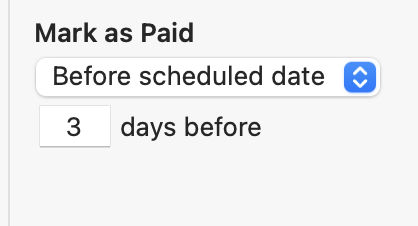
    Are you saying that Quicken is failing to mark your schedule bill transactions as paid according to what you specified in the details of the scheduled transaction. In other words, if you set a transaction to be automatically paid 3 days in advance, are you saying it just doesn't happen?

    Screenshot 2025-08-16 at 9.35.31 AM.png

    I'm also curious why you are setting up your scheduled transactions to be marked paid/deposited 45 days in advance so you can see them. In each register, you can set how far in advance it will display scheduled transactions (using the little clock icon dropdown in the upper right of the register). Most users would set this to show 30 or 60 days, so you would see scheduled transactions, in gray, that far into the future, without marking them paid/deposited. Then, you could (a) manually mark them paid, (b) have Quicken automatically mark them paid a few days in advance, or (c) wait until you download transactions and Quicken matches them to the scheduled transaction.

    Quicken Mac Subscription • Quicken user since 1993
This discussion has been closed.