Transfers to same account still happening automatically with downloaded transactions
There have been numerous conversations on this topic, all closed as far as I can tell, But I am still having this problem as reported by others in the past
I am on Windows 11, R63.21 of Quicken Classic Deluxe
My main checking accounts and a few of the credit cards are with Chase
- My memorized payee list has no account names as a category
- Transfer detection is set to "Scan downloaded transactions for possible transfers", and "Confirm possible transfers before entering in register
- Downloaded transaction settings:
- Automatically add to banking registers is checked
- Automatically categorize transactions is checked (what would I do without this?)
- Automatically apply Quicken's suggested name to payee is checked
- Use my existing renaming rules is checked
- Automatically create rules when I rename payees is UNCHECKED (this was checked for a long time, creating erroneous transfer categories.
4. Data entry and quickfill - All Quickfill and memorized payees options are unchecked
I am trying to get my system under control, but it is not clear how to fix these things. The best process I have found is to
- Change the category in the main checking account to the correct account name. This creates a matching transaction in the other account, say my carecredit card account

Becomes

Go to the other account, the carecredit account, and note the new transaction added with the red pencil;

I tried clicking on the red pencil, and click on "match to a downloaded transaction (can't do a screen print , sorry) to do a manual match:
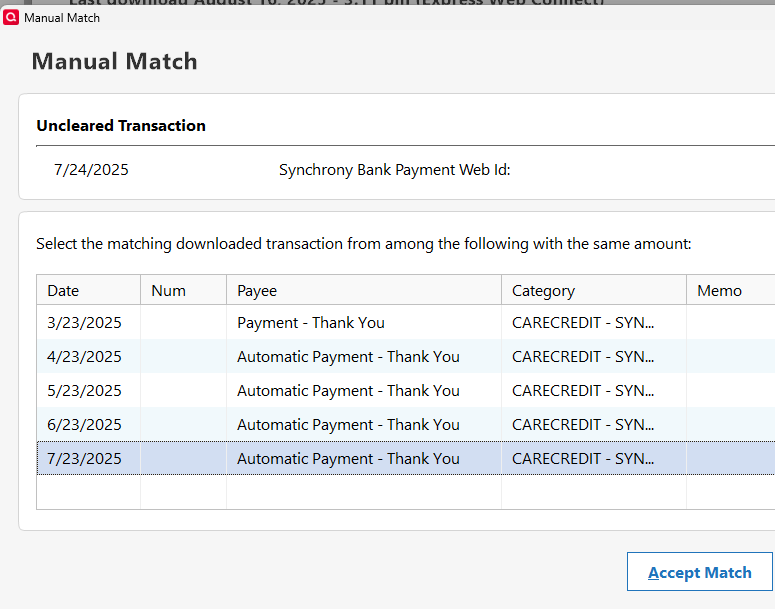
choose the payment, and accept match. The original payment is deleted, but it's erroneous category is still kept, so oops, can't use this. I will just delete the old transaction and clear the newly created transacion
I have over 500 payment transactions to credit cards or transfers to bank accounts when the category is the same as the register's account name. This seems to be Quicken's default process when it cannot create a match. Turning on "confirm possible transfers" helps, as it at least keeps wrong classifications down (those happen too). This used to work better years ago (2022)
This checking account is way out of balance, and I don't know if this is causing the problem
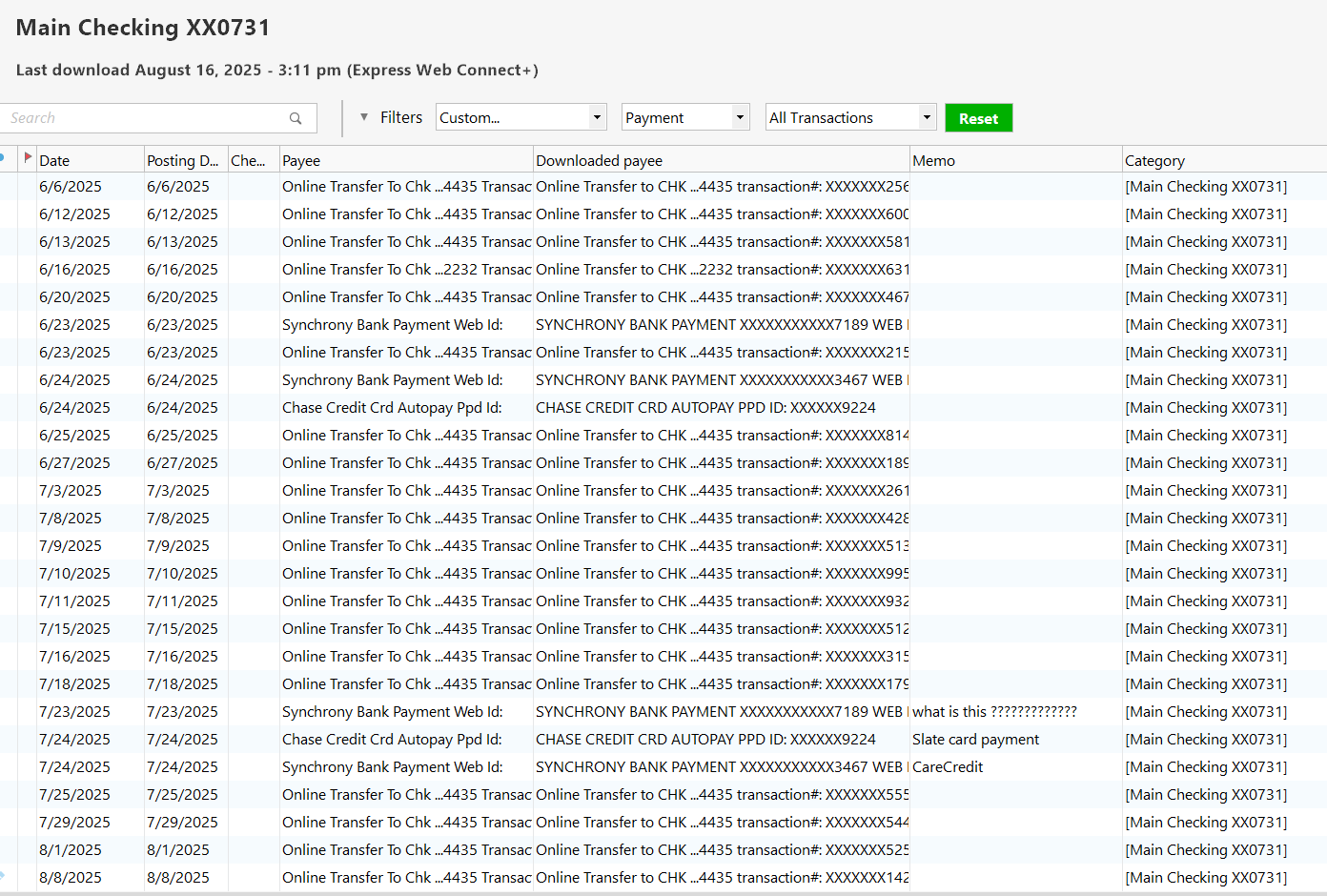
and this is just one account

Comments
-
Can Quicken be fixed to do this better? Any advice on how to deal with the en mass?
0 -
Since I've never used the practice of allowing Quicken to try and "do my accounting for me" I don't think I can be too helpful beyond addressing your en masse question. In your checking Account go up to the "Search" box and type in the Payee name for one of the transfers you've shown. That should produce a register window that shows only that one Payee. At that point you can use the Windows convention for selecting all of the transactions shown, right click on the selection and then select "Edit Transaction(s)." That will allow you to edit the Category to the correct Account in your file.
I have had over the years perhaps a couple of instances where I've seen what you're describing, i.e. a Transfer between Accounts showing up as two different different entries in each Account - the "from" Account and the "to" Account - where each transaction has as its Category that Account's Name, and I have no idea why that occurred.
I'm only guessing here but my guess is that "Scan downloaded transactions for possible transfers" feature only can scan "today's" transfers. That is if it "sees" two dollar amounts in the same amount in two different Accounts "today" then it might figure that's a transfer and enter it as such. But if the actual real-world transfer happens on different days, as is typical of credit card payments (depending on the mechanics of the real-world transaction either the credit card or the bank will show the payment first) then it won't make the connection between the two entries and might just opt to record each entry as a "self-referencing transfer" using the Account's name as the Category.
But even if Quicken does that I'd still expect that your Accounts overall would show the correct amounts, possibly with a day or two lag, so I don't know why you'd say that your Account is way out of balance, unless you're referring to a bunch of timing differences; you do show an awful lot of transfers so those timing differences could get large.
0 -
Yes, I must dig deeper to find the out of balance problem.
I cannot find a good way of matching a single transaction without deleting at least one downloaded transaction, and the data it came with.
0 -
In an attempt to help quicken match, I am changing a lot of automatic payments to include pennies in the amount, as a "thumb print" to help the matching process
1 -
I'm just seeing this thread now, so I'm going to start from the top.
First off, yes, I believe that they introduce a bug Quicken some time ago that is causing this problem. Before it would never assign the category as the balance adjustment to the current account. That smacks of a similar problem to the changing of the Online Balance (both are adjustments to the register).
On trying to use the manual match feature to fix it, you can't do it the way you are trying.
Trying to figure out the easiest way to fix the transactions, I think maybe this might be the best.
Which account you want to do it in is up to you, maybe of one has a memo you want to preserve you start there.
You do just what you did and change the category from the current account to the one it should be in. Then you will have to delete the old one in the other account. Note that whenever you enter a "transfer category" into a register that creates a new transaction in the other register that is linked to the first one. This is why you will have to delete the now duplicate downloaded transaction in the other register.
I think the main reason you can't use manual matching is because it isn't the same as "transfer matching".
Transfer matching is Quicken looking at two downloaded transactions in two different registers that have the same amount, but with opposite signs and guessing that they might be a transfer. If that is approved, then what it does is link the two together. This only happens during the download processing. Manual match on the other hand is for matching a downloaded transaction with a manually entered (or one entered by reminder).
Back to the original problem.
Are you entering one side of the transfers into Quicken to match or trying to just let Quicken guess?
Because yes, it is just a guess and if this the same amount every time it is going to lead to problems. Primarily Quicken is using the amount for the guess. Your idea of using different amounts should help though.
Note I haven't seen this problem is a while. Part of that might be that I was able to change my process given the new memorized payee features recently introduced.
Just like the "SuperUser suggestion" you will see on here whenever the subject comes up about transfers, which states that the best way is to manually enter the transfer into Quicken before the download, so that Quicken can match to that, instead of doing a transfer detection guess, I'm now able to use memorized payees to accomplish the same thing.
What one wants is that in the first account to get the downloaded transaction, have that one "categorized" as a transfer to the other account. (Note this might not work reliably if the transfers are downloaded at the same time, I'm doing it with credit card payments that hit the credit card account first and a day or two later hit the checking account, and I download daily)
The new memorized payee features let me state what account to use a memorized payee in. This is important because the checking account and the credit card are from Chase and the payees are the same. I only want this to kick in, for the credit card account, and then the checking account will just match the transaction/transfer that is created by the downloaded transaction in the credit card account and the memorized payee.
With all this said, if you have a lot of transfers and don't have something like a payee that you can lock into, then the two best ways to handle the problem would probably either be entry the transaction manually before downloading of the transactions OR turn off "Automatically add to banking registers".
With this mode your transactions will appear in a Downloaded Transactions tab at the bottom of the register.
You will need to go through the transactions one at a time entering them into the register. When you get to a transfer the category you will want to give it will be the [Other Account]. When you do the same thing in the "Other Account" you should find that you now have a Match to that new transfer transaction that would be created from the Accepting in the transaction with the [Other Account] "category".
Signature:
This is my website (ImportQIF is free to use):0
Categories
- All Categories
- 56 Product Ideas
- 36 Announcements
- 225 Alerts, Online Banking & Known Product Issues
- 22 Product Alerts
- 702 Welcome to the Community!
- 671 Before you Buy
- 1.2K Product Ideas
- 53.7K Quicken Classic for Windows
- 16.3K Quicken Classic for Mac
- 1K Quicken Mobile
- 812 Quicken on the Web
- 111 Quicken LifeHub


