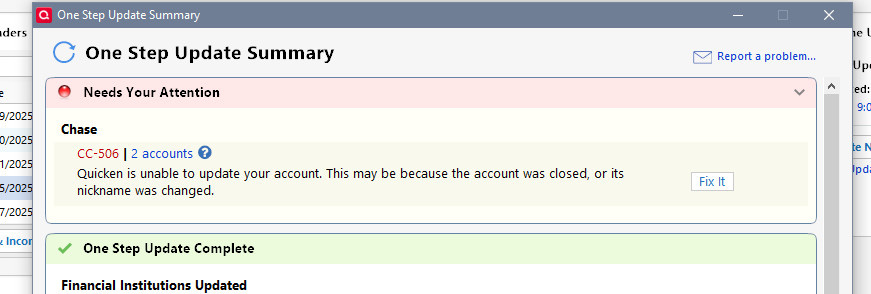
Chase CC-506 (QWIN)
Chase CC accounts are throwing CC-506 errors in Windows today. On e of the interesting things about running both Quicken and Mac is seeing how they handle things differently. No such error in my Mac Quicken installation, same accounts. Nothing changed on my end.
Now Q Windows has NOT asked or automatically updated to the newest version where Online Billers likely will change, so that is not the issue.
Anyone else?
I have had many CC502 and 503 errors before. I do not recall 506. Shall I wait it out or….?

Comments
-
I'm seeing 506 errors on two different Chase user IDs, both of which have multiple credit card accounts. I got it on a one step update of all my accounts, then replicated it when attempting to update transactions on the individual Chase accounts.
0 -
Thanks. Same for me.
Odd that Quicken Mac does not show this. So must be a Q Win issue and not our accounts. Or, of course, how Chase reports to Q win.
0 -
Hello All,
Thank you for taking the time to report this issue!
Could you please provide a screenshot of what you are seeing? If needed, please refer to this Community FAQ for instructions on how to attach a screenshot. Alternatively, you can also drag and drop screenshots to your response if you are not given the option to add attachments.
We will be forwarding this issue to the proper channels to have this further investigated. However, we request that you please navigate to Help > Report a problem within your Quicken program and submit a problem report with log files and screenshots attached in order to contribute to the investigation.
It would also aid the investigation to include a sanitized file when submitting the problem report. A sanitized file is a data file that removes personally identifiable information so you can comfortably share this file with the Quicken team.
While you will not receive a response through this submission, these reports will help our teams in further investigating the issue. The more problem reports we receive, the better.
We apologize for any inconvenience in the meantime! Thank you.
(CBT-773)-Quicken Anja
Make sure to sign up for the email digest to see a round up of your top posts.0 -
@Quicken Anja Report sent
~Bob
0 -
Thank you @Bob., your files and screenshots have been attached to the ticket.
-Quicken Anja
Make sure to sign up for the email digest to see a round up of your top posts.0 -
All fixed….
0 -
Thanks for following up and letting us know!
-Quicken Anja
Make sure to sign up for the email digest to see a round up of your top posts.0 -
Got the errors, reset the accounts (One Checking and Two CC's) and all is good now.
0 -
Resetting did not quite work for me. One of my four Chase accounts (a checking account) was "not found." The three credit cards were.
I ended up deactivating and reactivating all four, and I seem to be back up and running for now.
0 -
@Richard Schreyer & @GermanBlueRam Thank you both for chiming in! Glad to hear it is working now.
-Quicken Anja
Make sure to sign up for the email digest to see a round up of your top posts.0
Categories
- All Categories
- 56 Product Ideas
- 36 Announcements
- 225 Alerts, Online Banking & Known Product Issues
- 22 Product Alerts
- 703 Welcome to the Community!
- 671 Before you Buy
- 1.2K Product Ideas
- 53.7K Quicken Classic for Windows
- 16.3K Quicken Classic for Mac
- 1K Quicken Mobile
- 812 Quicken on the Web
- 111 Quicken LifeHub