Principal Financial login failure

Daniel S
Daniel S Quicken Windows Subscription Member ✭✭

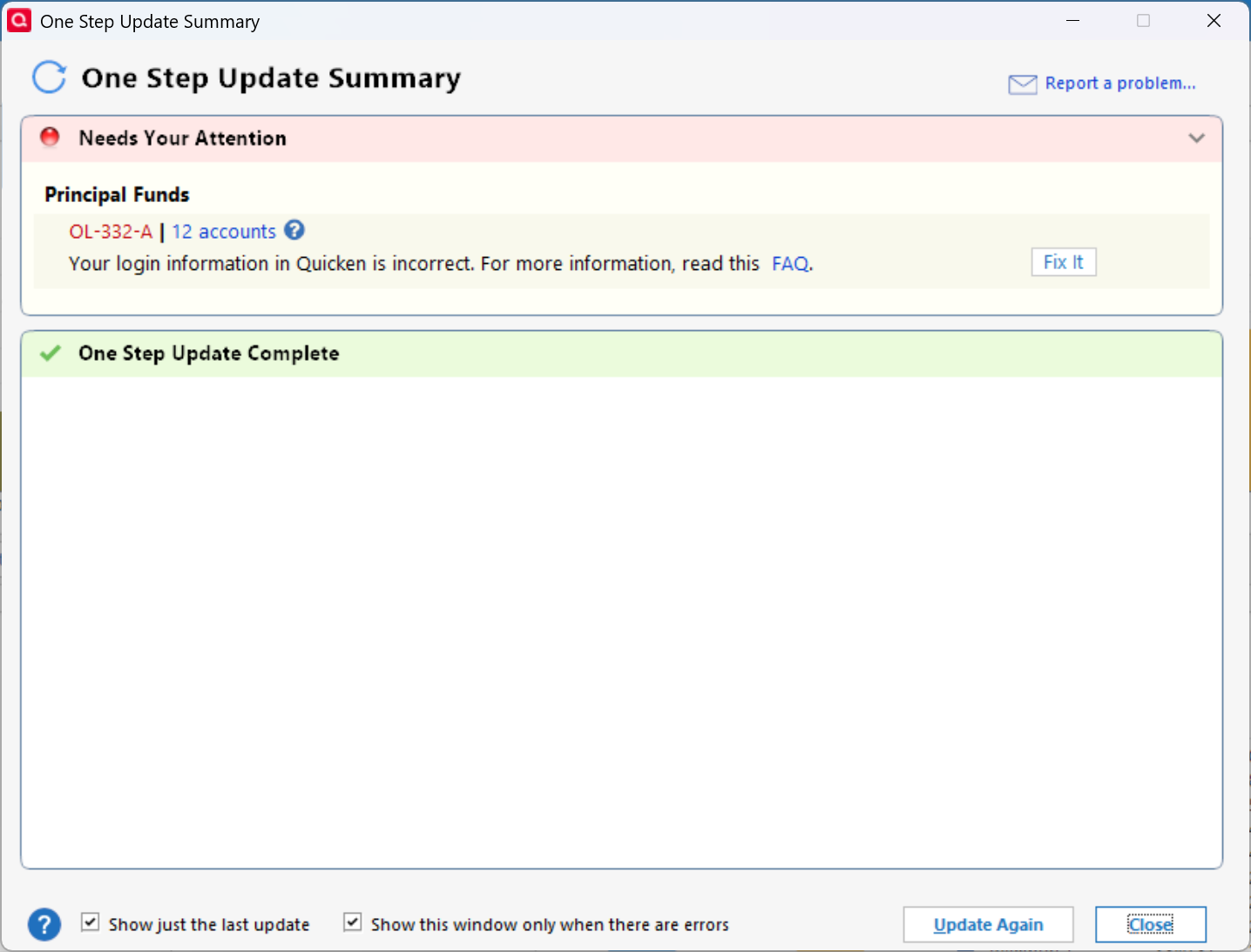
A couple of months ago Quicken started throwing invalid login errors for my 401K accounts with Principal Financial. The login credentials work fine on the Principal website so there's no issue there. Unfortunately this has been a recurring problem for a number of years with Quicken. Seems like something changes on the Principal end that Quicken can't keep up with. In the past the issue resolves itself after a few months, but frustrating nonetheless. Any resolution tips appreciated.


Comments

  • Quicken Anja
    Quicken Anja Moderator mod

    Hello @Daniel S,

    Thanks for reaching out—and I totally understand how frustrating that can be, especially when the credentials work fine on the Principal site.

    To better assist, could you please let me know the exact error code/message you're receiving in Quicken?
    If possible, a screenshot of the error would also be really helpful. If needed, please refer to this Community FAQ for instructions on how to attach a screenshot. Alternatively, you can also drag and drop screenshots to your response if you are not given the option to add attachments.

    Thank you!

    -Quicken Anja
    Make sure to sign up for the email digest to see a round up of your top posts.

  • Daniel S
    Daniel S Quicken Windows Subscription Member ✭✭

    Hi Anja. Here is the screenshot of the error code:

    image.png
  • Quicken Anja
    Quicken Anja Moderator mod

    @Daniel S Thank you for sharing the screenshot.

    The OL-332 error specifically points to an incorrect customer ID or password being entered in Quicken (even if the same credentials work on the financial institution’s website). This can sometimes happen because financial institutions have special requirements for Quicken credentials that differ from the normal website login (such as length, case sensitivity, or character restrictions). It can also occur if outdated credentials are stored in Quicken.

    Please review the steps in this support article for OL-332.

    The article will walk you through verifying your credentials, checking your Customer ID in Quicken, and making sure your Password Vault isn’t storing outdated information. If the issue persists even after those checks, the next step is to try logging in directly on Principal’s site. Sometimes doing so will prompt you to unlock your account or complete Multi-Factor Authorization before Quicken can connect again.

    If the error continues even after you’ve confirmed your credentials are correct, the best course of action is to reach out to your financial institution directly, as they’ll be able to check on any account-specific restrictions or resets that might be required. If possible, request to speak with a supervisor or Tier 2 agent, as they are often more familiar with Quicken and other third-party applications.

    Hope this helps!

    -Quicken Anja
    Make sure to sign up for the email digest to see a round up of your top posts.

This discussion has been closed.