This discussion was created from comments split from:
costco citi cc and quicken deluxe issues
.
8/25/25 - Still have a problem. Spent over an hour and a half with Quicken trying many different ways, none worked.
Hello @greg.ziolkowski,
Thank you for letting us know you're seeing an issue when attempting to connect with Citi. I can see that you contacted Quicken Support earlier today about this issue. Based on what was documented in the ticket, you're able to import via QFX, but when trying to connect via Express Web Connect+, you're getting roadblocked by an error message on Citi's website, before it even gives you a chance to login.
What web browser do you have set as your default browser (Chrome, FireFox, Edge, etc.)? Do you encounter the same error when using an alternate web browser?
Do you use a VPN? If you do, try turning it off while connecting your Citi account.
Do you use an anti-virus? If you do, which one do you use? Does it have a safe banking feature?
I can see that the agent recommended contacting Citi to determine if there was an issue on their end. Have you spoken with them? I tested in my Quicken and did not get that error when redirected to Citi's website, so if it was an issue on their end, then it may be resolved.
I look forward to your response!
Same problem here. It has been going on for weeks. I have submitted multiple "problem reports" to Quicken, but the same problem occurred once again today.
Hello @Jack Scripps,
Thank you for letting us know you're seeing the same issue. To help troubleshoot, I took a look at the problem reports you submitted, and can see in your description of the issue in those problem reports, you're getting the yellow error message saying there's a connection issue with Citi.
To clarify, what is the exact issue you're encountering? Are you getting the yellow error message, or are you trying to reconnect with Citi and getting roadblocked by error messages on Citi's website? The troubleshooting steps are different, depending on which issue you're encountering.
I look forward to your reply!
The Citi website works fine if I go direct. I do not get an error number on Quicken — only the yellow message saying that Quicken is working on a connection problem. Got the same message today.
There is no error number.
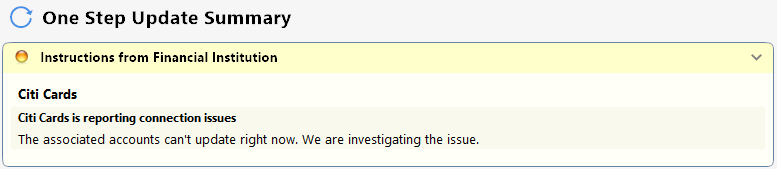
My yellow error message reads:
"Instructions from financial institution"
"Citi Cards"
"Citi Cards is reporting connection issues"
"The associated accounts can't update right now. We are investigating the issue."
My Quicken client tells me that is last downloaded today but was last reconciled on 9/04/2025.
Please note that my Citi account balance is $0.00.
Thank you for your replies,
The issue with the yellow error message has already been reported to our teams for further investigation and resolution. We do not have an ETA.
If you haven't already done so, please follow the troubleshooting from this earlier post in the discussion on the yellow error message issue:
Thank you!
(CTP-14158)
OK, I got the same yellow caution today, and no update. So, I closed the Quicken connection to this bank, and then reestablished the connection. I had no problem doing that. I then tried both one step update and a direct update from the account register page, and both resulted in the yellow message. No luck. All other accounts and financial institutions update just fine.
I am having same problem since the beginning of this month (September). Posting in this account worked smoothly since January of this year so problem is recent. Did "reset" account several times but problem not resolved. All other accounts are working fine. Seems to me like problem started after Quicken routine update several weeks ago.
Same problem here. I got the first yellow "citi cards is reporting connection issues"… "we are investigating" message within the last week, the second today.
ADDENDUM a few hours after first posting:
We have two citi card accounts. The Costco citi card is still downloading transactions. The other citi card, accessed under a different login because it belong to my spouse, must be the one triggering the error.
This is a known issue, which has already been reported and our teams are working to resolve. If you haven't already done so, I recommend following these troubleshooting steps:
📌 Note: The ProgramData folder is hidden by default. If you need help accessing it, Microsoft's support site has instructions on how to unhide folders.
The problem persists. Same yellow message this morning (9/14/25).
Thank you for the follow-up,
I'm sorry to hear the troubleshooting did not correct the issue. Our teams already know about the issue and are working to resolve it. We do not have an ETA.
I also use a Citi card, and have been downloading its data after a successful authorization at Citi.
Do you get an email message from Citi confirming the card authorization succeeded? If you don't get it, that suggests the problem is at Citi. If you do get the confirmation, then I'd think the problem lies with Quicken.
If you have a sort-of-large Quicken data file (mine is 135 MB), the operations Q performs after the Citi authorization, but before it all works OK in Q, can take several minutes to complete. If you bail out before it comes to a normal completion, the subsequent downloads will fail - as I learned the hard way.
Same issue here for the last 4 days. When is this going to get fixed?
It is 9/20/25 today, and the yellow Citicard download warning appeared once again. No fix yet.
Thank you for the update,
Our teams are still working on the issue.
The problem persists as of 9/24
And, the same problem continues on 10/9/25
Problem continues on 10/10
The post from Quicken Kristina 9/14/2025 took care of the issue for us.
Thanks!
Oddly I get the Citi yellow warning error nearly every morning (PST), then it will randomly successfully connect and download transactions every few days in the afternoons/evenings. This sporadic success/failure has been going on for at least 6-8 weeks.
Hello @Roger Kint,
Thank you for letting us know this issue is sometimes affecting your ability to download transactions. When this happens, do you see any additional error message/code, or just the yellow error message? Have you noticed any pattern to when it fails to download? If you have multiple accounts with Citi connected in Quicken, does this affect all of the accounts?
I'm failing to reconnect my Citi Personal Wealth Management investment account, too. I believe the problem is that Quicken's system fails to redirect from investments.citi.com to investments-citi.netxinvestor.com, the newer address hosted by netxinvestor.
If I enter investments.citi.com in my browser it does properly redirect to investments-citi.netxinvestor.com, the platform that hosts a number of other banks, including TDAI (aka TD Wealth), among others. If I attempt to create a new account for TD Wealth, it displays tdwealth.netxinvestor.com as the connection, which works. All attempts to create a new account associated with citi.netxinvestor.com (a number of "Citi" names in Quicken use that URL) consistently fail.
I believe if Quicken were to update the connection URL to investments-citi.netxinvestor.com, the problem would go away.
@Quicken Kristina This is the only message receive. I only have one Citi account that I'm updating. Above it has failed @ ~6:10AM PST. It worked yesterday afternoon.
Same problem today (10/15). No joy.
Thank you for your reply @Roger Kint,
Have you tried using a different connection option with Citi? One work around another user posted was to backup your Quicken, deactivate the problem account, then navigate to Tools>Add Account, select Costco Anywhere Visa Card by Citi, and follow the prompts. When you get to the Add/Link screen, make sure to carefully link the account to the correct nickname in Quicken
I hope this helps!
I tried deactivating and then reactivating, and that did not work. The same problem reoccurred this morning.
And the problem continues today, 10/29/25.