Quicken classic stopped showing all decimal places in my investment account

PCE
PCE Quicken Windows Subscription Member
edited September 27 in Investing (Windows)

I signed into my account to day and in the investment tab, all my accounts stopped showing decimals. Everything is rounded to the whole dollar.

I went into preferences and there aren't any options to turn on or turn off decimals.

I asked the AI help, and it kept telling to select report only perferences and select show decimals. But it couldn't understand that my Quciken does not offer that option

Answers

  • NotACPA
    NotACPA Quicken Windows Subscription SuperUser ✭✭✭✭✭
    edited August 25

    Have you tried taking a backup and then Validating your Q data file?

    Also, which Q product are you running and what BUILD of that product?

    Q user since February, 1990. DOS Version 4
    Now running Quicken Windows Subscription, Business & Personal
    Retired "Certified Information Systems Auditor" & Bank Audit VP

  • Jim_Harman
    Jim_Harman Quicken Windows Subscription SuperUser ✭✭✭✭✭

    Is this in the account registers, the Holdings view (Account Overview), the Portfolio views, or where?

    For the Portfolio views or the Holdings view, click on the gear at the top right and select Show cents in amounts.

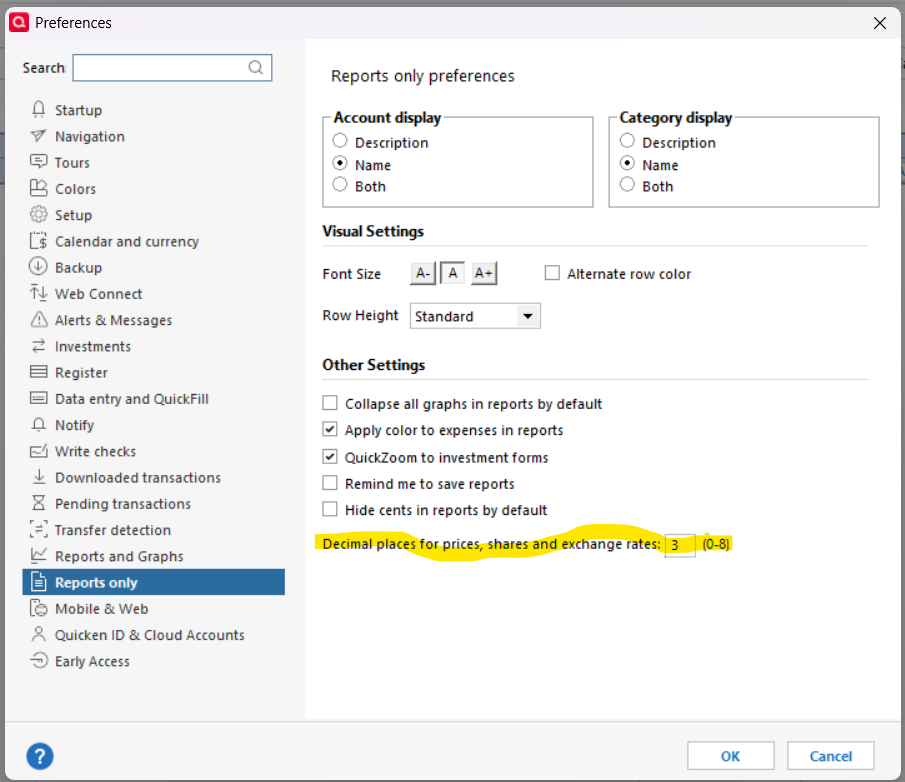
    For reports, go to Edit > Preferences and change this setting

    image.png
    QWin Premier subscription
  • mshiggins
    mshiggins Quicken Windows 2017 SuperUser ✭✭✭✭✭

    If you are referring to the Account Bar that is usually docked on the left hand side of the Quicken window, there is a preference to show/hide cents in the amounts. Right click in the Account Bar to see the list of preferences.

    Quicken user since Q1999. Currently using QW2017.
    Questions? Check out the Quicken Windows FAQ list

This discussion has been closed.