Saving Goal Question
I been using Saving Goals since DOS, but have a question. According to documentation I been using SG wrong. I create the SG goals and then the way I add or withdraw from the SG is via just using the register, do a transfer and either a payment or deposit with the category being the saving goal name. Always has worked fine for years. Does anyone else use SG entries directly on register??
I did know about using the Planning tool, just easier the way I do it.
Playing with the planning tool today I did notice that it has a pull down to ask where you would want to put a withdraw and it would only show accounts that had made a deposit to the SG. I thought that was cool, I always have to be careful and not transfer from account that didn't make a deposit to SG.. I have several SG and only deposit or withdraw from the one account per SG.
I thought the pull down from the planning tool would keep someone from withdrawing from account that didn't deposit. Put I tested that out and it will let you withdraw more from the SG than the account deposited. But it did only list accounts that did deposit.
Would be nice if Quicken kept track and didn't let you withdraw more than the account deposited. Just a thought, I will keep doing my old way, maybe that was the only way back in DOS days- don't remember. Or maybe Quicken should link an account to a SG and make it impossible to deposit or withdraw from non linked accounts. I use SG for jobs I bid on and budget for, so I use them a lot and doing withdraw and deposits from register is faster.
Best Answers
-
I have only used SG once and that was recently when I was setting up a funding plan for purchase of a new home. Like you, I found setting up the SG deposit transfer transactions in the funding accounts as an easy and, for me at least, a better method than entering them in the SG itself. By doing it this way I was able to see how much could be taken from each account before actually entering the transaction and without needing to leave the account register and go to the SG to do that.
Would be nice if Quicken kept track and didn't let you withdraw more than the account deposited. Just a thought, I will keep doing my old way, maybe that was the only way back in DOS days- don't remember. Or maybe Quicken should link an account to a SG and make it impossible to deposit or withdraw from non linked accounts.
I set up a couple of SGs in a test file using multiple funding accounts for each SG. With both SGs:
- I was able to withdraw and return funds only to the accounts that had originally been used to fund them.
- I was not able to withdraw/return more in funds to the funding accounts than had been originally funded from them.
- I tried doing the withdraws both from the withdraw button on the SGs views and from the register views of the SGs.
So, from this limited testing, what I'm seeing is that Quicken is tracking which accounts the funds are coming from and the funding amounts from each of them so withdrawals cannot be made to accounts that did not fund the SG and could not be made in amounts that exceed what had been been funded from them.
Maybe I'm misunderstanding what you are describing. Would you be able to describe in more detail what you are seeing or post a snapshot (blurring out or redacting any confidential information) of the SG register view? A picture can be worth a thousand words.
Also, which version of QWin are you using? (Help > About Quicken)
Quicken Classic Premier (US) Subscription: R65.15 on Windows 11 Home
0 -
I don't think you are doing anything 'wrong' in your approach. I have not used SGs frequently, but I do recall using your approach way back in the DOS or early Windows days of Quicken. I'd think at that time the register entry was likely the expected way to use the tool.
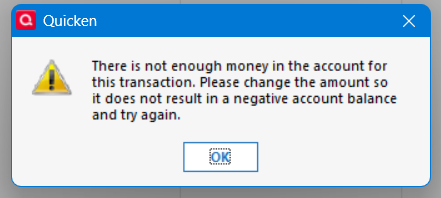
For some limited testing, I also set up two goals, and deposited to each from two different accounts (checking and investment, FWIW). I found if I 'withdrew' from the goal in the goal register, I could not 'send back' more to the Checking account than I had 'set aside' from the checking account. If I tried to do that, I'd get this type of message:
This is the type of limitation you seem to be seeking. In this case, I had $300 in the goal as $100 from the Checking and $200 from the Investment. I tried to return $150 to the Checking and got the message.
HOWEVER, if I created the transfer back to the checking account as an entry in the checking account, no such restriction got applied. As a Checking account entry, I could move $300 from the goal to the checking account even though the checking account had only contributed 100 of 300 toward the goal.
Hope this helps
1
Answers
-
I have only used SG once and that was recently when I was setting up a funding plan for purchase of a new home. Like you, I found setting up the SG deposit transfer transactions in the funding accounts as an easy and, for me at least, a better method than entering them in the SG itself. By doing it this way I was able to see how much could be taken from each account before actually entering the transaction and without needing to leave the account register and go to the SG to do that.
Would be nice if Quicken kept track and didn't let you withdraw more than the account deposited. Just a thought, I will keep doing my old way, maybe that was the only way back in DOS days- don't remember. Or maybe Quicken should link an account to a SG and make it impossible to deposit or withdraw from non linked accounts.
I set up a couple of SGs in a test file using multiple funding accounts for each SG. With both SGs:
- I was able to withdraw and return funds only to the accounts that had originally been used to fund them.
- I was not able to withdraw/return more in funds to the funding accounts than had been originally funded from them.
- I tried doing the withdraws both from the withdraw button on the SGs views and from the register views of the SGs.
So, from this limited testing, what I'm seeing is that Quicken is tracking which accounts the funds are coming from and the funding amounts from each of them so withdrawals cannot be made to accounts that did not fund the SG and could not be made in amounts that exceed what had been been funded from them.
Maybe I'm misunderstanding what you are describing. Would you be able to describe in more detail what you are seeing or post a snapshot (blurring out or redacting any confidential information) of the SG register view? A picture can be worth a thousand words.
Also, which version of QWin are you using? (Help > About Quicken)
Quicken Classic Premier (US) Subscription: R65.15 on Windows 11 Home
0 -
I don't think you are doing anything 'wrong' in your approach. I have not used SGs frequently, but I do recall using your approach way back in the DOS or early Windows days of Quicken. I'd think at that time the register entry was likely the expected way to use the tool.
For some limited testing, I also set up two goals, and deposited to each from two different accounts (checking and investment, FWIW). I found if I 'withdrew' from the goal in the goal register, I could not 'send back' more to the Checking account than I had 'set aside' from the checking account. If I tried to do that, I'd get this type of message:
This is the type of limitation you seem to be seeking. In this case, I had $300 in the goal as $100 from the Checking and $200 from the Investment. I tried to return $150 to the Checking and got the message.
HOWEVER, if I created the transfer back to the checking account as an entry in the checking account, no such restriction got applied. As a Checking account entry, I could move $300 from the goal to the checking account even though the checking account had only contributed 100 of 300 toward the goal.
Hope this helps
1 -
We seem to be talking about the same thing, but getting different results.
Example: via the check register account A has funded SG XXX and only account A has ever transferred funds to SG XXX. However via the check register I can Transfer (TXFR) funds from SG XXX to checking account B. Checking account B has never transferred funds to SG XXX. NOW if I used the planning tool (not a TXFR via check register) it won't let me transfer to account B as it is not in the pull down menu of the Planning Tool. Also, I did discover if using the Planning Tool I couldn't transfer more that I put in the SG from that account. Example: I moved $5.00 into SG XXX from account B, then tried to withdraw $7.00 back to account B and it wouldn't let me (via the planning tool menus). Gave me a message about not enough money, even though there was, just not enough was put in from account B (which was $5.00)
However, using the TRFX via the check register I could moved $5.00 into SG XXX from account B, then transfer $7.00 back to account B. I did not get the message about not funded enough like I did using Planning Tool.
It seems to me that Quicken wants me to using the Planning Tool Menu for all transfers, when I just use it to build the Saving Goals. It mush easier and then I can make comments using the check register and doing TXFR method and just make it a deposit or payment. That is the way I have always done it, maybe the Planning Tool wasn't available back in the DOS days and when it became available, I just didn't use it?
I hope this makes some sense, hard for me to put in words, mush less all this typing.
Should add I am on Release 63.21 Build 27.1.63.21
Added:
Yes Q_lurker I see the same thing, I just couldn't put in as few words as you. I just long winded and not good at explaining in writing.
Thanks everyone for the replies.
0 -
Actually I believe way back in DOS and early Windows, you used add account and Saving Goal was an option and only the check register was the way to add or withdraw from SG. The Planning Tool came along later.
0
Categories
- All Categories
- 56 Product Ideas
- 36 Announcements
- 224 Alerts, Online Banking & Known Product Issues
- 22 Product Alerts
- 702 Welcome to the Community!
- 671 Before you Buy
- 1.2K Product Ideas
- 53.7K Quicken Classic for Windows
- 16.3K Quicken Classic for Mac
- 1K Quicken Mobile
- 812 Quicken on the Web
- 111 Quicken LifeHub