Better Register Filters

heisescott
heisescott Quicken Windows Subscription Member ✭✭

Presently, you can filter on dates, transaction type, and Status (my word for flagged and CLR filter combined)

we should also be able to filter on other columns, category in particular. As far as I know, the search bar does not allow us to filter on multiple columns,

Expand the search bar from one search across multiple fields to have separate filters for payee, memo, downloaded payee, downloaded memo, amount. Anything showing on the display.

Kind of like column filters in EXCEL - each column can have a filter, and you can use equal, not equal, less than, greater thanm, or contains

Use case 1:

Filter on category "Food & Dining:Fast Food" for the last 3 years

Sort on Payee

examine and change payees for a consistent payee name; use mass changes when needed (easily selectable when sorted by by payee)

Use case 2:

Filter on Payee - name contains "Target", date within the last 3 years, amount greater than $50, category <> "Shopping:Target"

sort on category - change category as needed

3
3 votes

Reviewed · Last Updated

Comments

  • Chris_QPW
    Chris_QPW Quicken Windows Subscription Member ✭✭✭✭

    Some of this can be done in slightly different ways.

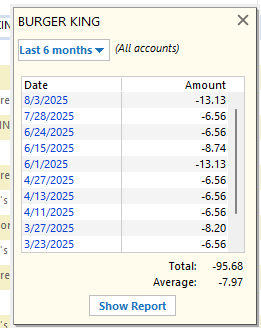
    For instance, you can type in the payee or category in the register search/filter box and if it is unique it will filter to the transactions you want. Also, there is find and replace that has much more flexibility on what to search for and what to replace.

    On top of that there is the min-reports:

    image.png image.png

    The same goes for the categories.

    Signature:
    This is my website (ImportQIF is free to use):

    http://www.quicknperlwiz.com/

  • heisescott
    heisescott Quicken Windows Subscription Member ✭✭

    It took me a while to find "Find and Replace". I found it by going from the tools icon to register report to find & replace. The filtering in "Find and Replace" is what I have in mind. I just wish the "any field" list included the account name. My other request, for sorting, is still lacking in this facility.

    It's all about filtering and sorting to find groups of transactions that need to be updated as a group, and which account it is in matters.

  • Jim_Harman
    Jim_Harman Quicken Windows Subscription SuperUser ✭✭✭✭✭
    edited September 8

    An easier way to get to Find and Replace is from the Edit menu, or hit Ctrl-H.

    I agree that adding the account name to the Find criteria would be a useful addition.

    Note that clicking on the Find and Replace icon in a report does not restrict the results to the transactions that meet the report's filter criteria. Thus for example even if the report is restricted to one account and the current year, the Find and Replace results include all accounts and all time. I think this limits the usefulness of the report Find and Replace.

    QWin Premier subscription
  • Chris_QPW
    Chris_QPW Quicken Windows Subscription Member ✭✭✭✭
    edited September 8

    I'm sorry I should have pointed out where to find it.

    As @Jim_Harman said you can just do Ctrl+H. This is basically doing: Edit → Find and Replace.

    Also, while in a given register there is Ctrl+F or Edit → Find, set the criterial and then Find All, select Edit Transactions, and here you can replace your categories. The main difference is that Ctrl+H searches all accounts Ctrl+F only searches the account you are in. That is why Ctrl+F is only available when you are in an account register.

    Also, if you select All Transactions on the account bar this gives you a "register" that spans all the non-investment accounts. Here you can filter by account. And once filtered to what you want you can use regular Windows multiple select to select the transactions (left lick on the first transactions, hold down shift key and right click on the last transaction. You could left click the last one, but right clicking does the same selection, but also brings up the context menu). In the context menu you can select Assign category.

    Signature:
    This is my website (ImportQIF is free to use):

    http://www.quicknperlwiz.com/

  • Chris_QPW
    Chris_QPW Quicken Windows Subscription Member ✭✭✭✭

    I liked the idea of Find and Replace so much that I made an idea for it, that people can vote on:

    Signature:
    This is my website (ImportQIF is free to use):

    http://www.quicknperlwiz.com/