Downloaded file came in with almost all Positive Red Numbers
Just purchased Quicken Classic Premier a few days ago. Running Window's 10. Downloaded almost all my files. Things went smoothly. I went to check my balances and transactions and I see my Quicken bank checking account balance is a RED positive number. I check my bank's website and the balance is fine but Quicken's balance is a positive red.....but because the number is red and not black, I have a negative balance according to Quicken. I start looking at the transactions and two years of almost all positive red numbers when I pay a credit card bill. The corresponding credit card account balances are fine. How can just the color be wrong in that one file? Do I have to delete the file and start manually from scratch? I do have a QFX file I made when I was on the banking site but I'm not sure I trust it. Is it possible for me to salvage this file? I'm still in my trial period so there can be a refund. Thanks for any suggestions.
Answers
-
Hello @dasw,
Thanks for sharing the details about your file. I just want to clarify something before we proceed: are you saying that the values of all the transactions and the account balance are correct, but they’re displaying as negative (red) instead of positive/black numbers? Also, what is the name of the financial institution that this account is connected with?
Also, could you please provide screenshots showing the account balance and a few of the affected transactions? This will help us better understand what’s happening and how it might be resolved.
If needed, please refer to this Community FAQ for instructions on how to attach a screenshot. Alternatively, you can also drag and drop screenshots to your response if you are not given the option to add attachments.
Thank you!
-Quicken Anja
Make sure to sign up for the email digest to see a round up of your top posts.0 -
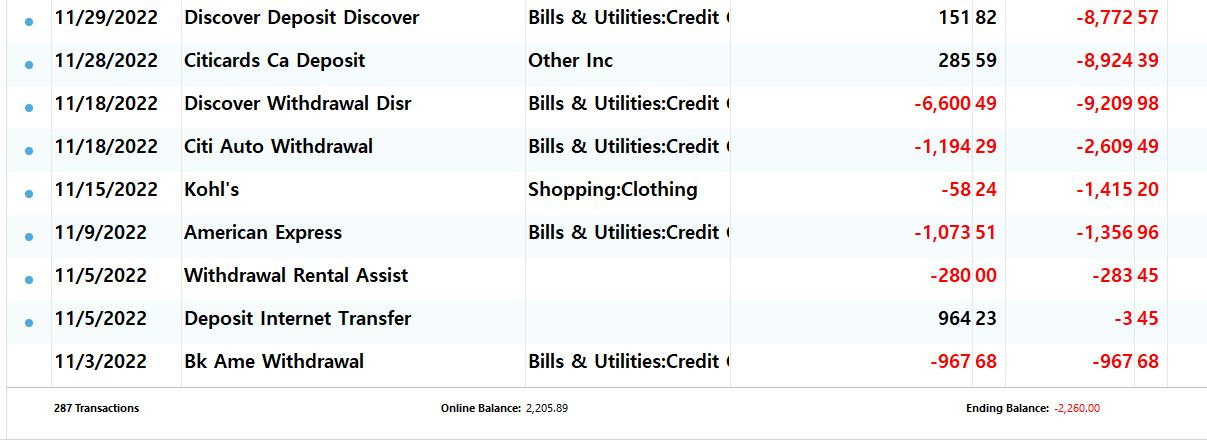
The Financial Company is MidHudson Valley Federal Credit Union. I downloaded 3 accounts from them but the checking is the only one messed up. I then tried to add funds to the end of the transactions but that only raised my final balance by a few thousand dollars but still negative. That's when I posted my problem. After your post I tried widening the columns and the minus signs showed up. So now the question is why is my Quicken balance in the negative red and my online balance okay?
I noticed that my download came in with the first transaction on 8/13/2022 and the balance at that time was already a negative. (?) I can't see that far back in my online banking registers so I'm not sure what's going on. I'm tempted to add more fake funds to the quicken balance but will send the screen shots next. Am I correct in saying that I can't bring that fund in again from my credit union?
0 -
Is the register sorted in date order? And not filtered? Try clicking the DATE column heading to sort by date and maybe reset the filters at the top.
Are the transactions in the wrong column or is the balance just going the wrong way? Are you showing all the amount columns? There are actually 3 columns...Payments, Deposit and Amount and then the Balance column. Amount can be for either deposit or payment. Depending on the sign + or - in the Amount column it will also put the $ in the appropriate Payment or Deposit column. I would show the Payment and Deposit columns and turn off the Amount column.
Could the account be missing deposits? Also make sure you have the right starting balance. If it's zero you might need to add a beginning balance for when you started the account in Quicken. Quicken has been resetting the beginning balance. So you should enter the balance in the first Memo line in case it gets dropped so you know what it was.
I'm staying on Quicken 2013 Premier for Windows.
0 -
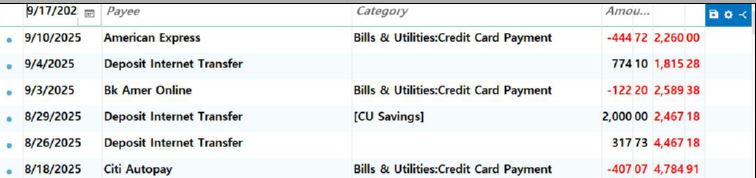
Screenshots beginning and end of Quicken file for checking account.
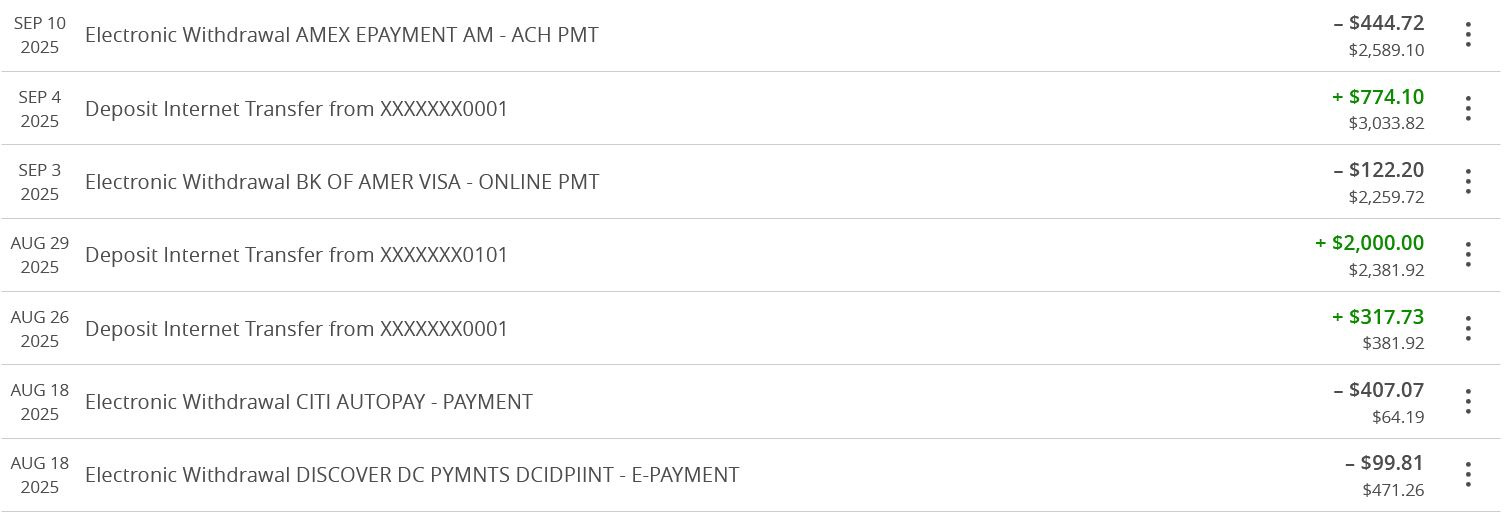
Beginning of online credit union checking.
0 -
Thank you volvogirl.
Register is by date with the latest on top. Filters are all types, all dates, all transactions.
filters with only Deposits in types is a few thousand dollars less than filter of only payments.
Deposits are all black and I see no strange ones. I am not able to double check past 8/13/2024 because that is all I can see in my online credit account. (they brought in more than I can verify…I had no date range choice).
I can not see my real starting date because it probably goes back to 1997. The last transaction they sent me was from 11/3/2022.It was a payment transaction of -967 and total balance of -967 ! I would have to make up a fake starting date for 11/3/2022. How do I do that? The Quicken fund I had before (manual 2013) is gone overlaid by my new quicken…let's not go there.
0 -
Update:
Yesterday I entered a fake amount of funds that would bring my balance to where it should be. Now my current balance is correct and new transactions brought in, update the balance as expected. Past date transactions have always contained correct amounts so I just ignore the incorrect older balance totals. It appears during my first download the account started with an incorrect beginning balance.
Also that particular credit union (MidHudson Valley Federal Credit Union) started messing up one of my other accounts too during my last update. So I discontinued their download service for that fund. I am considering changing my local Bank/Credit Union.
0 -
First of all you should sort the register with the newest data at the bottom and the oldest date at the top. Like an actual checkbook. Just click the Date heading to reverse the sort. Then as I said above you should use the payment and deposit columns instead of just the payment column. Click on either gear at the top right.
So when you downloaded did it make a new account? Is that all the transactions in this account starting with 11/3/22? Yes you need a beginning balance to start. The 11/3/22 withdrawal is the first transaction. Just enter a new transaction with a date earlier than 11/3/22. FOR the category you just enter the same account name in square brackets that you are in to make a one sided transaction. Like [Checking].
Do you have older transactions in another Account? You may want to copy all these over to the old account.
I'm staying on Quicken 2013 Premier for Windows.
0 -
Hi Volvogirl,
That's what I first tried to do. It was the most logical. I tried to enter a transaction on 11/2/22 but probably got the amount or set up of the register wrong because the final Balance was not quite right. I was going to increase the amount but got nervous and asked for help. I will probably try again with a proper register that you suggest (after I get the emotional strength to eliminating my fake deposit from yesterday).
0 -
Update: I finally was able to get my downloaded Quicken File to match my actual Bank Account., I was able to get a CSV file of this account from my Bank and open and print it with a File Viewer. Like Volvogirl mentioned, I then created the correct initial balance by adding funds of what the actual balance was at that time many years ago (using the transaction fields that she suggested). I also checked the downloaded transactions against the actual Bank transactions and found several MISSING internal transfers. Why this happened during the download is anyone's guess. Good luck to anyone who finds a messed up download from their Financial Company. Especially when dealing with 14 years of data.
I also would not have been able to do this with Quicken Simplifi which I found does not offer a balance column!
1 -
@dasw Thank you for the detailed update! I’m glad to hear that you were able to get your Quicken file to match your actual bank account and resolve the balance issues.
And thank you @volvogirl for providing your guidance and suggestions!
-Quicken Anja
Make sure to sign up for the email digest to see a round up of your top posts.0
Categories
- All Categories
- 56 Product Ideas
- 36 Announcements
- 225 Alerts, Online Banking & Known Product Issues
- 22 Product Alerts
- 703 Welcome to the Community!
- 671 Before you Buy
- 1.2K Product Ideas
- 53.7K Quicken Classic for Windows
- 16.3K Quicken Classic for Mac
- 1K Quicken Mobile
- 812 Quicken on the Web
- 111 Quicken LifeHub