Categories Dropdown - How to Remove "Recently Used"

TheSlothAwakens
TheSlothAwakens Quicken Windows Other Member
image.png

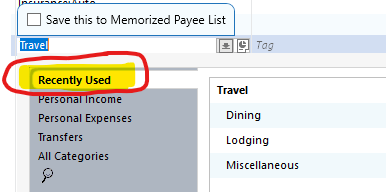
I am using Classic R64.29. Not long ago "Recently Used" became default for Categories dropdown.

Every time I categorize a new transaction from "Royal Caribbean", Category defaults to my top-level category "Travel" and the dropdown defaults to "Recently Used". How do I stop this from happening? I sub-categorize all transactions from this Payee and I don't want to Quicken to filter my Travel sub-categories based on Recently Used. I have to then manually click "Personal Expenses" or "All Categories" to get to the my other sub-categories. This is very annoying.


Answers

  • Quicken Anja
    Quicken Anja Moderator mod

    Hello @TheSlothAwakens,

    At this time, Quicken doesn’t have a setting to disable the “Recently Used” section in the Categories dropdown. I understand how frustrating it can be to have to manually navigate to your sub-categories each time.

    If you’d like to see this feature added or adjusted in the future, I recommend creating an Idea post. This lets other users vote on it, and our Development and Product teams often review these ideas when planning updates and new features.

    I hope this helps!

    -Quicken Anja
    Make sure to sign up for the email digest to see a round up of your top posts.

  • UKR
    UKR Quicken Windows Subscription SuperUser ✭✭✭✭✭

    Every time I categorize a new transaction from "Royal Caribbean", Category defaults to my top-level category "Travel" and the dropdown defaults to "Recently Used". How do I stop this from happening? I sub-categorize all transactions from this Payee and I don't want to Quicken to filter my Travel sub-categories based on Recently Used. I have to then manually click "Personal Expenses" or "All Categories" to get to the my other sub-categories. This is very annoying.

    I'm a little puzzled. If I understand you correctly, Quicken suggests "Travel" as the category for your new "Royal Caribbean" transactions. Doesn't a simple mouseclick on one of the shown subcategories (see above image) solve the issue with selecting subcategories of Travel?
    Or are you using categories and subcategories other than "Travel"? … In that case, I would suggest you review your Memorized Payee List's entry for Royal Caribbean and change it to use (and memorize) the desired category instead.

This discussion has been closed.