Quicken R64.25 is not getting correct Cash Balance for Fidelity accounts w/ EWC+

Using EWC+ on a test datafile with Quicken R64.25.
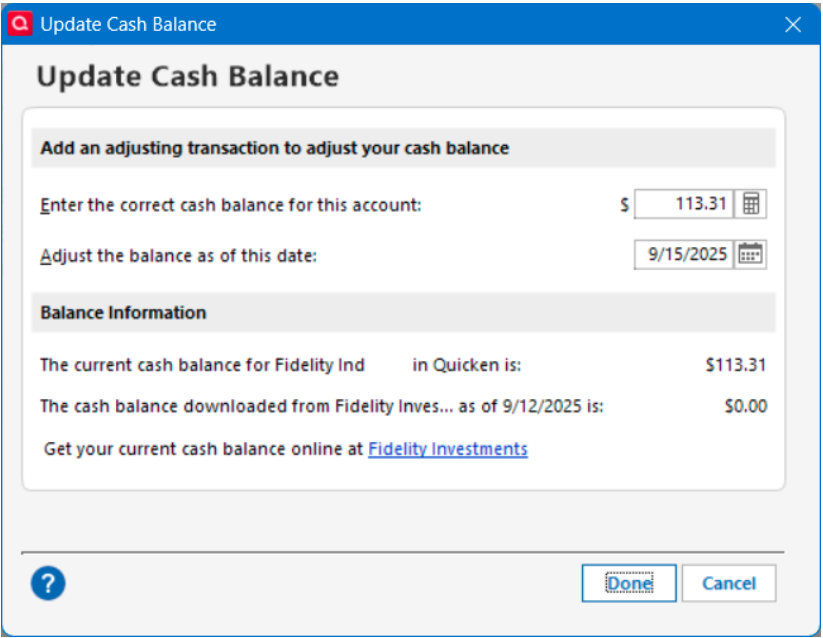
When selecting Update Cash Balance, Quicken states the cash balance coming from Fidelity is $0.00. If this is actually the case, Quicken needs to work with Fidelity to make sure the correct cash balance is being sent. Currently, instead of the correct cash balance, Quicken is treating the core Money Market fund that IS the actual cash balance as reported on the Fidelity website as a separate security while stating the cash balance is $0.00. Quicken should fix this with Fidelity before forcing users to cutover to the EWC+ connection.
Deluxe R65.29, Windows 11 Pro
Comments
-
Hello @leishirsute,
Thank you for letting us know you're encountering this issue! You may need to change the Money Market representation for the problem account(s) if you were not prompted. You can do this by clicking the Cash link in the problem account or by clicking the gear icon, selecting Account Details, then going to the Online Tab and clicking the “Reset Money market securities/cash options to trigger the choice of cash or security again.
Please let me know how it goes!
Quicken Kristina
Make sure to sign up for the email digest to see a round up of your top posts.
0 -
I tried your recommendation. There is no Reset Money Market/Securities" options for any of the Fidelity accounts via the Cash link or the Account Details. Contrary to this being reported as Fixed, it is not fixed.
Here's what shows when the Cash link is selected and is similar for all Fidelity accounts.
Here's what shows when the Account Details is used and is similar for all accounts.
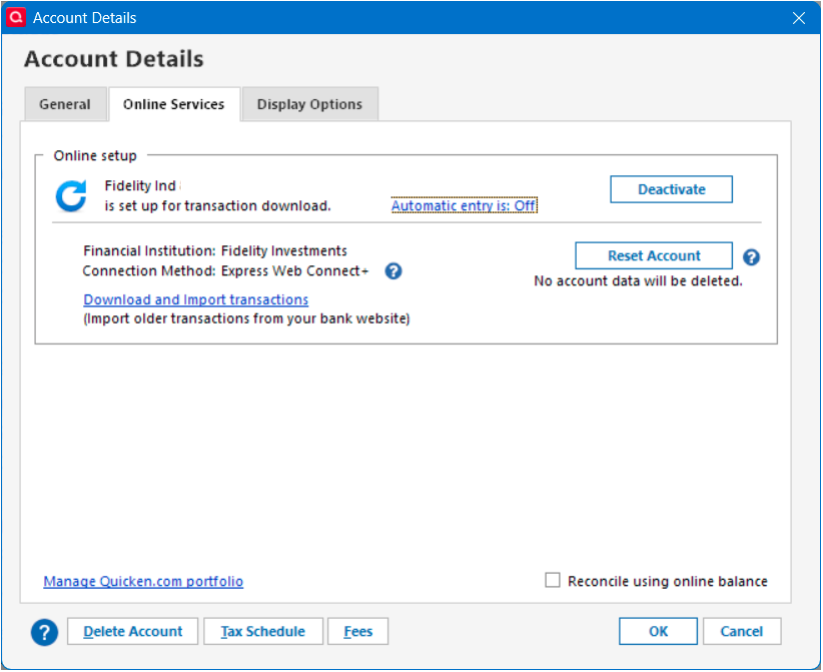
[Edited - Removed partial account number]
Deluxe R65.29, Windows 11 Pro
2 -
Thank you for your reply,
To help look into this further, please provide more information. What separate security is the cash balance showing in?
Thank you!
Quicken Kristina
Make sure to sign up for the email digest to see a round up of your top posts.
0 -
@Quicken Kristina Regarding "To help look into this further, please provide more information. What separate security is the cash balance showing in?"
My online Fidelity website accounts have the following core cash Money Market funds providing the cash balance for the accounts:
SPAXX for 4 non-IRA accounts
SPAXX for 1 Roth IRA account
FDRXX for 1 traditional IRA account
The security values of the above separate securities in Quicken match the account cash balances on the Fidelity website. However, they are incorrectly not being treated as the cash balances in Quicken as they were treated for a DC connection. Please make EWC+ have the same resulting Quicken behavior as the DC connection.
Is this the information you are seeking?
Deluxe R65.29, Windows 11 Pro
2 -
Thank you for the additional information,
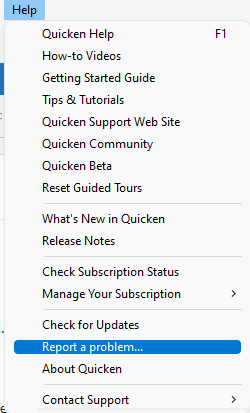
Since the issue was marked corrected, but is still happening, I forwarded it to the proper channels for further investigation and resolution. If you haven't already done so, please navigate to Help>Report a Problem and send a problem report with log files attached. Please reference CBT-816 in the subject line of the problem report.
Thank you!
(CTP-14526)
Quicken Kristina
Make sure to sign up for the email digest to see a round up of your top posts.
-1 -
I have submitted this problem via Report a Problem a couple of times but will resubmit again with CBT-816 in the subject line of the problem report.
Deluxe R65.29, Windows 11 Pro
1 -
Thank you for the follow-up,
I sent you a DM. To view it, please click the envelope icon near the upper right.

Thank you!
Quicken Kristina
Make sure to sign up for the email digest to see a round up of your top posts.
0 -
I am having a daily problem when I download transactions from my Fidelity accounts. It always asks me what the current cash balance is. This is annoying meaning that I have to log into Fidelity to enter the cash balance. If I have to do this, then why do I need Quicken. I wind up updating manually. Really?
0 -
[Removed-Rant] Leishirsute has done everyone a great service by pursuing this problem, which I'm having as well. Thank you!
1 -
@leishirsute @Quicken Kristina
@leishirsute I too have a mixture of SPAXX and FDRXX with my Fidelity Accounts as the Cash Sweep account. However, when I switched over to EWC+ a unique popup appeared ASKING me how I wanted to treat FDRXX on the one account that used this security. I selected Cash and that Fidelity account has behaved correctly ever since (the FDRXX is treated as cash and I don't get a securities mismatch). That one account DOES show the CASH REPRESENTATION button under the Update Cash Balance menu and also RESET MONEY MARKET SECURITIES/CASH OPTIONS under the Online Services menu. None of the accounts using SPAXX have either of these buttons/selections. Therefore, I had assumed that maybe the money market security selected was the difference (FDRXX vs SPAXX). Could you check to make sure the account using FDRXX does not offer these cash selection options? In any case, this is a BUG that was introduced in the conversion to EWC+ and needs to be fixed for ALL Cash mutual funds that Fidelity offers. I have also REPORTed A PROBLEM using the CBT-816 label, so hopefully Quicken will address this problem.
1 -
@bmbass Thank you for your suggestion. I checked Online Services, Update Cash Balance, and the Cash Balance register link for the IRA account using FDRXX and none has the Cash Representation or Reset Money Market Securities/Cash options. It seems the programming for this capability needs improvement.
Curious, what do you have set for "Never interpret downloaded Money Market funds as cash" in Preferences → Downloaded Transactions?
My setting is not check marked.
Deluxe R65.29, Windows 11 Pro
0 -
I'm having the same issue as the original poster
1 -
I am having all of these same issues and in addition, some Fidelity transactions are not being downloaded. Another frustration is that even though this has been a widespread issue, the Quicken support techs are surprisingly unaware of all the issues.
0 -
I, too, am having all of these same issues. Never a problem until the forced connection change.
0 -
I am now getting Fidelity Transactions downloaded, but having the same issue with "CASH". My Cash is being recorded into "FDIC BANK DEPOSIT SWEEP NOT COVERED BY SIPC" security. This is being recorded as a Reinvest DIvidend, instead of just a Dividend or Interest that is deposited to CASH.
"No Matter Where You Go, There You Are"Windows 11 Pro, Quicken SubscriptionIntel Core i7-12700, 32GB Ram0 -
Promising news
When I updated my test datafile with Fidelity EWC+ connection on my desktop using Quicken R62.16 and on my laptop using R64.25, I got the option to select the suggested core cash MMF for my Fidelity accounts to be used as cash and they matched the core cash MMF in Fidelity i.e. FDRXX for an IRA account and SPAXX for the other accounts. The cash balance was updated and matched in all accounts except one, which I can correct. Also, the Cash Representation option displays for all the accounts. This was the major issue I had with moving forward to use EWC+ Fidelity connections and it seems resolved. Fingers crossed.
For the account that is in error, Quicken still shows the security has some older shares and I don;t know where it got thecash balance form but I wonder if someone has changed their core account in the past, that would mess up the cash balance calculation.
Deluxe R65.29, Windows 11 Pro
0 -
Okay. Not totally fixed. The Cash Representation selection appeared only once and can't be reselected as it disappeared after being selected.
UPDATE: I did another OSU and the cash selection reappeared. Strange.
For the account with a cash balance error, I had to select multiple transactions of the core MMF DIV and BOUGHT remnant transactions that were not deleted and delete them. Bad move. I restored again from a backup.
Deluxe R65.29, Windows 11 Pro
0 -
My "Never interpret downloaded Money Market funds as cash" is also unchecked (and has always been this way).
I just got this dialog on ALL of my Fidelity accounts that were using SPAXX and was not treating it as Cash after the EWC+ conversion:
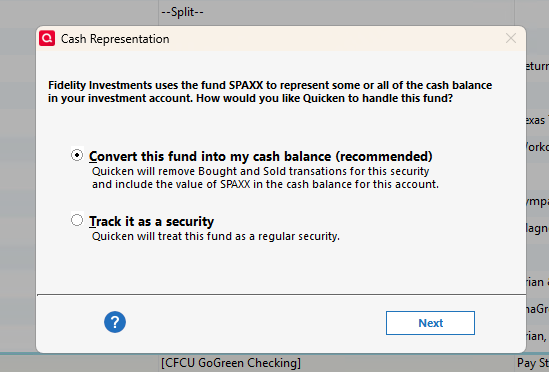
After selecting Next and then Yes on the next question, I now have both the Cash Representation and Reset Money Market cash option options included in those accounts. So, All my Fidelity accounts are now treating my CASH correctly!
0 -
I had same prompt, but only seeing the "Reset Money Market" option on some not all of my Fidelity Accounts. I am not seeing another option that has "Cash Representation" on any of my 5 Fidelity Accounts (Brokerage, IRA, 3 ROTHS)
"No Matter Where You Go, There You Are"Windows 11 Pro, Quicken SubscriptionIntel Core i7-12700, 32GB Ram0 -
The securities in my linked cash account was off because buys and sells weren't deleted. No biggy. I can remove them.
Deluxe R65.29, Windows 11 Pro
0 -
I have reauthorized all accounts and processed the cash representation for each. I have two remaining issues: 1. On three accounts, the Quicken cash balance is different from the downloaded balance for Fidelity, and 2. One of these 3 accounts shows a securities mismatch that is empty.
These 3 accounts contain money market funds that are not the core cash positions. In two of these, the only fund in the account is a non-core money market fund and there is no cash in the core position. These two accounts show the holdings in the Quicken account in agreement with the Fidelity brokerage account. One account is investment and the other is an IRA.
The third account (investment) includes core cash in FCASH, a money market fund (SPRXX), and two other funds. This is the account that shows the mismatch.
WRT the cash balance difference, it appears that Fidelity is reporting core cash and money market positions as cash to Quicken. I checked a file from prior to this conversion and there were not cash differences. I suspect the securities mismatch is related. Also, during the cash representation process, the two non-core money market funds were flagged, and I selected "Track it as a securtity."
I have reported this to Quicken with the CBT-816 label.
I'm running Release R64.29
 1
1 -
Hello @JLP1976,
Thank you for letting us know you're also impacted by this issue. I added the information you provided to the ticket.
Thank you!
Quicken Kristina
Make sure to sign up for the email digest to see a round up of your top posts.
0 -
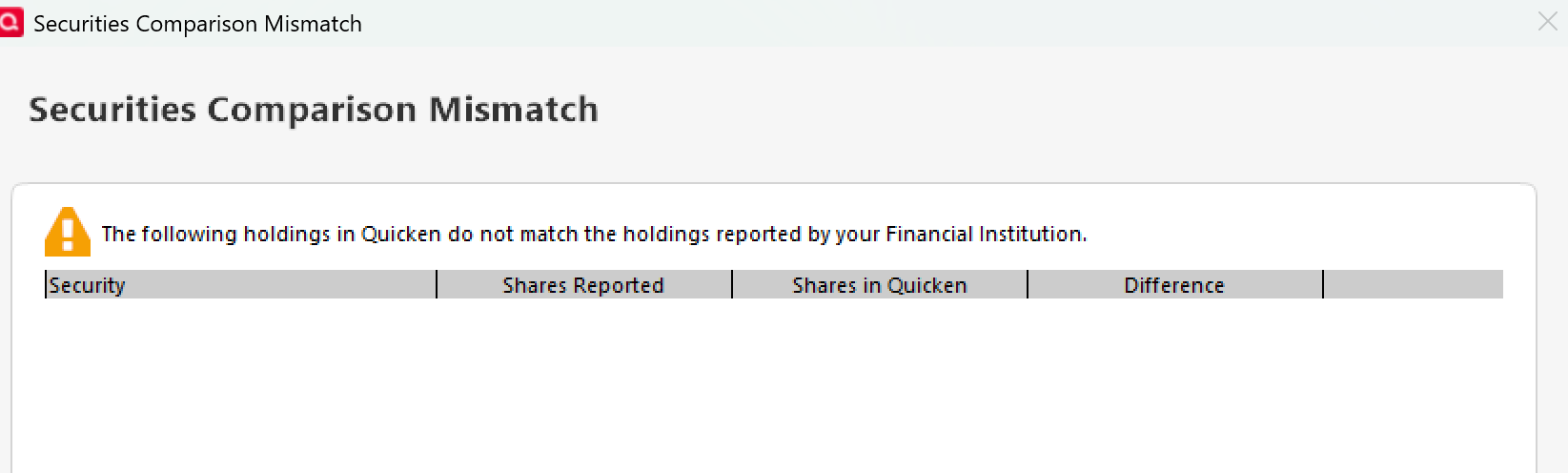
The balance in my linked checking account shows as zero under "Shares in Quicken" in the comparison while "Shares Reported" is correct.
0 -
Can you please describe where Shares Reported and Share in Quicken are displayed?
Deluxe R65.29, Windows 11 Pro
0 -
Shares in Quicken and Shares Reported are in the Securities Comparison Mismatch screen as displayed above.
Online Center - Holdings then Compare to Portfolio
1 -
I have noticed the Quicken is not getting the latest cash balance value from Fidelity. It is getting a cash balance for the prior day.
Deluxe R65.29, Windows 11 Pro
0 -
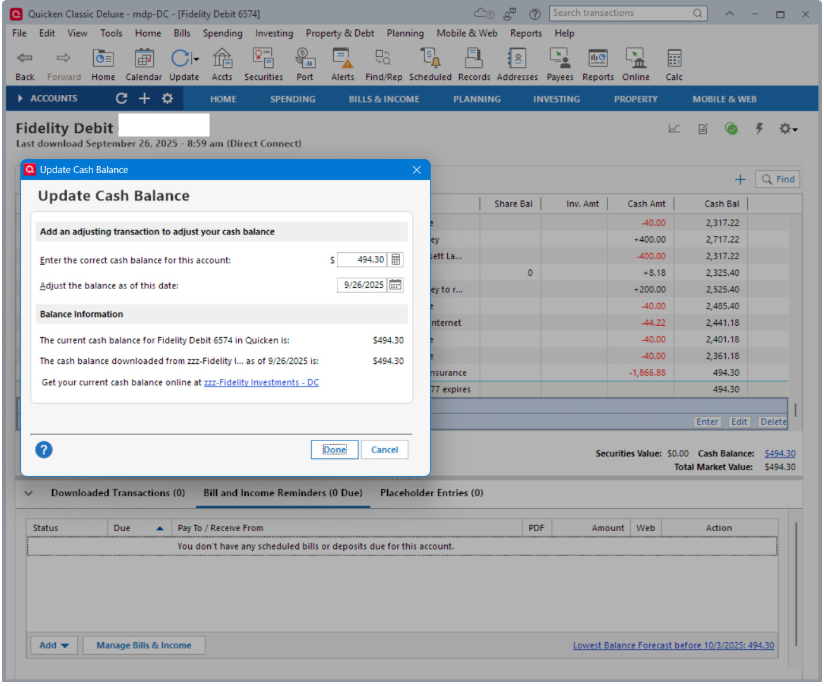
Quicken using DC connection for Fidelity correctly reports the current cash balance for all accounts. Example shows download on 9/26 and Fidelity cash balance as of 9/26.
However, using EWC+ connection, the cash balance is not current and a day late. Example shows download on 9/26 and Fidelity cash balance as of 9/25.
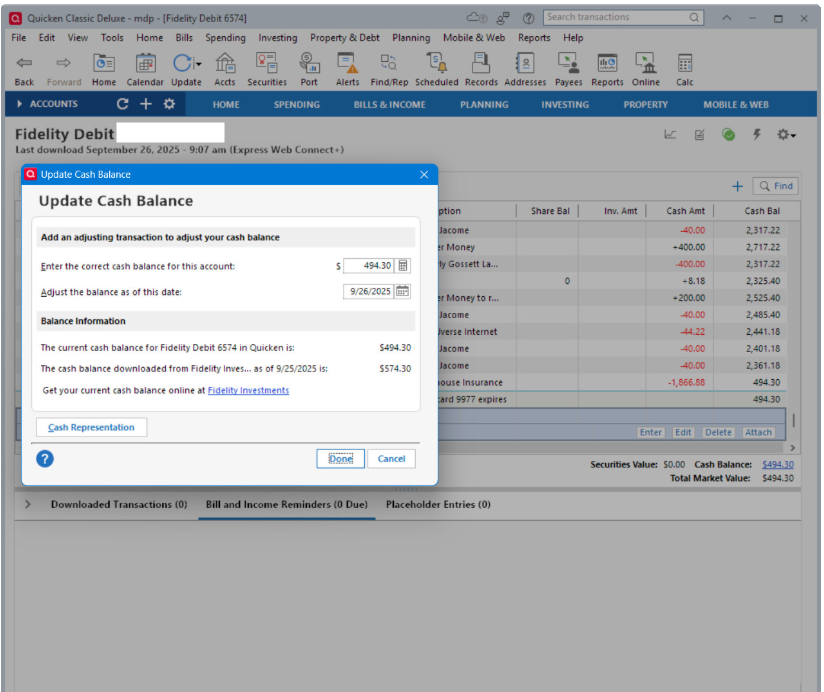
Is it expected behavior for the EWC+ connection to be a day late with cash balances?
Transactions appear to be downloaded correctly.
[Edited - Removed partial account numbers]
Deluxe R65.29, Windows 11 Pro
0 -
Thank you for the additional information,
To clarify, is this issue with the cash balance related to the issue you posted in a different thread about all downloads with Express Web Connect + seeming to be delayed a day compared to Direct Connect:
Thank you!
Quicken Kristina
Make sure to sign up for the email digest to see a round up of your top posts.
0 -
Yes. It's about the same post. Although, at the time of the posting, I thought it only related to cash balance but now I see that all transaction downloads are delayed a day.
Deluxe R65.29, Windows 11 Pro
1 -
Thank you for the clarification,
I'm still waiting to hear back from my team.
When I have further information, I'll post to let you know!
Quicken Kristina
Make sure to sign up for the email digest to see a round up of your top posts.
0


Categories
- All Categories
- 65 Product Ideas
- 35 Announcements
- 222 Alerts, Online Banking & Known Product Issues
- 21 Product Alerts
- 704 Welcome to the Community!
- 673 Before you Buy
- 1.2K Product Ideas
- 54K Quicken Classic for Windows
- 16.4K Quicken Classic for Mac
- 1K Quicken Mobile
- 812 Quicken on the Web
- 115 Quicken LifeHub