OL-297-A error link broken
I am receiving this error message from One Step Update due to Franklin Templeton not functioning with Quicken. That's bad enough, but when I click on the Question mark icon, I get a box labeled Error Information. Near the bottom of that page, I am referred to a link to Quicken Support. That link is broken and needs to be repaired. It arrives at a scrambled page which I believe is intended to be the 404 landing page.
While I'm at it, how do I prevent that error message since FT is unreachable? (I do have any FT account shown in my OSU settings.
Comments
-
Hello @NebularNovice,
Thank you for reaching out! I'm sorry to hear that there's a broken link for that error message. Are you able to provide a screenshot of exactly where you're clicking that is bringing you to that scrambled page? If needed, please refer to this Community FAQ for instructions on how to attach a screenshot. Alternatively, you can also drag and drop screenshots to your response if you are not given the option to add attachments.
If you're not able to provide a screenshot, could you please describe exactly where the link was? For example, was it directly on the One Step Update Summary?
If needed, here is the correct link for the OL-297 error message troubleshooting:
While I'm at it, how do I prevent that error message since FT is unreachable? (I do have any FT account shown in my OSU settings.

If you do have the account in your One Step Update (OSU) settings, then you should be able to prevent the error message by unselecting it.
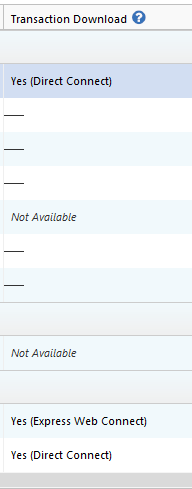
If you do not have it showing up in your OSU settings, then backup your Quicken file and navigate to Tools>Account List and look for the problem account(s). In the Transaction Download column next to the problem account, if it shows Yes, then Quicken thinks the account is connected.
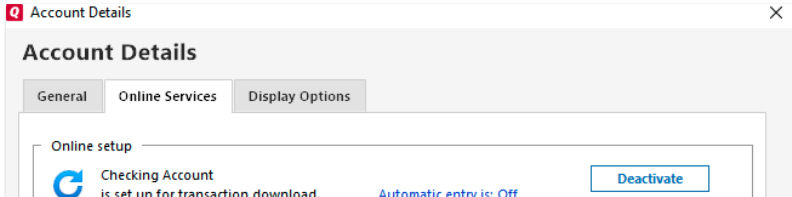
If that is the case, try deactivating the account by clicking the Edit button next to the account, choosing the Online Services tab, and clicking the Deactivate button.
I hope this helps!
Quicken Kristina
Make sure to sign up for the email digest to see a round up of your top posts.
0 -
Thanks for the reply, Quicken Kristina.
I thought I did describe exactly where the link is, though a bit briefly. Let me try again and include a screenshot.
The error message appears at the top of the One Step Update Summary. It says "OL-297-A 1 account" with a question mark icon following. When I click on that icon, I get the box headed "Online Banking Error: More Info" which I hope to attach here. The second to last paragraph of that box starts: "Visit the Quicken Support website for FAQs …" Quicken Support is underlined and in red. Clicking on that gives the broken link. Quicken attempts the link in the same box with heading changing to "404 ! Quicken" where the ! is the vertical bar character. (I just see a link for the attachment below. Clicking the link accesses the screenshot on my computer, but I'm not sure it shows up for you.)
On my issue of preventing the error message, the account is in my current Quicken file. It is not connected. Account list shows "Not Available" under Transaction Download and "Unknown" under Financial Institution. The Online Services tab of Account Details shows only "Set Up now…" but set up will not let me do it because Quicken does not recognize Franklin Templeton even when I type that in.
The account does NOT show up as an option in OSU Settings. (On the 77th reread of my first message I finally realized I left out that "not.") I assume that is standard for an account with no online setup. As I understand it from discussions here, Franklin Templeton is not allowing direct download to Quicken. I am not happy about that, but trying to move on, which is bothered by this continuing error message. One interesting factor is the error message appeared about a week ago, long after FT last appeared in my OSU settings. I.e., OSU should not have been trying to contact FT. (I have done Validate File which showed no problems.)
I THINK I had a similar problem with another institution a while back and someone here came up with a solution, but I can't remember anything more than that and can't find it using search here.
0
Categories
- All Categories
- 56 Product Ideas
- 36 Announcements
- 225 Alerts, Online Banking & Known Product Issues
- 22 Product Alerts
- 702 Welcome to the Community!
- 671 Before you Buy
- 1.2K Product Ideas
- 53.7K Quicken Classic for Windows
- 16.3K Quicken Classic for Mac
- 1K Quicken Mobile
- 812 Quicken on the Web
- 111 Quicken LifeHub