I received the following email from Schwab yesterday. It appears that on Oct 22nd I will not be able to use Direct Connect with my Schwab retirement account. Any ideas?
| A change to how you download your retirement transaction history with Quicken Direct Connect. |
|
|---|
According to our records, you currently utilize Quicken Direct Connect to automatically download activity from your Schwab retirement plan.
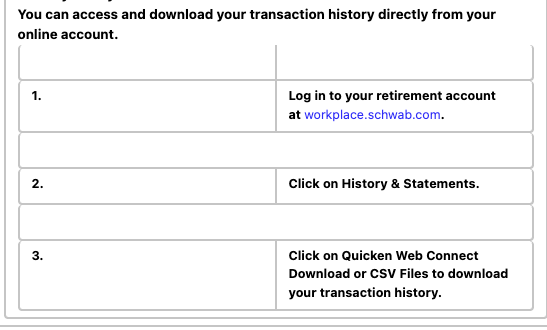
We’re writing to let you know that this automated connection will no longer be supported within your retirement plan at Schwab after October 22, 2025. What this means to you. If you would like to continue downloading your retirement plan transaction history for use in Quicken or another financial management software, you have a few available options. Directly from your online account.
You can access and download your transaction history directly from your online account. 2. | Click on History & Statements. |
3. | Click on Quicken Web Connect Download or CSV Files to download your transaction history. |
|
|
|
|---|
From your Schwab brokerage account.
If you have a Schwab brokerage account, you may be able to access and download your retirement plan transaction history using the Quicken Express Web Connect Plus method. Here’s how to set it up. 1. | Open Quicken or another external provider’s website. |
2. | Follow the on-line process to establish a link to your retirement plan account. |
|
|
|
|---|
After adding your account, transactions will automatically download. Each time you log in after that, only new or updated transactions will be downloaded. |
|
|
|---|