I am trying to connect my merrill lynch 401K with Quicken
I used to be able to download the QFX file but now it says Quicken is currently unable to verify the financial institution information for this download. I deactivated online services and tried to reconnect since they have a new connection method now. No luck. When I try to add an account through Merrill Lynch that does not work as my account is actually through Merrill Lynch Retirement Group. Using Windows, Quicken Classic Deluxe, up to date
Answers
-
Hello @joan7910,
Thank you for sharing your experience, and I am happy to help.
There is an Announcement posted regarding Merril Lynch no longer supporting QFX downloads. Within the announcement, there are also steps on how to import a CSV file as an alternative option.
After reviewing your account internally, I don't see any connection attempts to Merril Lynch Investments.
Please try connecting to this instance and let me know how it goes!
Thank you!
Quicken Alyssa
Make sure to sign up for the email digest to see a round up of your top posts.
0 -
When is Quicken going to update the current version (Quicken Classic Business & Personal) to automatically upload transactions and price history for Merrill Lynch Benefits OnLine accounts?
Perhaps it is as simple as adding Merrill Lynch Benefits Online to the list of available Merrill Lynch investment choices as listed by Joan7910.
0 -
Note that at least for my wife's 401K the login for any of these is wrong. It has always only had Web Connect. And that is now disabled.
The log in is:
Logging into www.ml.com is rejected.
Signature:
This is my website (ImportQIF is free to use):1 -
Is it safe to say that the Merrill Lynch connection is completely down for everyone? There is no download CSV option.
1 -
You have to qualify what connection. Web Connect/QFX for Merrill Lynch 401K accounts (www.benefits.ml.com) has certainly been disabled. I don't know about other Merrill Lynch accounts like brokerage accounts (www.ml.com) those are supposed to be switched over to Express Web Connect + only.
Signature:
This is my website (ImportQIF is free to use):1 -
Experiencing the same issue.
Web Connect/QFX for Merrill Lynch 401K accounts (www.benefits.ml.com).
Quicken does not recognize financial institution error.
0 -
My family is also having this problem, since Oct 1st. The QFX downloads no longer import.
The account at "https://www.benefits.ml.com/Login/Login" does not work with the (Sat Oct 4) list of available Merrill Lynch web sites for Quicken Classic UPDATE button.
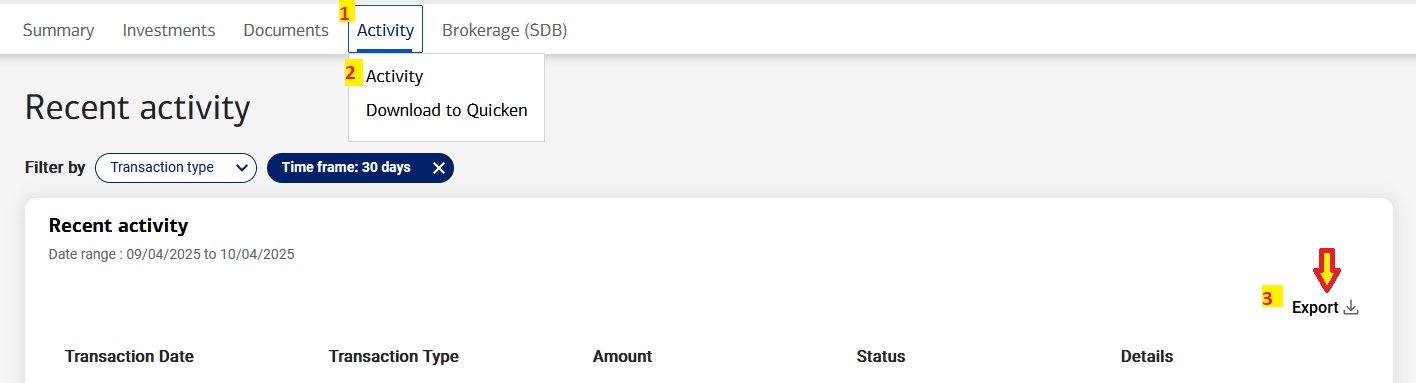
We did find the new EXPORT button on the ML 401k web site, for ACTIVITY tab, ACTIVITY menu, (Recent Activity screen). The right side has "Export" with icon. The CSV lists up to 2 years of data, if you change the "Filter Time Frame". — We did not have time to try importing an Export CSV into Quicken. (We plan to backup the Quicken file before messing with the CSV.)
0 -
Likewise I can't connect to Merrill Lynch 401(k) at https://www.benefits.ml.com/bolt/k401/summary. When I try to deactivate and establish a new account, no option for Merill Retirement Group (what it used to say) is offered, only Merrill Lynch Investments which is not the same portal. How do I reconnect with this account?
1 -
Quicken’s new CSV import doesn’t work for investment accounts.
Signature:
This is my website (ImportQIF is free to use):1 -
Hello All,
Thank you for adding to this discussion.
Just to confirm, have any of you tried connecting to the Merrill Lynch Investments option in Quicken, as stated in my earlier post? I only ask because after reviewing your accounts internally, I am unable to see any attempts.
I think trying the new instance is the best place to start. If you have tried, what are you seeing happen from your end? Do you get any error messages? Does the 401k account show up when authorizing accounts, but not come into Quicken? Does the account not show up in the list of accounts to authorize at all?
Additionally, screenshots may be helpful. If needed, please refer to this Community FAQ for instructions on how to attach a screenshot. Alternatively, you can also drag and drop screenshots to your response if you are not given the option to add attachments.
Thank you!
Quicken Alyssa
Make sure to sign up for the email digest to see a round up of your top posts.
0 -
For the 401K accounts you can’t get to the point where you see accounts.
Merrill Lynch uses a completely different site/authorization for the 401K accounts. That is the “benefits” in the URL.
Fidelity does the same thing with their NetBenefits site.
When Intuit disabled the Merrill Lynch Retirement Group “financial institution” that blocked all of these 401K accounts.
If Merrill Lynch still wants to support Web Connect/these 401K accounts Intuit needs to change this back.
Signature:
This is my website (ImportQIF is free to use):1 -
I too cannot reconnect my account. I have tried all the other Merrill accounts and what everyone has already said I can confirm. They are not the benefits site so our logins do not work and instantly fail. When will Quicken address this issue so we can resume downloading our updated 401k info?
0 -
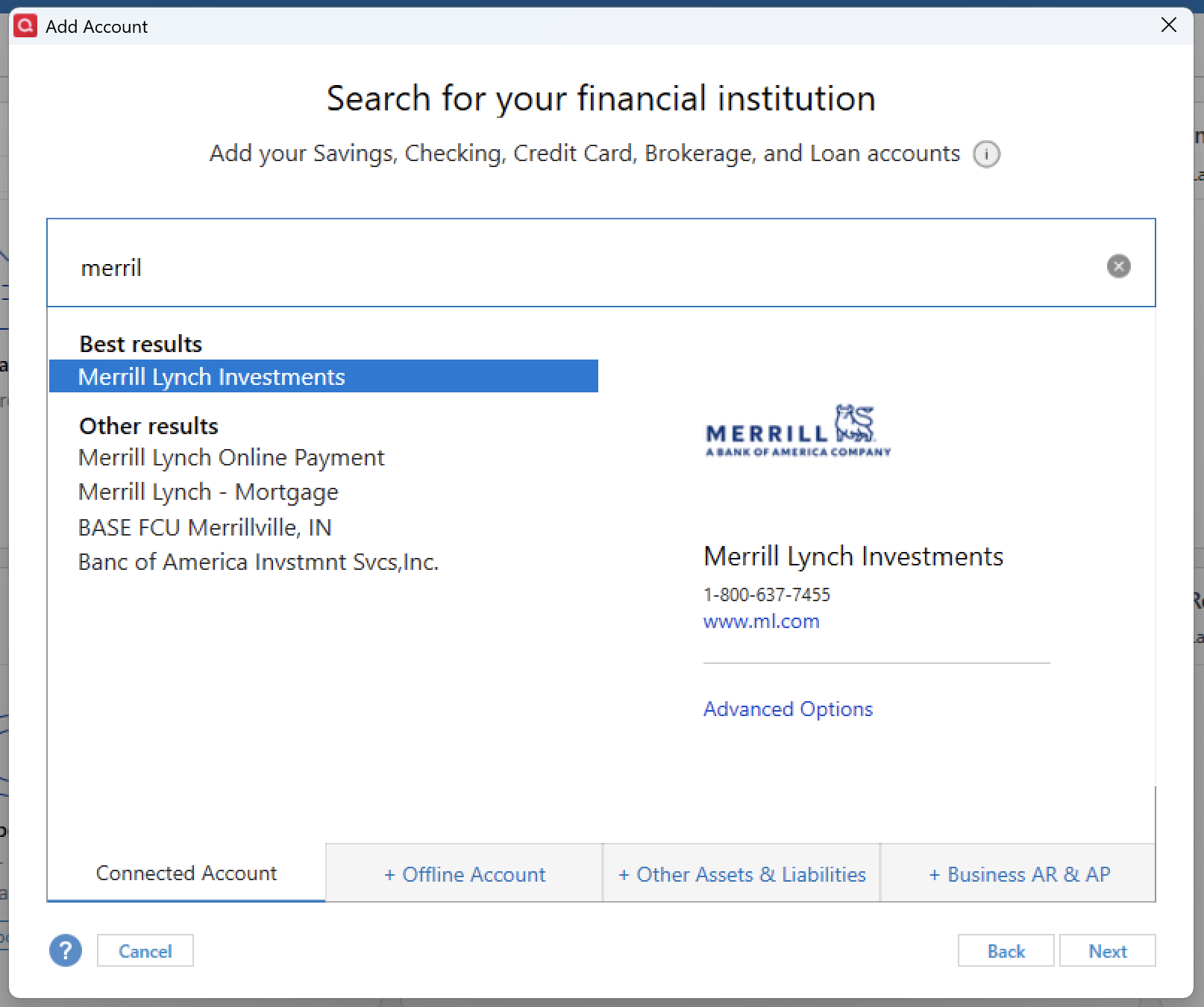
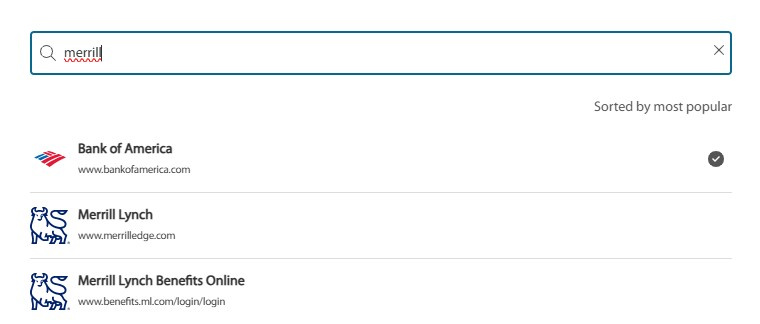
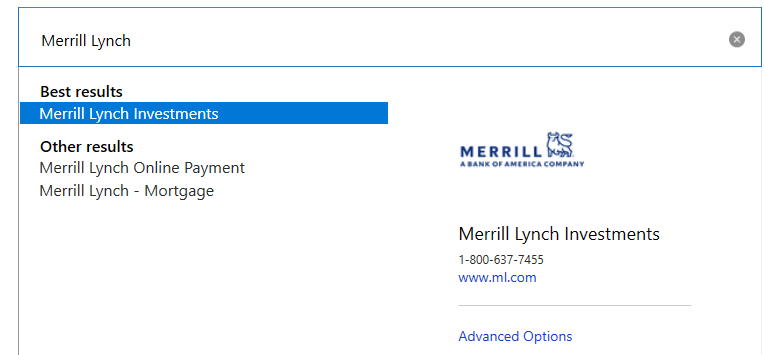
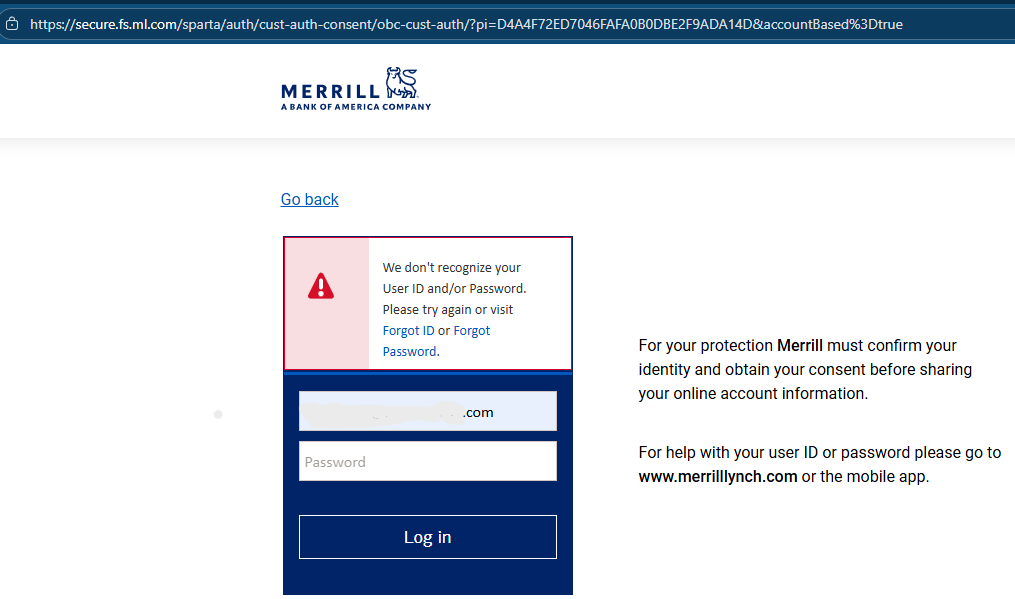
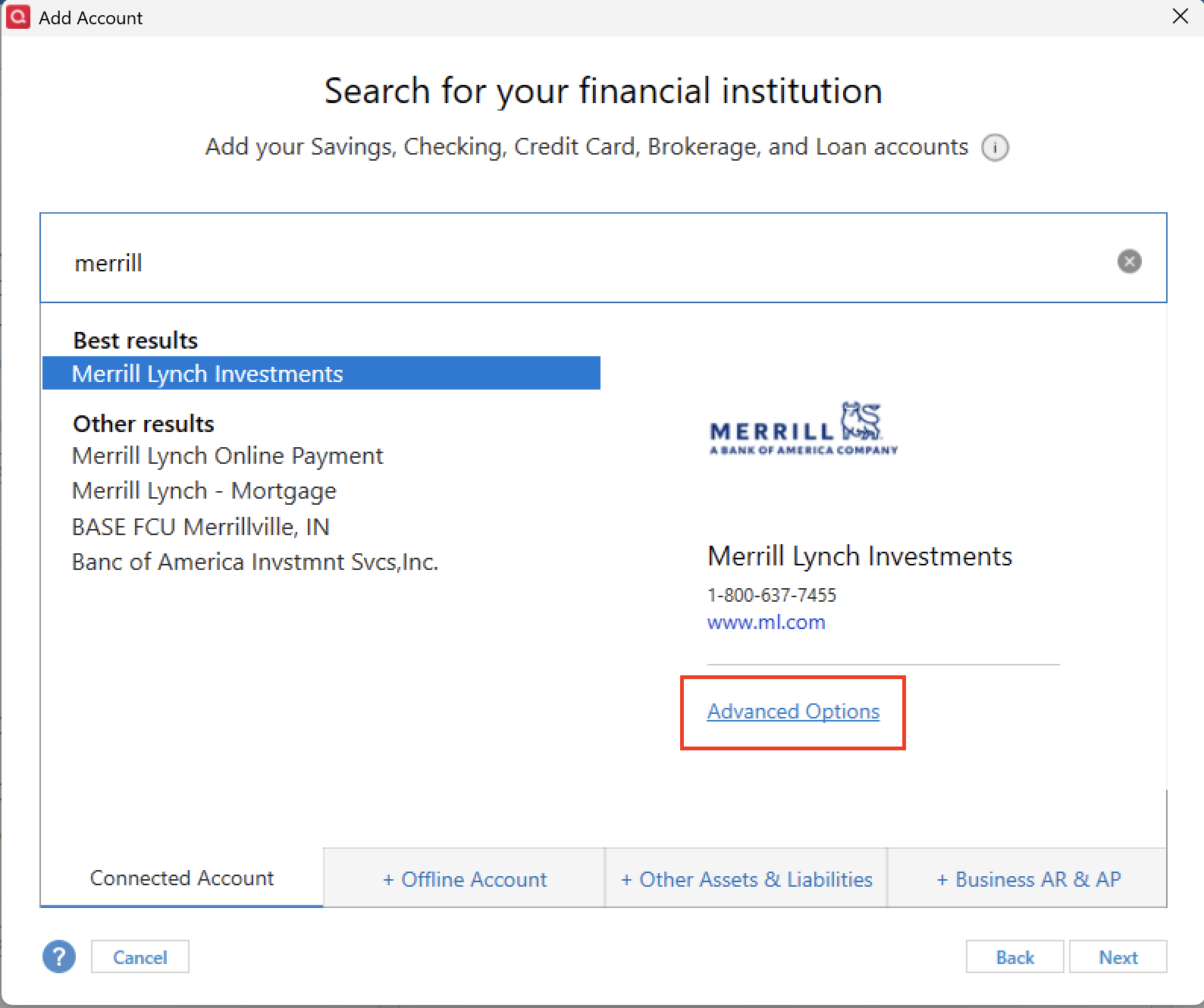
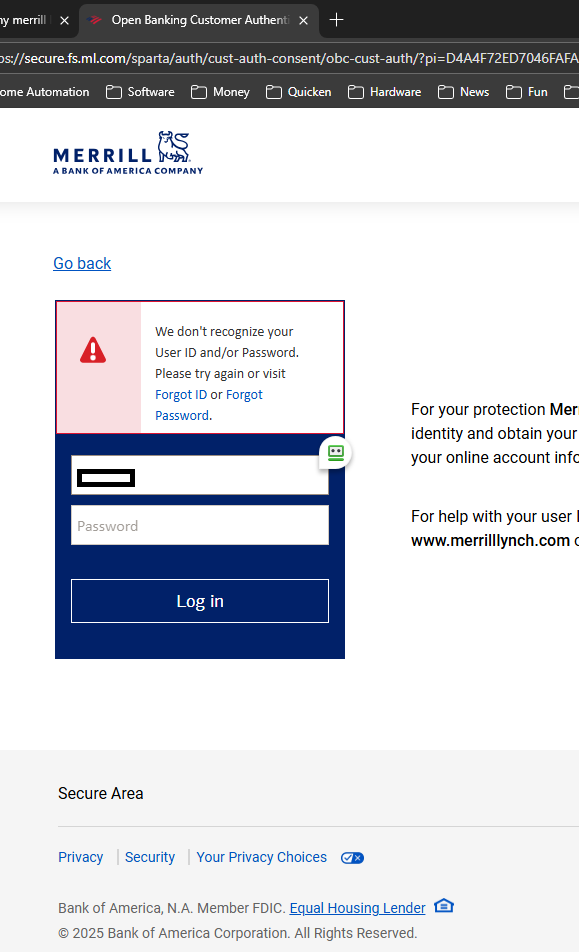
So if you select Merrill Lynch Investments, I along with everyone else who has tried, are trying to say it doesn't work. Our accounts are not at that website. First screen shot is me selecting ML Investments. Second screen shot is the site it takes us to in order to sign in to authorize. Note the primary website being secure.fs.ml.com and my sign in fails each and every time. The 3rd screen shot is the website where all of our 401k information is at to login. www.benefits.ml.com That site used to be an option for us to select. It no longer is. So, we are all orphaned from our 401k account in quicken.
1 -
Hello All,
Thank you for adding to this discussion.
Please confirm if you have tried the Merrill Lynch Investments instance in Quicken. I’ve seen other users successfully update their 401(k) accounts through this method — though it’s possible their accounts may differ in some way.
I am unable to determine what the best course of action will be until we can confirm whether that connection works. Once you've given it a try, please let me know — I’ll be able to check for any internal issues and guide you from there.
Thank you.
Quicken Alyssa
Make sure to sign up for the email digest to see a round up of your top posts.
1 -
Yes, as @Lbrinkman posted it won’t work to use www.ml.com.
I think the confusion comes from Merrill Lynch’s implementation. For some reason some 401K accounts are under www.benefits.com and some under www.ml.com. I have seen from time to time people mention that they could download their 401K using Direct Connect, which has never been possible with www.benefits.com, so clearly their account is at www.ml.com.
My wife’s is at www.benefits.com.
Signature:
This is my website (ImportQIF is free to use):0 -
Yes I've tried the regular Merril Lynch Investments site and my login credentials aren't accepted there because it's a different web site. My screen shots would be exactly as posted above. There is currently no option in Quicken accounts for the benefits.ml portal.
1 -
I've come to the conclusion that I will need to manually enter any of my Merrill Lynch 401k transactions into Quicken as downloading directly into Quicken from the Merrill Lynch 401k site will no longer work. Its a workaround which is not ideal but it will have to do. When I try to deactivate my Merrill Lynch 401k in Quicken and try to reconnect I only get errors. I am tired of wasting time with this issue. Eventually when I am no longer employed with my current employer when I retire someday I will just rollover my Merrill Lynch 401k to a rollover IRA at Vanguard so I won't have to deal with this any longer. I can download my transactions from Vanguard directly into Quicken without any issues.
0 -
Still no success downloading ML 401k information with my Quicken Classic, current Version R64.30 (Build 27.1.64.30). — But I do get a new message-box when Quicken starts, which mentions that BOA/ML are switching from Web-Connect to Express-Web-Connect.
Like Lbrikman, 10/06/25 2:37 pm (CST), I tried the Merrill Lynch Investments, with "www.ml.com" and I got the same error-message pictures as above, which says Merrill Lynch does not recognize the UserID from www.benefits.ml.com.
I agree with Chris_QPW, that we need the FIDIR.TXT line item for BENEFITS.ML.COM to work again. It is line-item# 10779, name "Merrill Lynch Retirement Group", or "zzz-Merrill Lynch Retirement Group".
Two copies of the Quicken Classic file FIDIR.TXT, are on my computer.
...\Banklist\2019\fidir.txt (10/07/2025 7:32:36 AM)
...\Banklist\2018\fidir.txt (01/11/2023 3:51:16 AM)
The new file in the current \2019\ folder has this line item:
10779 10779 10779 zzz-Merrill Lynch Retirement Group https://www.benefits.ml.com NA https://www.benefits.ml.com/login/login.aspx ACTIVE NOT_QBP NAThe older file in the current \2018\ folder has this line item:
10779 10779 10779 Merrill Lynch Retirement Group https://www.benefits.ml.com NA https://www.benefits.ml.com/login/login.aspx ACTIVE 401K&WEB-CONNECT NOT_QBP NASince Merrill Lynch has at least two separate login domains (www.ml.com) and (www.benefits.ml.com), these cannot be combined in a single line of the FIDIR.TXT file. Since many of us created our "Merrill Lynch Retirement Group" accounts as retirement ("401k") type accounts in Quicken, we need the 10779, "Merrill Lynch Retirement Group" to be fixed.
I did review several CSV Export files from www.benefits.ml.com. They are barely informative. It does NOT even identify which investments are the source/target of transactions. So that does NOT help with Quicken.
Does anyone know if we can manually edit the fidir.txt file to add "401K&WEB-CONNECT", for offline imports of QFX files, or if that will mess up Quicken?
0 -
@KJDaubel2 manually editing the file will not work.
Signature:
This is my website (ImportQIF is free to use):1 -
It sure looks like we have all tried what you have suggested a few times and it doesnt work. So that is why we are here in the first place. Most of us already tried it. Using Merrill Lynch Investments does not work at all and does not recognize our usernames. Selecting Merrill Lynch Investments as the bank would be no different than selecting www.nfl.com Our Merrill Lynch Benefits account for our 401k's would not be recognized there either. Something needs to be added back in to grant access to the Merrill Lynch Benefits site to access 401k accounts.
Thanks you.
0 -
Hello All,
Thank you to everyone who tried the suggestion, though I am sorry it didn't work to bring in your accounts.
I do understand what you all are telling me, and I don't want any of you to feel unheard. In order to escalate issues, I have to troubleshoot, test, and eliminate possibilities. I do apologize if that has been inconvenient, and I appreciate your patience as we work together to get to the bottom of this.
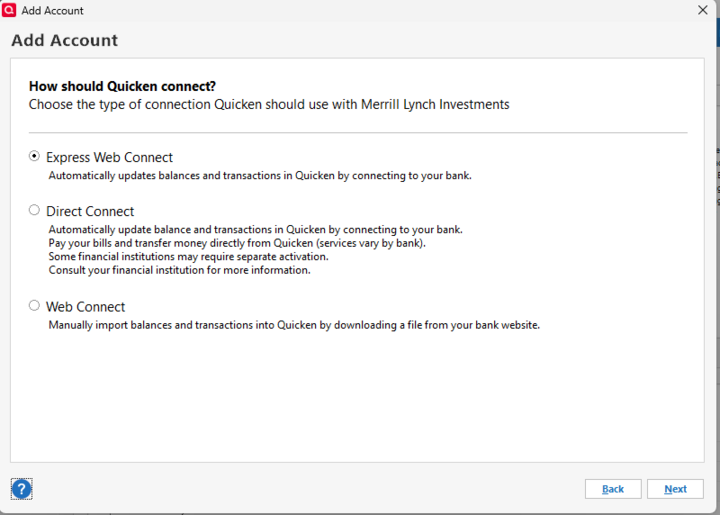
I'm wondering if Direct Connect/Express Web Connect makes a difference here. Can I have you try again, only this time, click on the Advanced Options link near the bottom right?
Then select Express Web Connect, and go through the rest of the prompts.
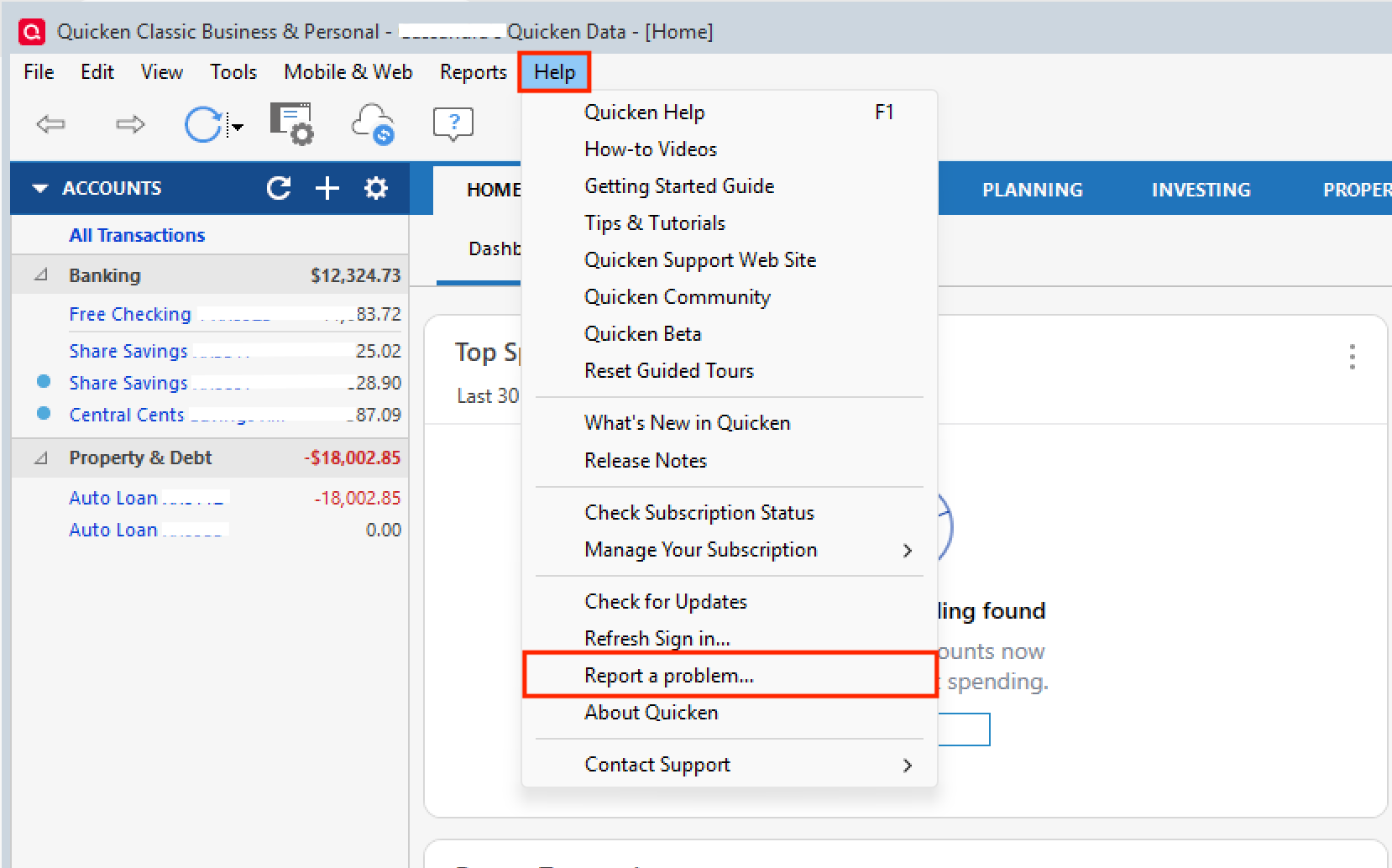
Let me know how it goes. If you receive an error, please go to Help>Report a Problem>Send to Quicken.
Thank you!
Quicken Alyssa
Make sure to sign up for the email digest to see a round up of your top posts.
0 -
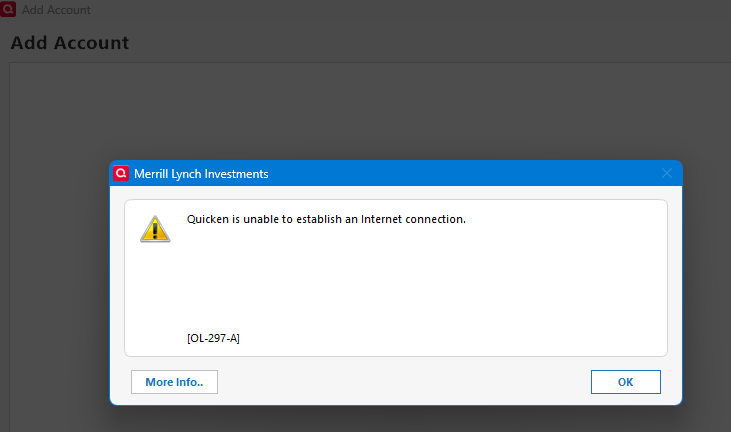
No, it makes no difference. These 401K accounts have never supported Direct Connect.
Error with attempting Direct Connect:
Error with Express Web Connect:
Signature:
This is my website (ImportQIF is free to use):0 -
Thanks everyone, esp. @Chris_QPW and @Lbrinkman. Per @Quicken Alyssa, I submitted a problem report via Quicken "Report a problem…" feature of "One Step Update Summary" popup. I had to deselect several files so that I could attach 2 PNGs showing the FIDIR.TXT file and "…Update Summary" popup. I also included the URL for this Community web page too.
Frankly, if they just made "zzz-Merrill Lynch Retirement Group" work like it did last month before the "zzz-" prefix, that would help until they got the new Exp-Web-Connect working for "www.benefits.ml.com".
I hope it is fixed in the next 1-2 weeks, so that my Quicken is accurate before end of October 2025. 😀
0 -
Folks, if you are no longer employed with the company that used Merrill Lynch as your 401k, just roll it over to a Rollover IRA at Vanguard. You will have many more investment options at a lower cost…plus you won't have to deal with this download mess.
0 -
Hello All,
Thank you for following up on this discussion. I do see one of you sent in logs, thank you for that!
I have created a ticket for this issue. If I can get some more of you to go to Help>Report a problem>Send to Quicken, that would help out a lot.
Let me know if you send them over so I can add them to the ticket.
Thank you!
(CTP-14813)
Quicken Alyssa
Make sure to sign up for the email digest to see a round up of your top posts.
0 -
Believe me if I could I would have rolled my wife’s 401K into our Chase accounts but she is still working.
I submitted a problem report referencing you problem report number in the title.
Signature:
This is my website (ImportQIF is free to use):0 -
Hello @Chris_QPW,
Thank you for letting me know that you have sent over your logs! I have added them to the ticket.
Thanks again!
Quicken Alyssa
Make sure to sign up for the email digest to see a round up of your top posts.
0 -
My experience is that Fidelity Investments (Rollover IRA, CY-2025) is more feature rich than Vanguard (401k, CY-2022). But maybe all financial firms treat Rollover IRA customers better than 401k customers. Detailed comparisons would be off topic….
I strongly recommend everyone download their complete transaction-history lists quarterly from their financial institutions web sites, esp. if they use Quicken. It was a decade after I started using Quicken in CY-200x, that I discovered that my Quicken Direct downloads had many placeholders for missing 401k-transactions, and that I should have periodically used the 401k web site for QFXs, or even CSVs and PDFs.
My FIDIR.TXT has over 15,200 financial data sources (with over 12,400 login URLs, for over 11,200 company URLs), plus over 150 sources that are being phased out (zzz-….). Wow! That is a lot of partner companies for Quicken to work with!
Thanks for putting in the ticket @Quicken Alyssa.
0 -
Yes…Fidelity Investments would be fine as well. I choose Vanguard due to their emphasis on low cost index funds (which over time tend to beat actively managed funds in terms of performance…although Fidelity does have index funds as well.) I download my transactions and update my asset prices each morning into Quicken. I like to keep a close eye on what is happening due to the size of my portfolios. I've been downloading into Quicken for about 15 years…but a Quicken user for over 29 years. Hopefully this Merrill Lynch issue can get resolved…but the moment I am no longer employed at my current employer the first thing I will do is roll it over to Vanguard. This post was off topic I know…
0 -
To concur with others in this thread, it appears that the .QFX file downloaded from www.benefits.ml.com for Merrill Lynch 401(k) accounts reference:
ORG: Merrill Lynch Retirement Group
FID / INTU.BID: 10779As of recent switch to EWC+, the ORG and FID don't have a matching entry in Quicken’s FIDIR.TXT file, located at: C:\ProgramData\Quicken\Inet\Common\Localweb\Banklist\2019\fidir.txt (on my computer). This causes Quicken to reject the .QFX file with the error message: “Quicken is currently unable to verify the financial institution information for this download.” Unable to set up a new connection using EWC+ because there is no option to select "Merrill Lynch Retirement Group" (at the correct website www.benefits.ml.com) as a Connected Account.
Steps That Worked for Me:
- Download the .QFX file from www.benefits.ml.com — be sure to SAVE the file (don’t OPEN from the website).
- Open the saved .QFX file in Notepad or another text editor.
- Locate and replace the following lines:
ORIGINAL:
<FI>
<ORG>Merrill Lynch Retirement Group</ORG>
<FID>10779</FID>
</FI>
<INTU.BID>10779</INTU.BID>CHANGE TO:
<FI>
<ORG>Merrill Lynch Investments</ORG>
<FID>05550</FID>
</FI>
<INTU.BID>05550</INTU.BID>This matches an existing entry in the current FIDIR.TXT file.
- Save the edited file.
- In Quicken, go to: File → File Import → Web Connect (.QFX) File, and import the modified file.
- Quicken will prompt you to either create a new account or link to an existing one. I chose to link it to my existing 401(k) account, and it updated correctly.
- This also changed the Financial Institution name to "Merrill Lynch Investments" in Account Details, so it won't prompt again to create new account.
Notes:
- Using Quicken Classic Premier, Rev 64.30.
- My 401k account is set to “Simple – Positions Only” (not “Complete – Positions and Transactions”).
- This workaround only applies to manual QFX downloads. I assume One-Step Update won't work since the original financial institution ORG and ID is no longer recognized.
- I wouldn't be surprised if the ability to manually download QFX files from www.benefits.ml.com is removed at some point.
Please let me know if anyone finds a more permanent solution.
5
Categories
- All Categories
- 56 Product Ideas
- 36 Announcements
- 223 Alerts, Online Banking & Known Product Issues
- 22 Product Alerts
- 701 Welcome to the Community!
- 671 Before you Buy
- 1.2K Product Ideas
- 53.7K Quicken Classic for Windows
- 16.3K Quicken Classic for Mac
- 1K Quicken Mobile
- 813 Quicken on the Web
- 111 Quicken LifeHub