Tab Bar has turned Black
Ver. R64.30, Windows 11, Problem start: 10/01/2025
Tab bar is fine and intact when opening and using Quicken. The problem happens after One-Step Update has finished downloading. As soon as the One-Step Update box closes, the tab bar turns black. Only way to get tab bar back is to close and reopen Quicken.
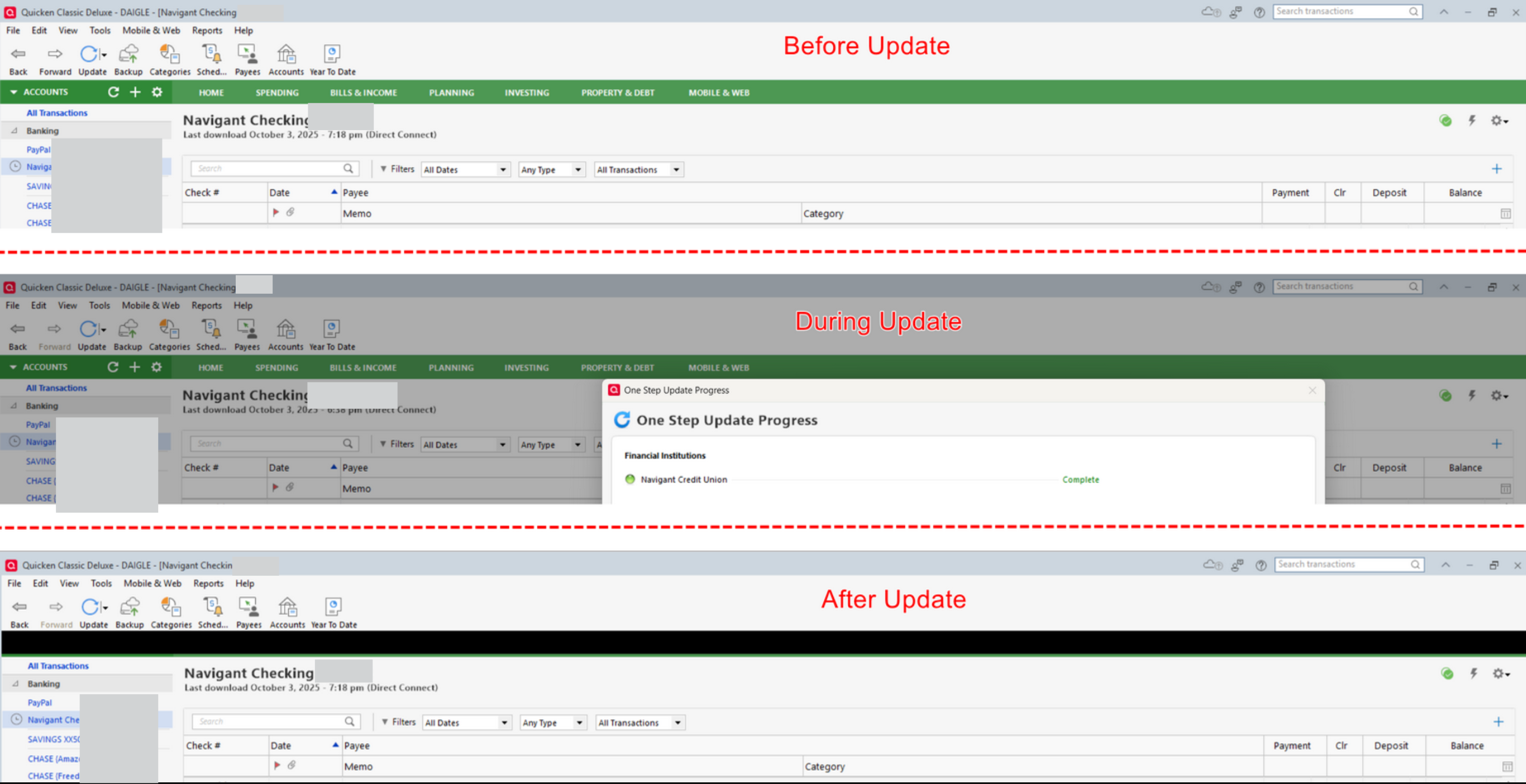
[Edited Screenshot for Privacy & Security]
Comments
-
Hello @bluesgene,
Thank you for reporting the issue with the tab bar turning black after One-Step Update. To help troubleshoot, could you provide some additional details?
- Where is your Quicken data file stored — is it on your local hard drive (C: Drive) or on a cloud-based/external drive (e.g., OneDrive, Dropbox, USB, etc.)?
- Have you attempted any troubleshooting steps so far? If so, what were they?
- Were there any significant changes to your system or software before the issue began (updates, new installations, etc.)?
- Does this happen consistently every time you run a One-Step Update, or is it intermittent?
Check back and let us know! Thank you.
-Quicken Anja
Make sure to sign up for the email digest to see a round up of your top posts.0 -
- local HD data file storage.
- didn't try any troubleshooting
- other than the recent Quicken R64.30 update, no other changes to system or software
- issue consistently happens every time I run One-Step Update
0 -
I uninstalled/reinstalled Quicken today, but the problem persists. The Tab Bar is still as black as ever
0 -
Hello @bluesgene,
Thank you for the update and for letting us know the issue persists after reinstalling Quicken.
When you uninstalled and reinstalled, did you follow these steps below?
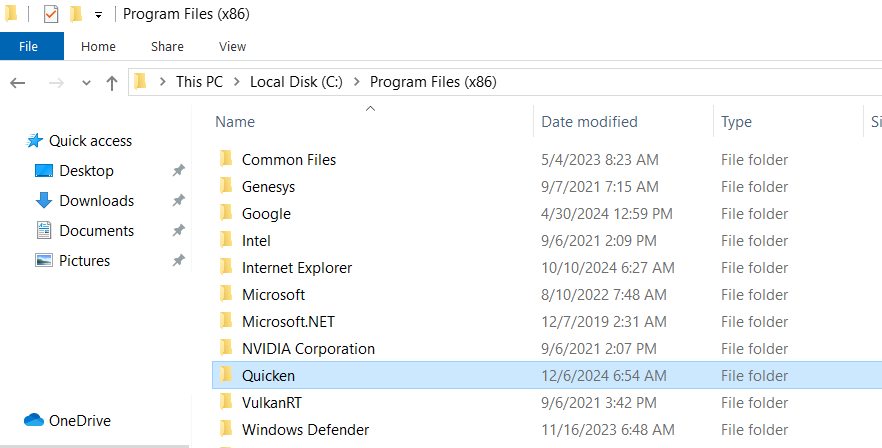
After uninstalling Quicken, please open Windows File Explorer and navigate to:
This PC > C: Drive > Program Files (x86). Then delete the folder titled "Quicken". This will not affect your data files.
Once that folder has been removed, proceed with reinstalling Quicken. This step ensures that any leftover program files from the previous installation are cleared, which can sometimes resolve display/UI issues like the black tab bar.
Check back and let us know! Thank you.
-Quicken Anja
Make sure to sign up for the email digest to see a round up of your top posts.0 -
OK, I deleted Quicken file after uninstall. Reinstalled, but no dice. Black Tab Bar is insistent.
0 -
Thanks for following up!
Since reinstalling the program didn’t resolve it, this leads me to believe that this may be an issue with the data file itself.
Next, please restore a backup from before you first noticed this issue and see if the same behavior occurs in that backup. If that’s too far back to restore, please let me know and we can try some other troubleshooting.
Let us know how it goes!
-Quicken Anja
Make sure to sign up for the email digest to see a round up of your top posts.0 -
I'm running Quicken Classic R64.30 HF3 Build 27.1.64.30 which was originally installed from with in Quicken, but today I downloaded and installed the corresponding Mondo Patch.
I'm also having the issue with the Black Bar showing up over the Tab Bar immediately after a One-Step Update finishes. Doesn't matter if I run the One-Step Update on a single account or multiple accounts.
I frequently do data file validations and backup my Quicken data files.
I took a backup data file from Sept 24, 2025, the day before I first installed Quicken Classic R64.30 HF3 Build 27.1.64.30. I then ran a Super-Validate on the data file to verify it had no problems.
I then did a One-step Update. The Black Bar still showed up over the Tab Bar after running the One-Step Update with the data file from Sept 24, 2025.
0 -
Did as you suggested and opened a backup file that was well before the issue arose. Still can't shake the black bar.
0 -
I am not experiencing this issue, so it's probably not a Quicken program or data file issue. I would start to suspect a display driver conflict. But, when was the last time your restarted your computer system? Are you using the recommended display settings for scale and layout?
0 -
System was restarted as recently as today. Display settings are OK, but tried other settings just to see but it didn't make a difference. Issue started shortly after the most recent Quicken update.
0 -
Have you tried changing the Tab bar color to some other color scheme than green … just to see if that resets the memorized tab bar color and prevents it from going black
(Edit / Preferences / Colors: Tab color scheme)
and try turning off "dim disabled windows"You can always change back to green if you don't like the other color choices.
1 -
Tried changing the tab color scheme but the problem still continues.
0 -
I have the same problem. Just started recently. Defiantly a Quicken issue.
0 -
Actually, the Black Bar seems to be overlaying most of the Tab Bar. On my screen, I can see a narrow section of the bottom of the tab bar. If I right click on that visible portion of the tab bar's visible portion, I get a context sensitive pop-up menu from the tab bar. If I right click on the Black Bar, I get nothing.
0 -
Wow rbylsma, good observation!
0 -
Well, changing the Tab bar color scheme was worth a try. Sorry, it didn't help solve the issue.
If you haven't done so already, I'd say it's time to contact Quicken Support on the phone during posted hours of operation and request help. Let them do a screen share session with you to review the situation on your computer, to determine the nature of the problem and to figure out how to fix it.
0 -
Hello All,
Thank you for taking the time to report this issue.
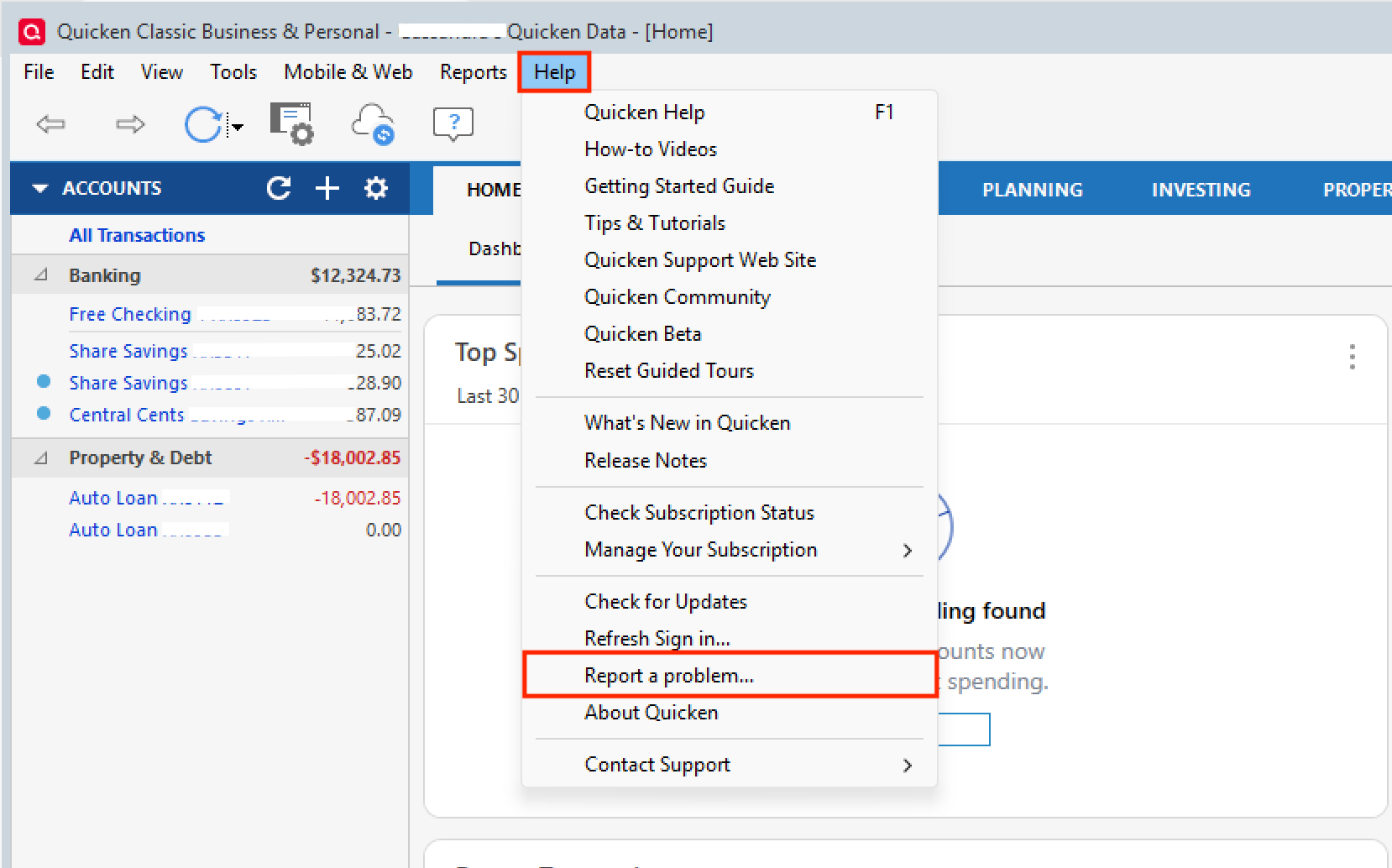
We have forwarded this issue to the proper channels to have this further investigated. If you haven't already, we request that you please navigate to Help > Report a problem within your Quicken program and submit a problem report with log files and screenshots attached in order to contribute to the investigation.It would also aid the investigation to include a sanitized file when submitting the problem report. A sanitized file is a data file that removes personally identifiable information so you can comfortably share this file with the Quicken team.
While you will not receive a response through this submission, these reports will help our teams in further investigating the issue. The more problem reports we receive, the better.
We apologize for any inconvenience in the meantime! Thank you.
(CBT-861)-Quicken Anja
Make sure to sign up for the email digest to see a round up of your top posts.0 -
I did submit a problem report earlier today and included a sanitized data file
0 -
I reported the problem a week ago but I didn't know to send it sanitized, so it went through as is. 😥
0 -
@bluesgene & @rbylsma Thank you both for submitting your problem reports! I’ve collected the files and added them to the ticket for our team to review.
@bluesgene—no worries if your initial submission didn't include a sanitized data file. The team can still use your logs to investigate the issue. They just prefer receiving a sanitized file when possible, as it allows them to see the issue “in action” without any personally identifiable information.
We appreciate your help in providing these details—it really makes the investigation more effective.
Thank you!
-Quicken Anja
Make sure to sign up for the email digest to see a round up of your top posts.0 -
Going on rbylsma's observation that the Black Bar seems to be overlaying most of the Tab Bar and that you can see a narrow section of the bottom of the tab bar, I noticed that if I left click on that narrow section in the position where one of the tabs would be, the tab opens. So I will be doing that from now on until/if this gets fixed by Quicken, instead of closing and re-opening Quicken (which is what I've been doing).
0 -
As a temporary solution, you can bring the Tab Bar back into full view, below the Black Bar, using the View selection of the main menu at the top of the Quicken window. First click View → Show Tabs to tell Quicken to hide the Tab Bar and then click View → Show Tabs a second time to tell Quicken to display the Tab Bar.
1 -
@bluesgene & @rbylsma Thanks for sharing your observations and the temporary workarounds. Those are really helpful for other users who may be experiencing the same issue.
In the meantime, the ticket for this issue remains open and actively investigated (CBT-861).
We appreciate your patience!
-Quicken Anja
Make sure to sign up for the email digest to see a round up of your top posts.0 -
This morning Quicken Classic Deluxe notified me that a version R64.35 update was available. The note simply stated a few bugs were fixed, but did not give any details about the fixes. I installed the new update then tested to see if the Black Bar issue was fixed. It was not fixed in this new release.
0 -
I have done all updates and am still having this problem
0 -
I am also having this problem. It seemed to start after Quicken had me change the way they were downloading data. I had to sign In to my account again under the new system.
I am not sure of the exact start time but it was around this time. I initially hoped it was a short time glitch that would be resolved through updates since I saw online that many seemed to be having the same problem,
I get the menu back by clicking VIEW, CLASSIC MENU. The black bar does not go away but menu is useable.
0 -
In an effort to keep the Community organized, I went ahead and merged your post into this existing one.
If you would like to aid in the investigation, you can go to Help>Report a problem>Send to Quicken. That will send over your log files.
Let us know once you have done so, and we will add you to the ticket.
Thank you.
Quicken Alyssa
Make sure to sign up for the email digest to see a round up of your top posts.
0 -
I have reported the problem to quicken. with a sanitized file.
0 -
Not sure why, but as of a few days ago, I am no longer getting the Black Bar overwriting my Tab Bar. As reported above, this was not fixed when I updated to version R64.35. My guess is that something was fixed on the Quicken server side was fixed to prevent the data being downloaded during a One-Step Update from causing the Black Bar to appear.
0 -
Thank you both for the updates!
@cschwalm—we appreciate you taking the time to submit your report and include a sanitized file. We’ll get your details and files added to the active ticket for this issue.
@rbylsma—thank you for sharing your update! We're glad to hear the issue appears to be resolved on your end.
For everyone else following this thread, please note that the investigation ticket will remain open as our teams continue to work on this, in case others are still experiencing the black tab bar issue.
Thank you all for your continued patience and cooperation!
-Quicken Anja
Make sure to sign up for the email digest to see a round up of your top posts.0
Categories
- All Categories
- 56 Product Ideas
- 36 Announcements
- 223 Alerts, Online Banking & Known Product Issues
- 22 Product Alerts
- 701 Welcome to the Community!
- 671 Before you Buy
- 1.2K Product Ideas
- 53.7K Quicken Classic for Windows
- 16.3K Quicken Classic for Mac
- 1K Quicken Mobile
- 813 Quicken on the Web
- 111 Quicken LifeHub