Balance errors created by reconciling a transaction
I don't know if this is related to all the Fidelity EWC+ conversion / Quicken issues but I just spent 4 hours troubleshooting, going back to backups, re-downloading transactions etc. I finally figured out that if I reconcile a transaction in my mortgage or escrow account (in Quicken of course), that was created from a payment transaction in my Fidelity CMA, the balance of the CMA gets terribly messed up. Any reason for this or has anyone else experienced it?
QW Classic Premiere R64.30 Windows 11
Comments
-
Hello @bbuckley,
Thanks for your post — I know how frustrating balance issues can be.
Just to clarify: are you saying that all balances look correct, but simply reconciling a transaction causes the balance in a corresponding account to go off? While reconciling, are you seeing any adjustments being added, or does it reconcile with a $0 difference?
This definitely sounds unusual and not like the expected behavior.
A couple of things I’d like to check:
- Where is your Quicken file currently located?
- Is it being backed up or synced by a third-party cloud service like Dropbox, OneDrive, or iCloud?
Let us know — we’ll help you get to the bottom of it.
Quicken Alyssa
Make sure to sign up for the email digest to see a round up of your top posts.
0 -
Hi Alyssa,
Yes, starting with everything correct; balances in all accounts, transactions etc, I go to the mortgage account and verify the balance & transactions are correct, so in that register I click Mark Reconciled for the last entry, which was created in the Fidelity CMA, and after entering the reconciliation, the balance in the CMA goes completely off the rails. All the balances in that register are off by an amount that makes no sense to me at all. Unchecking the reconciled transaction in the mortgage account doesn't fix it. There are no adjustment transactions in either account.
The Quicken file is in a Dropbox folder that I have downloaded to my SSD but synced. I do this so I can use Quicken on my laptop and desktop computers.
0 -
Hello @bbuckley,
Thank you for providing those additional details.
Quicken files are meant to be used from a single computer. Using a cloud service to sync your files is highly discouraged, especially syncing them between two computers, as it can cause damage to your files. Damage may not happen or be noticeable immediately, but is still possible nonetheless.
Side note: You can save backup files externally, but a Quicken data file should not be accessed/used from an external location.
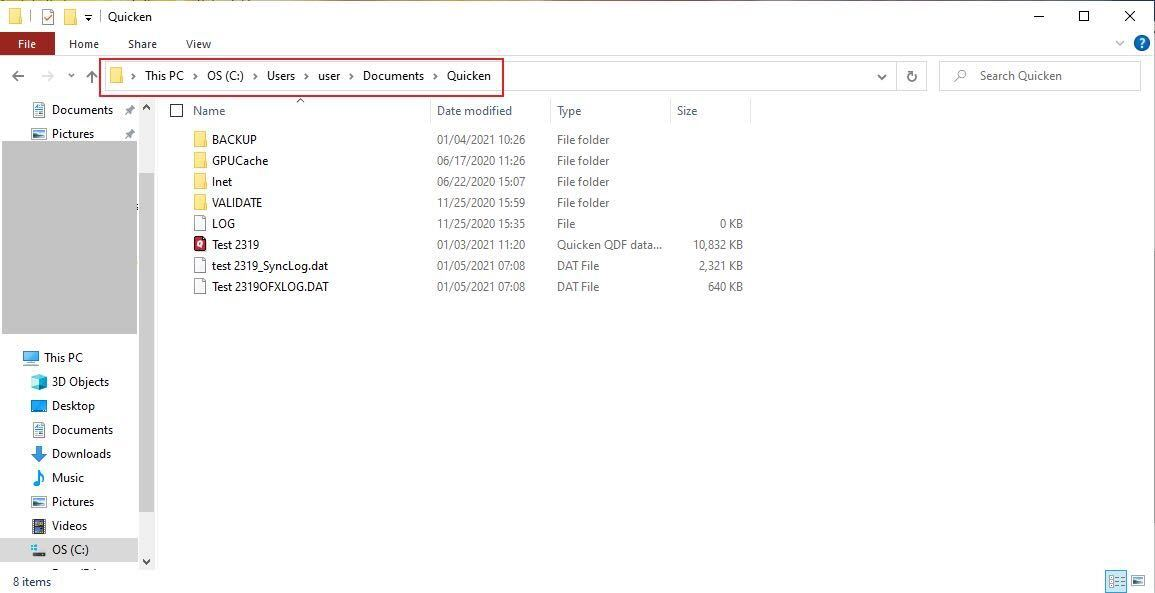
That being the case, I think a good place to start would be by moving your file onto your C drive. The default location for a Windows file is C:>Users>username>Documents>Quicken. This is where we recommend storing it.
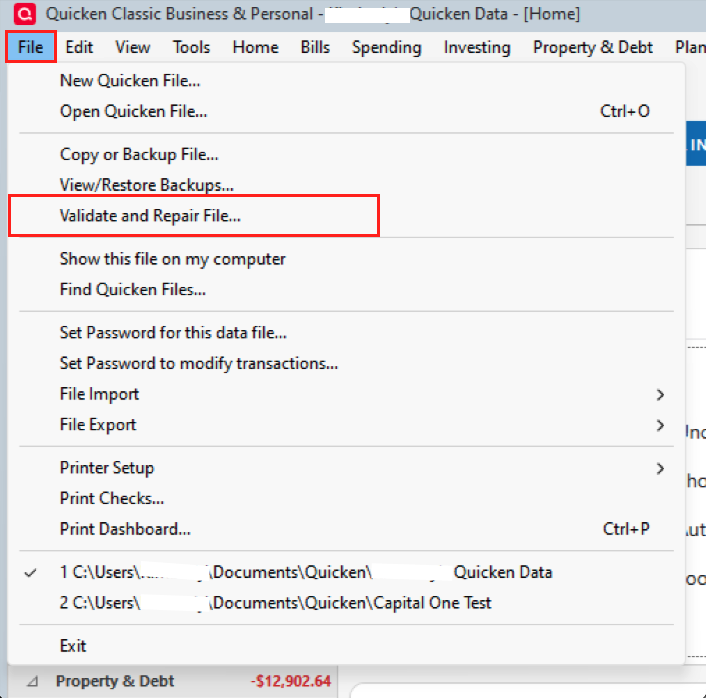
Once you have moved the file, we should Validate it next. Go to File>Validate and Repair file…>check the first box, Validate file>click Ok.
After the validation has completed, try reconciling again. Does the issue still exist?
Looking forward to your response.
Quicken Alyssa
Make sure to sign up for the email digest to see a round up of your top posts.
0 -
I’ll do what you’re suggesting, but I don’t understand… if I sync the entire file to my PC or laptop then turn off syncing while working on the file then after closing it turn the sync back on, why would that endanger the Quicken file? It’s just ones & zeros at that point that get uploaded encrypted just like every other file I sync to a cloud service. I happen to use Dropbox because they encrypt the data at rest as well as in transit.
0 -
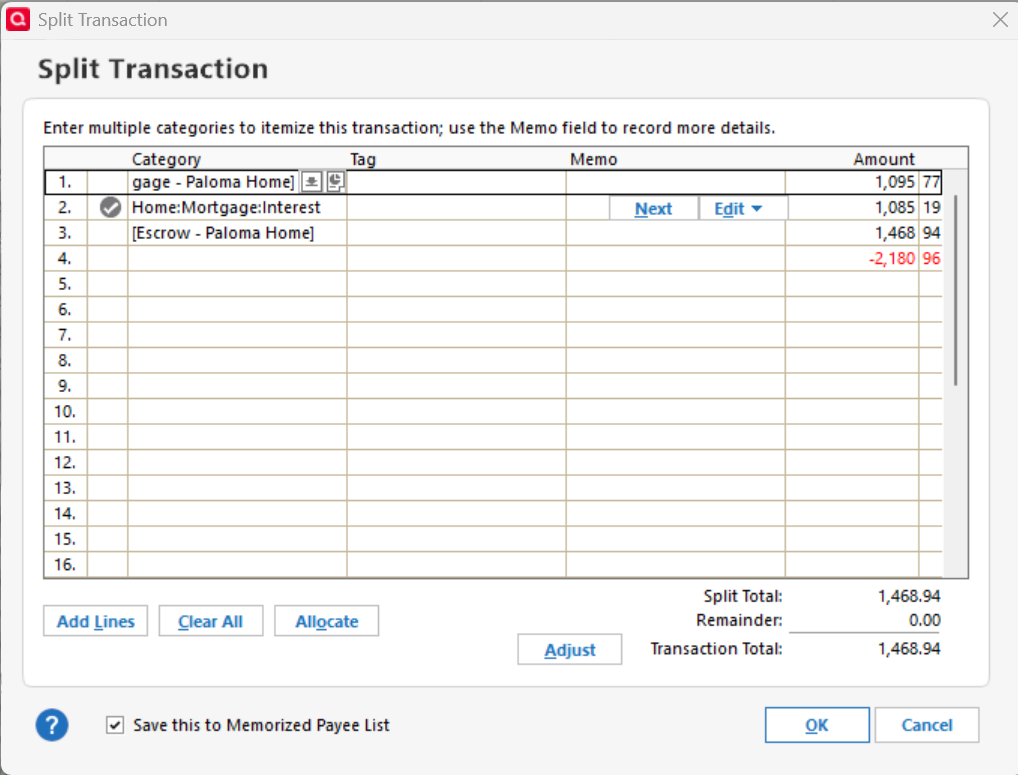
OK, I moved the file to the default location and performed the Validate procedure. When I reconciled the last transaction in the Escrow account it changed the balance in the CMA account, where the split transaction originated. But I was able to figure out what happened. The original split transaction was changed to have an entry that is equal to the sum of the other two entries in the split. So, that affected the CMA account balance. I didn't recognize this before because I selected multiple transactions in the Escrow account to reconcile at once so the CMA balance changed by a big number that I couldn't recognize. If I had noticed that all the CMA split transactions had different balances I would have opened one and seen the added entry.
This appears to be a Quicken issue not a file issue from cloud sync.
0 -
Hello again @bbuckley,
Thank you for following up and providing additional details.
Please follow the steps outlined in this Support Article for advanced troubleshooting. If the steps do not resolve the issue, please contact Quicken Support directly so they can take a closer look at this issue and see it happening in real time.
Thank you!
Quicken Alyssa
Make sure to sign up for the email digest to see a round up of your top posts.
0
Categories
- All Categories
- 56 Product Ideas
- 36 Announcements
- 223 Alerts, Online Banking & Known Product Issues
- 22 Product Alerts
- 701 Welcome to the Community!
- 671 Before you Buy
- 1.2K Product Ideas
- 53.7K Quicken Classic for Windows
- 16.3K Quicken Classic for Mac
- 1K Quicken Mobile
- 813 Quicken on the Web
- 111 Quicken LifeHub