How do I setup a Budget May 1 to Apr 30?
I would like a report with a column showing the budget, one YTD, the $ diff and % diff
Your profile reads "Quicken Windows Other". Without knowing your specific Q product, and the BUILD of that product we really can't help since what's available varies by product and how recent the product is.
The BUILD can be found at HELP, About Quicken.
Quiken Classic Build 27.1.64.30
"Classic" refers to all of desktop Q. Which specific product?
Classic Basic R64.30
There is no Q product called Basic. [Removed - Disruptive]
Hello @David Viking,
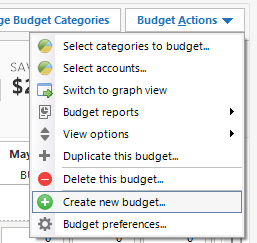
Thank you for reaching out! If you want to create a budget that starts on 1 May, then you will need to navigate to the Planning tab, select the Budgets tab, then in the Budget Actions dropdown, select Create new budget….
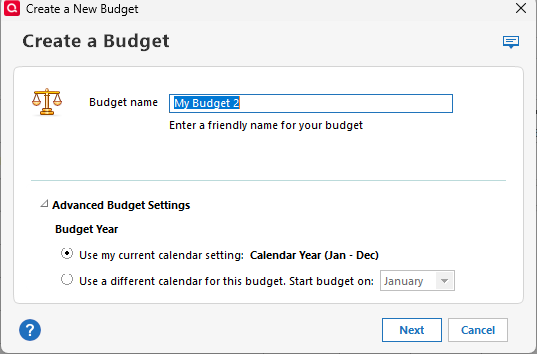
In the window that comes up, click Advanced Budget Settings, and you will be able to select the "use a different calendar for this budget. Start budget on:" option and select the month to start on.
I hope this helps!
Thank you
You're welcome!
If you need further assistance, please feel free to reach out!