Unable to send error report to Quicken
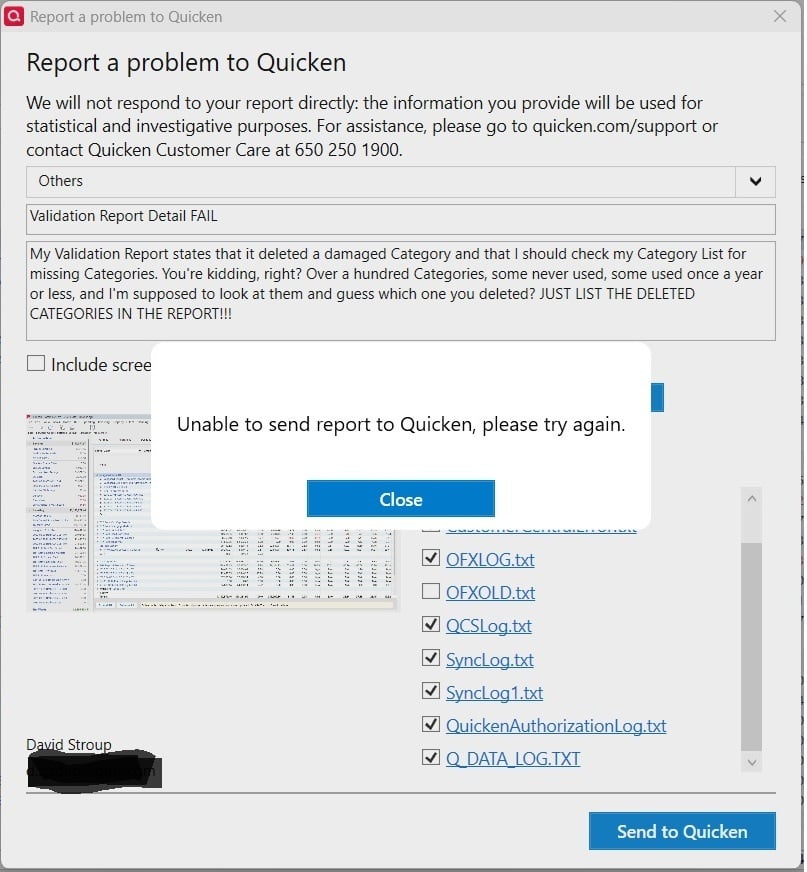
I just updated to Windows 11, 24H2, and tried to send an error report to Quicken regarding the validation report detail (validation deleted a category, then directed me to look at the category list and try to figure out which one is now missing - just tell me the category!). I got an error pop-up saying Unable to send report to Quicken, try again. I reinstalled Quicken, to eliminate possible Windows 10/11 conflicts, and got the same pop-up. I did a full power cycle reboot to start fresh with Windows 11 and the new Quicken, same pop-up. I tried to send the validation report text file (Q_DATA_LOG.TXT, above) each time, without a screen shot or a data file, since they have no effect on the validation report results. I've also tried reducing the number of files being sent, because I earlier ran into the hard limit of ten (10) files, maximum, that the Quicken error system has. Still can't send an error report!
I can't report my error or the error reporting error…

Comments
-
Making the validation log more informative has been "planned" since November 2023.
Quicken user since version 2 for DOS, as of 2025 using QWin Premier (US) on Win10 Pro & Win11 Pro on 2 PCs.
1 -
@Rocket J Squirrel thanks, I didn't expect them to fix it soon, with all the other issues going on. I still have the problem of no error reporting form me of any kind, though.
0 -
Hello @Ducksoup_SD,
Thank you for reaching out! Did the issue with being unable to send problem reports start after the update to Windows? If it did, have you checked to see if the update may have changed security settings? Are you seeing any pop-ups from Windows Defender when you try to send the problem report?
If you use a VPN and/or antivirus, it's possible they're blocking communication, which could cause the problem. Try turning off any VPN and pausing any antivirus, then test to see if you're able to send the problem report.
I hope this helps!
Quicken Kristina
Make sure to sign up for the email digest to see a round up of your top posts.
0 -
error reporting is problematic at best. try removing one or more attachments. try only one JPG attachment, try less verbiage in the description field. all of these have helped me get past that error in the past. also try not to use any special punctuation. like I said, problem reporting has its own problems.
0 -
@Quicken Kristina No VPN. I don't send a lot of errors, so I don't know if it just started after the Windows upgrade - I had to update to Windows 11 due to Microsoft's stuff. There are no Windows notifications of any kind - the screenshot where Quicken won't try to send it is all that I get. Did a new OS change security settings? Probably, but I couldn't begin to guess which ones. As I said, I did install a new copy of Quicken after Windows 11, which I think would be updated to handle any new Windows 11 mandates. Tried turning off the firewall and Defender - no change.
1 -
@Randy 415 thanks, I tried a stripped down version of my report, no jpg's, add a text file (the report), took off two OLD named files and - no change. This is the brand new Windows 11 update of 24H2, so maybe there's something in it that doesn't allow Quicken to do its thing.
0 -
Thank you for your reply,
Do you keep your Quicken file directly on your local hard drive? Is it synced with any cloud service, such as OneDrive, iCloud, or Dropbox? Are you trying to include any attachments aside from the log files that are selected by default? If you are, what file extension are the additional attachments (.jpg, .pdf., etc.)?
Thank you!
Quicken Kristina
Make sure to sign up for the email digest to see a round up of your top posts.
0 -
@Quicken Kristina My data file is on my hard drive and not sync'd with any cloud service. I am trying to include the validation report text file (.txt). I don't send a screenshot or a data file, because they don't show the problem. I have tried removing the default text files that have OLD in their names, to ensure I don't bump into the 10 file limit that the error reporting function has. I noticed that my new Windows 11 is a version that very recently came out - 24H2. Possibly that has some quirks in it that Quicken hasn't run into before. I know I've had problems in the past with Edge not being updated; maybe the version I have now is too new to work properly with today's Quicken.
0 -
I have had the same problem in the last month with Quicken Classic's Help > Report a Problem function.
I tried to send in a fairly simple report - text report of a problem, no attached files, no screenshots. My attempted report was rejected with the same message the OP presented in this thread. I got a message that I had too many attached files on the report I tried to send. I added no files, it was only the ones Q included by default. I unchecked a couple files related to the online backup, which I was pretty sure did not play in the problem I was reporting, and my report then was able to be sent.
It appears in some cases, additions to the default files sent with a problem report go above an existing limit in the Quicken reports. For example, activating the online backup adds a couple files to the default list attached automatically to a problem report.
I am current on all updates to Quicken. I am running the Windows 11 Home 25H2 insider dev version of the OS.
1 -
Windows 11 24H2 was released last year on October 1, 2024. I am still using Windows 11 24H2 and haven't upgraded to Windows 11 25H2 yet, which was released September 30, 2025.
I have had the same problem for at least a year. I don't use a VPN and all my files are local, not synced with any cloud service. I will try it again and turn off my Antivirus, but it has occurred with Webroot and Norton. I checked my security settings and nothing appears to be different. @Quicken, if you could tell us what to look for, that would be helpful.
0 -
I had some issues with this a while back. Beyond my already mentioned fixes, I did try two other things that also may have helped.
- Run a repair on your data file.
- Rebuild your data file from scratch by copying all transactions to a new data file.
There are instructions for both of these options online in the Quicken Support area.
Of course, it would be great to fix the real issue which is: Why does Quicken throw that error anyway? (It should not).
0 -
Thank you for your replies @Ducksoup_SD & @the3roots,
If the troubleshooting I posted above did not correct the issue, then you may want to check for file-specific issues. To do that, I suggest that you try validating your data file. Please save a backup file prior to performing these steps.
Validate:
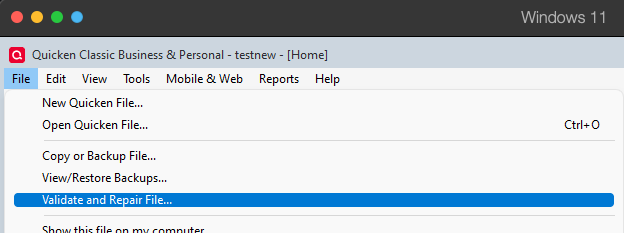
- File
- Validate and Repair File...
- Validate File
- Click OK
- Close the Data Log
- Close Quicken (leave it closed for at least 5 secs)
- Reopen Quicken and see if the issue persists.
Hello @Ray Cosner,
Thank you for sharing your experience. Are you still encountering this issue?
Thank you!
Quicken Kristina
Make sure to sign up for the email digest to see a round up of your top posts.
0 -
@Quicken Kristina no errors in validation and no change in the attempt to report the problem. There appears to be a message that occurs before the "Unable to send report to Quicken, please try again." pop-up, but it's covered so quickly, I can't read it.
0 -
@Ray Cosner , @the3roots , and @Randy 415 - thanks for trying to help and confirming that the error isn't just with my system.
1 -
Thank you for your reply,
Are you using a personal computer or a work computer? If you have an alternate network connection (such as a mobile hotspot), are you able to send the problem report when connected to that alternate network?
Thank you!
Quicken Kristina
Make sure to sign up for the email digest to see a round up of your top posts.
0 -
@Quicken Kristina I use my personal computer. I have a cable modem, with a wired Ethernet 250 Mbps connection (they claim). Sorry, but my error report isn't worth the hours (no hotspot experience, new to Windows 11) it would probably take me to get an alternate network connection working. Even if it did eventually work, I wouldn't do it again to report the next error, I'm sure.
1 -
@Quicken Kristina , Validating my Data File fixed my problem. Thank you very much.
P.S. I am using Windows 11 25H2 now.
1 -
Thank you for the follow-up @the3roots,
I'm glad to hear that validating the file corrected the issue for you!
If you would like to continue troubleshooting, to narrow down if it's being caused by a setting on your user profile on your device, test to see if the issue happens on an alternate device. If you don't have an alternate device to test on, try creating a new admin profile on your computer and test to see if the issue persists under that new profile.
Thank you!
Quicken Kristina
Make sure to sign up for the email digest to see a round up of your top posts.
1 -
@Quicken Kristina Thanks for your help. I just started using the Windows 11 24H2 forced upgrade and I'm planning on upgrading to 25H2 in the next few days (may as well get used to the newest version now), so I don't think I'll be trying to troubleshoot this now. Maybe when I get caught up and feel comfortable with Windows 11, I'll give it another try.
1 -
[Removed - Rant]
Like I said earlier, rebuild your data file, and that will probably "fix" it. Good luck.
0 -
This issue of being unable to submit a problem report remains open. I had this happen again a few minutes ago. Problem report not accepted, reason given was too many attached files. Only the default files were attached to the report, I didn't add any.
I guess that's one way to reduce the number of reported problems.
1
Categories
- All Categories
- 56 Product Ideas
- 36 Announcements
- 223 Alerts, Online Banking & Known Product Issues
- 22 Product Alerts
- 701 Welcome to the Community!
- 671 Before you Buy
- 1.2K Product Ideas
- 53.7K Quicken Classic for Windows
- 16.3K Quicken Classic for Mac
- 1K Quicken Mobile
- 813 Quicken on the Web
- 111 Quicken LifeHub