quicken matches my downloaded transaction to an already rectified tran

ROMAY
ROMAY Member ✭✭✭

For the past few months, Quicken has matched a downloaded transaction with one that has already been rectified months ago. When I unmatch it, the wrong date continues to stick to the downloaded transaction.

One of many many Quicken problems but the only one I care to deal with at this time.

See uploaded file

Any help would be appreciated.

[Edited - Readability]

Comments

  • Quicken Kristina
    Quicken Kristina Quicken Windows Subscription Moderator mod

    Hello @ROMAY,

    Thank you for letting us know you're seeing this issue. I suspect that it keeps trying to match to that reconciled transaction due to the amount being the same. Putting in a payee on the reconciled transaction it keeps trying to match to may help, since if Quicken sees a different payee name, that should prevent it from trying to match to that transaction.

    I'm not able to replicate the issue with the date remaining changed after unmatching a transaction. What kind of account is this happening in (Checking, Savings, Brokerage, etc.)?

    I look forward to your response!

    Quicken Kristina

    Make sure to sign up for the email digest to see a round up of your top posts.

  • ROMAY
    ROMAY Member ✭✭✭
    edited October 17

    hi Kristina, thanks so much for your response. It’s my checking account. From now on, I will put in a payee name so hopefully this won’t keep happening.

    Though you would think if it’s all rectified, it would leave it alone. But still, I will try your solution.

    have an excellent weekend
    Rosemary

  • Quicken Kristina
    Quicken Kristina Quicken Windows Subscription Moderator mod

    Thank you for your reply,

    If the issue persists, please let me know!

    Quicken Kristina

    Make sure to sign up for the email digest to see a round up of your top posts.

  • ROMAY
    ROMAY Member ✭✭✭

    I hope you tell the coders that if something is reconciled, then the current transaction is a new transaction and they should not associated with something that is two months old that has already been reconciled.


    thanks so much for your help.

    Rosemary

  • Bob@45
    Bob@45 Member ✭✭✭✭
    edited October 21

    @ROMAY

    My experience is also different from yours.

    Question: You said earlier "rectified". You did mean "reconciled", yes?

    My experience is that Quicken will not automatically match any newly downloaded transaction with any other transaction that is over a month old. If I need to match a newly downloaded transaction with an older transaction, reconciled or not, I need to edit/manual match the transaction before accepting it.

    It seems to me that Quicken will match newly downloaded transactions if all of these qualify: 1) the dollar amount matches, 2) the date is reasonably recent, 3) it has not been previously matched to any download, and interestingly 4) the historic transaction is not already reconciled.

    I have an FI that does not download all transactions for some reason. If I manually enter a transaction, wait a week, and it's not downloaded to match, I'll go ahead and accept it for reconciliation (assuming the balance matches). If a week later that transaction does finally download, I have to clear the reconciled flag for that older transaction to match (which it will do only if not matched to an earlier download).

    That appears to be the behavior you want, so I don't know why you're seeing these matches you don't want.

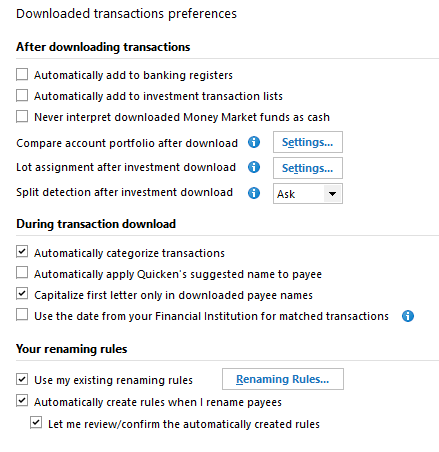
    These are my download preferences.

    image.png

    Another possibility — do you use the Mobile/Web part of Quicken? I don't. If the web side thinks your old transaction needs to be matched, that might be part of the issue.

  • Chris_QPW
    Chris_QPW Quicken Windows Subscription Member ✭✭✭✭

    Just so people know, when doing the matching Quicken ignores the reconcile status. The main reason for this I believe is because someone could switch between offline and online and as such, they would want to match up their existing transactions that might be reconciled with the downloaded ones.

    Here is what Quicken does. Say you enter a transaction, at this point there isn't any associated Downloaded ID with the transaction (you can turn on the Downloaded ID column to see this). That makes it a candidate for matching. After that it mostly the amount and somewhat the date that controls what will be used for the match. Note that date is more used for "don't match really old transactions" not for saying "the downloaded date is this, so pick the closest date to it". I think it still picks the oldest match in say about a 30-day period (I'm on sure of the period it might be up to 90 days) first and then next oldest and such for amounts that are the same. Supposedly the payee is used too, but it seems that if it is used it is a very "weak connection".

    This also implies something. If one deletes downloaded transactions instead of matching them then the manually entered transaction never gets the Downloaded ID and as such is still subject for matching future downloaded transactions until they fall out of the "date window"

    Signature:
    This is my website (ImportQIF is free to use):

    http://www.quicknperlwiz.com/

  • Bob@45
    Bob@45 Member ✭✭✭✭
    edited October 20

    Agreed. So one solution for @ROMAY 's problem may be to turn on the Downloaded ID display for this one account, and fill in a bogus downloaded id for transactions she knows she does not want matched against downloads.

  • Chris_QPW
    Chris_QPW Quicken Windows Subscription Member ✭✭✭✭

    Unfortunately, the Downloaded ID field is read-only.

    It has been requested quite I few times to make it writable, but that has never happened.

    Signature:
    This is my website (ImportQIF is free to use):

    http://www.quicknperlwiz.com/

  • ROMAY
    ROMAY Member ✭✭✭

    hi Bob,

    It seems that your experience and mine are quite different. I’m not sure if you saw the picture I posted in my initial inquiry,but my downloaded transaction absolutely decided to attach itself to an already reconciled transaction in July. This is the second time it happened in as many months and so now I know what to look for it.
    And I moved everything off of the mobile web. It was messing up my memorized split transaction over and over again. So I keep everything very local on my computer.


    I also have a problem with Quicken not downloading all of my transactions. Every once in a while, it decides to ignore one. 🤯 I went through all of the solutions I found on Quicken.com and called Quicken for help. They went through the same solutions I had already found and just said they couldn’t help me. Wouldn’t go through the metadata. Wouldn’t look at the transaction IDs. Whatever.


    I finally realized that Quicken is broken and I’m not spending any more of my time hunting for these errors. This one was quick to report.

    I remember when I could count on Quicken .Now my husband stays far away from me if I have to pay bills. It’s always something.

  • Bob@45
    Bob@45 Member ✭✭✭✭

    @ROMAY Do you have the "Authomatically add to banking registers" on? I keep mine off, and only allow Quicken to match to transactions I want it to match to. If it guesses wrong, I correct it before allowing the match.

  • Bob@45
    Bob@45 Member ✭✭✭✭

    I finally realized that Quicken is broken and I’m not spending any more of my time hunting for these errors. This one was quick to report.

    I came to that conclusion 4 years ago (maybe longer). I do a manual backup of my quicken files each and every day, and I never apply an update until it's been used by others for a couple of weeks and I've reviewed the community discussions about it.

    If anyone ever creates a really good replacement for Quicken, Quicken will see a mass exodus once the word gets out. (I hope someone is working on one; the ones I've seen so far come close but aren't good enough)

  • Bob@45
    Bob@45 Member ✭✭✭✭

    I’m not sure if you saw the picture I posted in my initial inquiry,

    No, by habit I never look at attachments unless I see a really good reason to do so. Too dangerous these days.

    Also, FYI, whenever I create an entry like your $80 Vacations entry that got matched, I've always entered a payee name and memo, even if it's just "ATM WD Vacation" and "Money for cash on hand". Maybe that's why I haven't seen your problem.

  • Chris_QPW
    Chris_QPW Quicken Windows Subscription Member ✭✭✭✭
    edited October 20

    Her PDF shows that she is using the Downloaded Transactions tab. Of course, she should be able to do an unmatch and then match to the correct one (and that would be true even if she was using "Automatically add to banking registers") but I get that it is just the fact that Quicken gets it wrong and she (like a lot of people) expects it to ignore reconciled transactions, which it doesn't, and she has to do the extra steps that is the problem.

    BTW once you go down the path of deleting instead of matching to the proper transaction it will just go on and on because now you have yet another transactions that hasn't been properly matched.

    At the end of the day, Quicken is making a guess, not much different than its guessing at what are transfers. It doesn't have much to go on other than the amount. The payee downloaded doesn't have to match with what the user might call it. The date can vary quite a bit between what is entered and the downloaded one. And as I pointed out the reconcile status might not indicate that the user wants it excluded from matching.

    This is why people need to look at each transaction and make sure they are correct not just accept that they are all going to be right. This is especially true in investment accounts.

    This is the nature of Quicken.

    Signature:
    This is my website (ImportQIF is free to use):

    http://www.quicknperlwiz.com/

  • ROMAY
    ROMAY Member ✭✭✭

    Bob, I just checked and I don't have "Automatically add to banking registers" on.

    So from now on if i enter a transaction by hand, I will put something in the Payee field. We will see if that helps. And I just need be aware that Quicken had many flaws and I just have to roll with them. :-/

    But thanks for all of the help. Maybe when I get the stupid "Quicken skips downloading bank transactions" problem again, I will post it.

  • DennisDe
    DennisDe Quicken Windows Subscription Member ✭✭✭

    For months, I had the same issue. I turned off Syncing and it seems to have the problem.

  • ROMAY
    ROMAY Member ✭✭✭

    Yep, I turned off syncing a long time ago. It kept messing up my memorized payee categories in a split that I use over and over again.. They even gave me a ticket number for the error. Who knows if they’ll ever work on.

This discussion has been closed.