Why can't I get a reconcile screen for my Fidelity Credit Card
Hello @Billt3256,
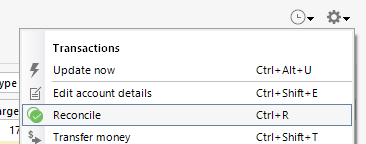
Thank you for reaching out! To help troubleshoot, please provide more information. What is happening when you try to access the reconcile screen? What method are you using to get to the reconcile screen? For instance, are you using the gear icon near the upper right of the register, then selecting Reconcile?
I look forward to your reply!
There is no gear in the upper right, like other accounts. This seemed to happen after you made changes to Fidelity sign ons. I also got transactions in all my Fidelity accounts that had previously been accepted.
[Edited - Readability]
Thank you for your reply,
If the duplicate transactions downloaded only once, and were for the most recent 30-60 days, that is normal behavior when connecting/reconnecting accounts by a different connection type. The change in the way the data is formatted makes it harder for Quicken to tell that the transactions are already in your register.
Not having the gear icon in the upper right of the account is unusual. Please post a screenshot of what you are seeing (make sure to redact any personal information please). If needed, please refer to this Community FAQ for instructions on how to attach a screenshot. Alternatively, you can also drag and drop screenshots to your response if you are not given the option to add attachments.
Thank you!
This is the heading when i click on the account
Are you encountering the same issue with the gear icon not showing in all of your accounts, or just in the Fidelity account? Does closing that yellow message about pending transactions let you access the gear icon?
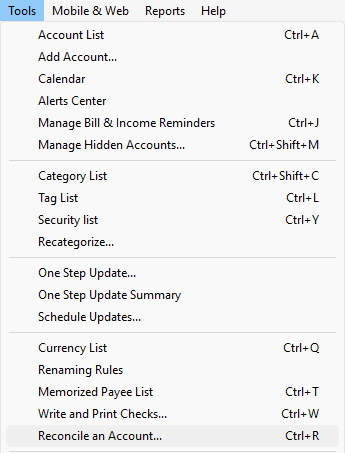
When you're in the account, are you able to use Ctrl + R to start a reconcile? If you have access to the menu options at the top, are you able to go to Tools>Reconcile an Account…?
I hope this helps!