Create Dividend / Interest reports
I'm trying to create a report that identifies all Div/Int posted to Banking AND/OR Investment accounts. I am able to set up such a report from the Spending or Tax areas but, no matter how I try to customize it the report will only refere to Investment accounts not Savings accounts. No matter what I do - even if I unselect all the Investment accounts the report ignores Savings accounts.
Answers
-
What Category are you using for interest income in your banking accounts? Quicken normally uses the Categories that begin with _underscores, _DivInc and _IntInc for investing accounts, but Interest Inc for banking accounts.
QWin Premier subscription0 -
The "Itemized Categories" report, under Spending, seems to be able to include both banking and investing accounts.
Most of my cash is in a MMF, an investing type account, but in 2023 I received a few pennies of interest in a bank checking account and was able to get that to show in the Itemized Categories report
Q user since February, 1990. DOS Version 4
Now running Quicken Windows Subscription, Business & Personal
Retired "Certified Information Systems Auditor" & Bank Audit VP0 -
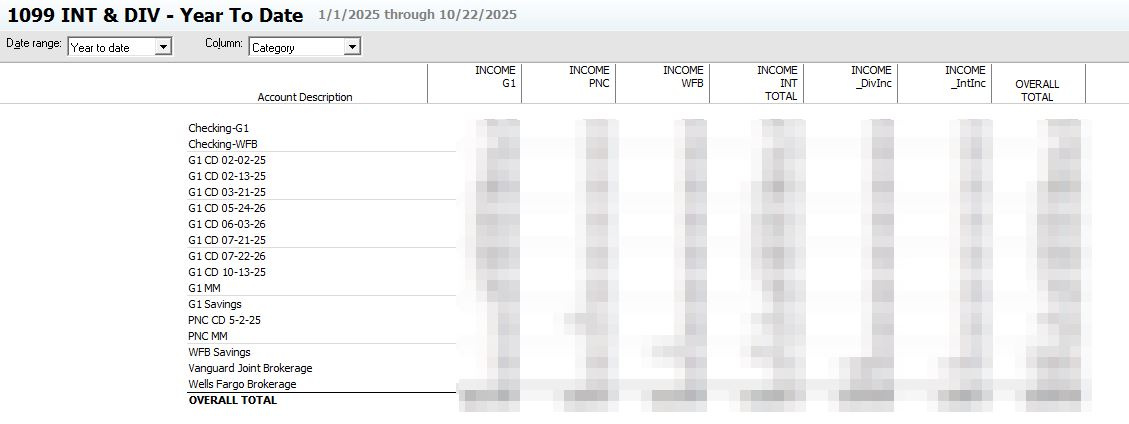
A report like this? Don't remember what kind of report I started with. Maybe an Itemized Category report? I setup subcategories under Interest for each bank then I can get columns. Then I can match it to the 1099s I get.
Customized to YTD, Row=Account, Column=Category
Accounts - the ones I want Banking and Investment
Categories - INT, (_DivInc), (_IntInc)
Payees - AllI'm staying on Quicken 2013 Premier for Windows.
1
Categories
- All Categories
- 56 Product Ideas
- 36 Announcements
- 224 Alerts, Online Banking & Known Product Issues
- 22 Product Alerts
- 702 Welcome to the Community!
- 671 Before you Buy
- 1.2K Product Ideas
- 53.7K Quicken Classic for Windows
- 16.3K Quicken Classic for Mac
- 1K Quicken Mobile
- 812 Quicken on the Web
- 111 Quicken LifeHub