The default account register includes the Transaction Date (in the "Date") column. I also have my spending accounts set up to include the Posting Date column which is the posted date the FI downloads so I can see how long it takes for the financial institutions to process and post transactions.
Generally I will enter transactions (either manually typing them in or by entering previously set up Reminders) into the account registers showing the actual Transaction Dates. Then when Quicken downloads the posted transactions that date will be entered into the Posting Date column without affecting the previously entered Transaction Date.
For many (not all) transactions the Transaction Date and the Posting Date are 2 different dates and historically Quicken has been pretty reliably entering the Posting Date correctly while leaving the previously entered Transaction Date intact. But today I noticed the following:
- Sometimes when the posted transaction gets downloaded the Transaction Date gets entered into the Posting Date column.
- Sometimes when the posted transaction gets downloaded the Transaction Date gets changed to match the Posting Date.
- Sometimes when the posted transaction gets downloaded the Transactions Date remains intact and the Posted Date column is correctly populated to show the date it posted at the FI.
- This Posting Date issue has been made retroactively in all prior transactions for the entire transactions history of the accounts.
- This issue has only occurred in my EWC and EWC+ connected Spending Accounts. My DC Spending Accounts have not exhibited this issue.
- This issue has been observed in 3 different unique data files.
- There does not appear to be much of a correlation with any specific FI. I am seeing this with Chase credit cards, Citi credit cards, Cap One credit cards, Fidelity Investments (Fidelity Rewards credit card), Old National Bank checking (previously Bremer Bank)…but I have not observed this with US Bank checking accounts.
- In Preferences there is an option that I do not recall seeing before. When did this get implemented?
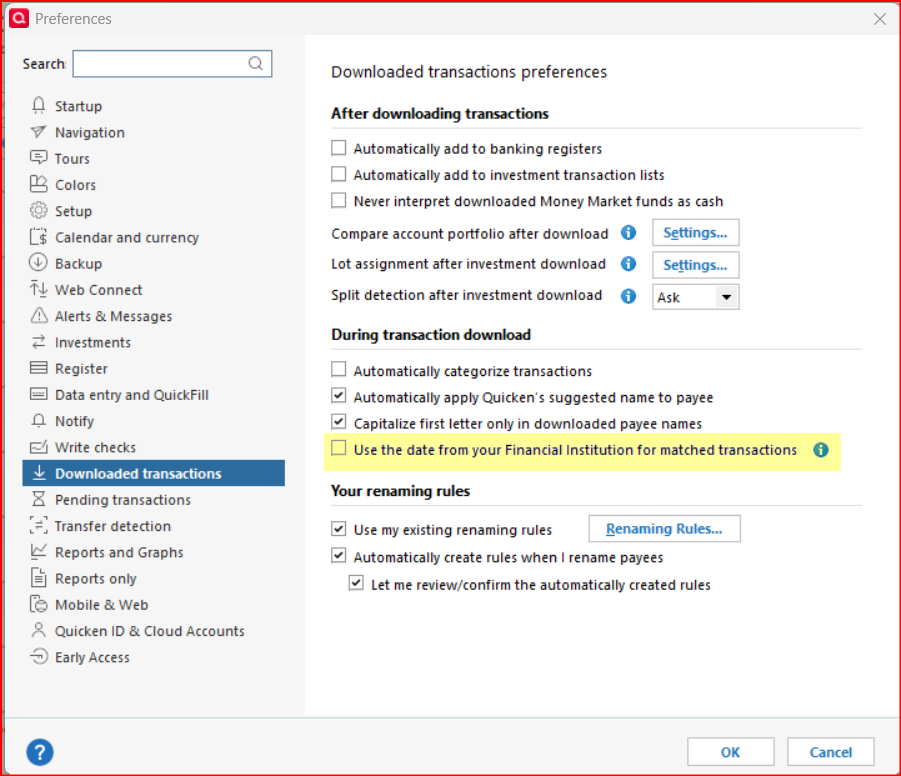
- The information button for this Preference is shown in the following picture. I have not tried checking that Preference box because the way it is worded is not clear as to what this is supposed to be doing. Does it mean the Posted Date is to be entered into the Posted Date column or does it mean that the Posted Date is to overwrite the Transaction Date that was previously manually entered into the Date column?

I'll admit that with all of the moving activities and related traveling I've done the last 2-1/2 months along with all the Fidelity EWC+ migration issues and testing I really had not been paying too much attention to the transaction vs posting dates lately so I have no idea of when this issue started occurring for me.
Is anyone else seeing this?

