PNC bank upgrade affecting Quicken downloads?
Answers
-
I’ll look this AM and see what Quicken version I’m on. If I had to guess (and it is just be a guess), the issues are not with Quicken….. but PNC or the OFX provider, Direct Connect.
When you do your DC downloads, do you show the DC transaction number in your register? I have found that very helpful for identifying duplications.
0 -
I agree that this issue is likely not a Quicken version issue.
- This morning I made a Quicken copy of the data file and got the same OSU results as with the primary data file. This should have eliminated any possible Cloud Account or runtime.dat file cause but since I got the same bad results I think I can rule out these 2 potential causes.
- I also restored a backup file from 2/18 (a day prior to the version update) and got the exact same OSU results.
- I then down rev'd to R65.29, restored a 2/17 backup file and got the exact same OSU results.
- I aborted an attempt to set up PNC DC in a test file because I was prompted to change my DC PW and I didn't want to go there.
After each of the attempts above, Reset Account made no difference.
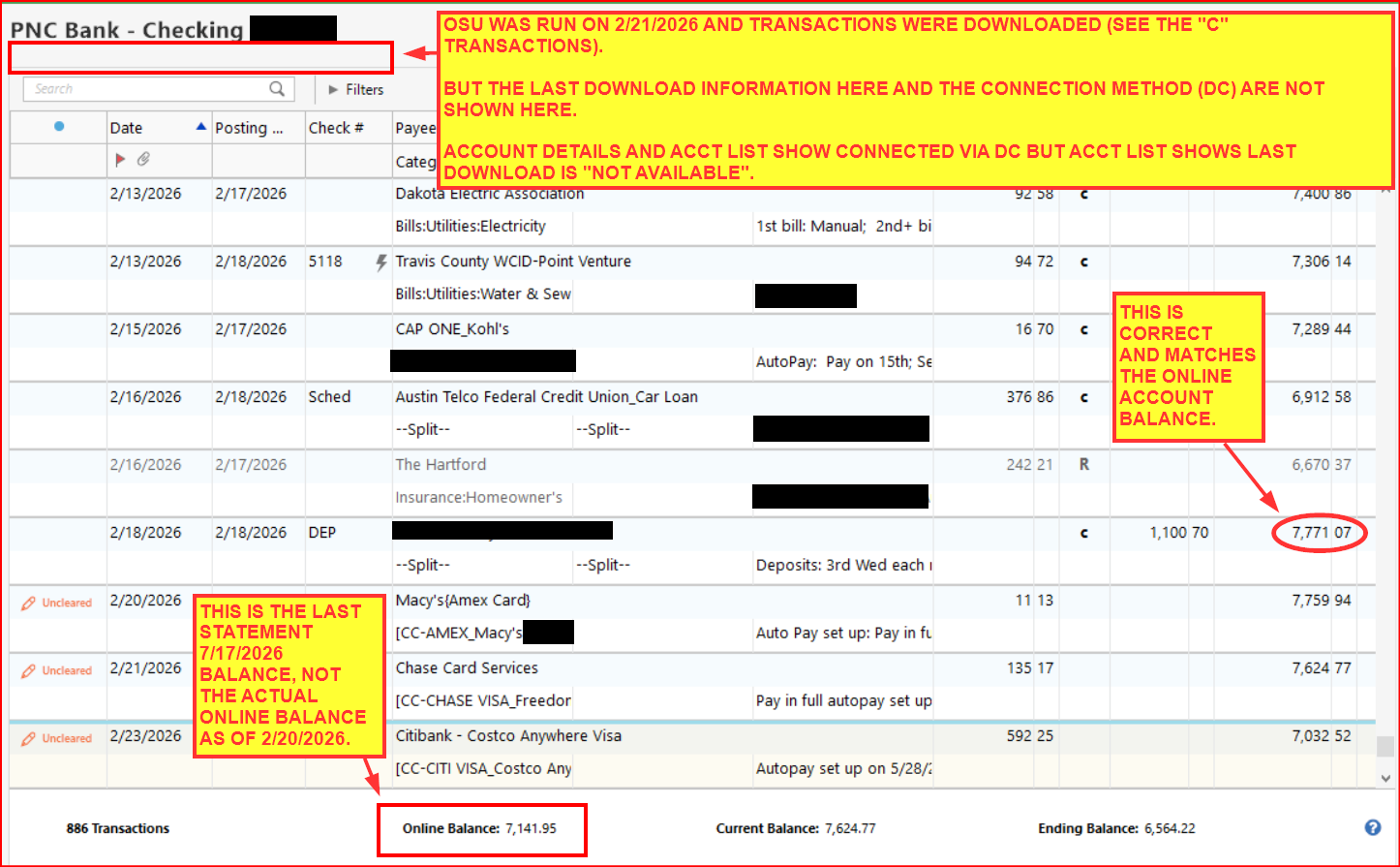
After each of the attempts above, I deactivated each of the accounts. The PW Vault seemed to be OK showing that the PW is Saved but to be sure I deleted the PW Vault and then did Add Account for PNC Bank - Direct Connect selecting Advanced Options and then Direct Connect and used my original DC login information.each time so it was set up, again. The setup process seemed to work OK matching the downloaded data to the correct accounts but the Online Balance is still incorrectly showing the last Statement balance.
And after each attempt the Account List and Account Details shows DC is connected. But Account List shows the last download is "Not Available" and the Account Register below the Account Name shows no information when it should show the last download date/time and the connection method.
Oh, and no error codes/messages received through all of this.
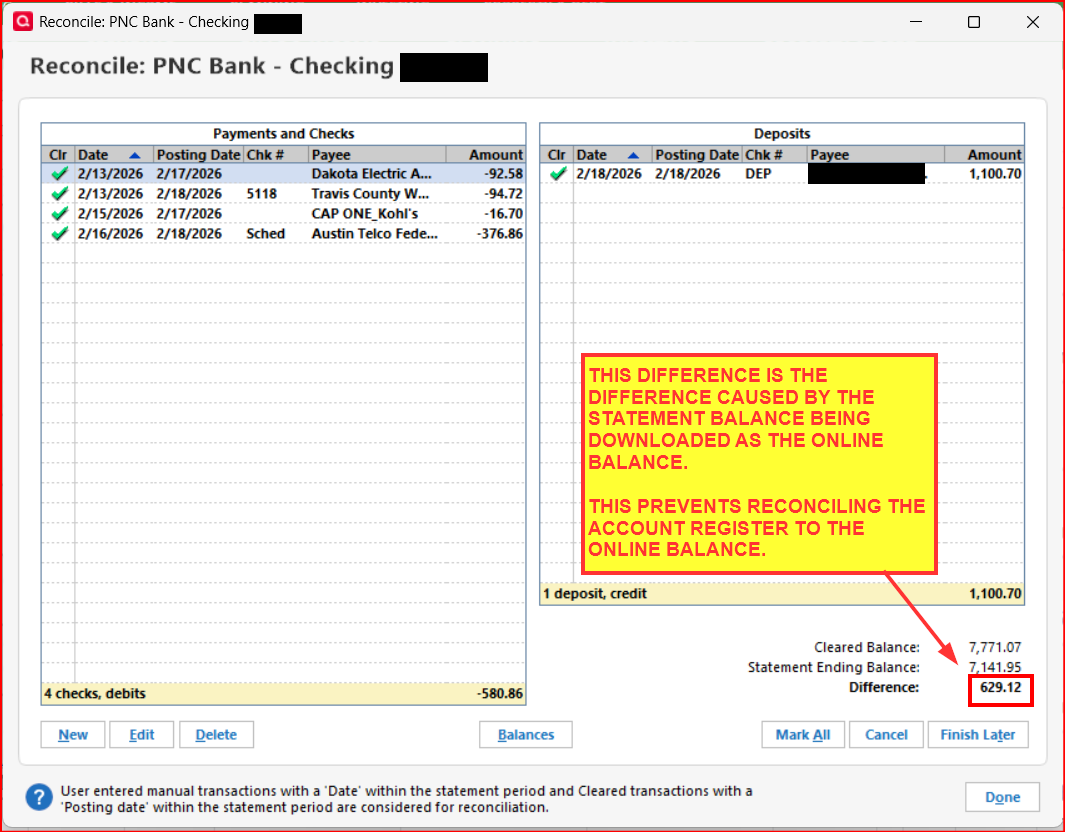
No issues with any other FIs. So, yeah, it sure seems that PNC DC issues have returned for me. All of the symptoms mentioned above are pretty much identical to the issues I experienced toward the end of November and into early December. The exception being that the downloaded Online Balance incorrectly shows the last Statement Balance instead of the real online balance.
I've got a lot on my plate today and tomorrow so I won't be able to drill into this some more, perhaps with PNC tech support, until Monday. Keeping my fingers crossed that it will self-resolve before then (yeah, wishful thinking).
Anyway, here are some snapshots of what I am consistently seeing through each attempt to fix:
Quicken Classic Premier (US) Subscription: R66.12 on Windows 11 Home
0 -
I am running R65.29 Build 27.1.65.29.
I think it is odd that you got no errors. In a way, I think that is actually good.
Is the "current balance" shown in your screen shot correct?
From my experience, the new test file is the fastest way to discount Quicken as the cause for these errors (and to prevent PNC from blaming Quicken should you contact tier 3 support). I had to request a new PNC PIN after I deleted my Quicken vault (because I didn't have the original PNC PIN when I reconnected and my aliased PIN no longer worked). If you are entering the original PNC PIN, I don't understand why you are getting the "change PIN" prompt…. unless it just wants you to set up a new alias PIN for Quicken (as a result of deleting your vault, which also deletes the alias (as I am sure you know). Once you delete the vault, I don't think even restoring from a back-up brings the vault PW's back (at least it didn't in my case).
I haven't been prompted to update Quicken to a new release yet. Was this latest update a beta?
Good luck getting to the bottom of all this…….
0 -
I think it is odd that you got no errors. In a way, I think that is actually good.
I would prefer there being an error code or message because that would then give me some idea of what might be causing the issue and how to troubleshoot it.
Is the "current balance" shown in your screen shot correct?
Yes it is. It is only the Online Balance below the register that is incorrect. That downloaded Online Balance appears to be the last statement balance instead of the current online balance (which does match what is shown in the register balance).
From my experience, the new test file is the fastest way to discount Quicken as the cause for these errors (and to prevent PNC from blaming Quicken should you contact tier 3 support). I had to request a new PNC PIN after I deleted my Quicken vault (because I didn't have the original PNC PIN when I reconnected and my aliased PIN no longer worked). If you are entering the original PNC PIN, I don't understand why you are getting the "change PIN" prompt…. unless it just wants you to set up a new alias PIN for Quicken (as a result of deleting your vault, which also deletes the alias (as I am sure you know). Once you delete the vault, I don't think even restoring from a back-up brings the vault PW's back (at least it didn't in my case).
Deactivating/reactivating the DC connection in my primary data file did not prompt me to change the DC PW. This has been true when I deleted the PWV and when I did not do that.
It was only when I tried to set up a new DC connection in a test file where I was prompted to do that, which I declined to do because I did not want to have to contact PNC to reset their system and possibly mail me new DC login info.
I haven't been prompted to update Quicken to a new release yet. Was this latest update a beta?
The latest release (R66.12) is a hot fix for R66.11. I do not know if R66.11 was beta tested because I dropped out of the beta program after the Nov release that addressed the Fidelity EWC+ issues (I only joined beta specifically for that release).
I doubt that I'll spend much more time on this PNC DC issue. I set up PNC with EWC+ in a test file and it worked well so I might just switch to that if this PNC DC issue is not resolved within the next 1-2 days. We moved last summer and PNC does not have a local presence where we live now. Our prior house is under contract and closing is on 3/6 after which it would be a good time for me to switch to one of two banks that do have a local presence. They both support free DC Bank Bill Pay and my experience with their DC connections reliability has been very good for the last couple of years.
Quicken Classic Premier (US) Subscription: R66.12 on Windows 11 Home
0 -
I would be very interested in your results with EWC+ at PNC and your results with a new bank and DC. For me, not having Bill Pay from within Quicken is a deal breaker right now (although I did live without it for a couple months).
0 -
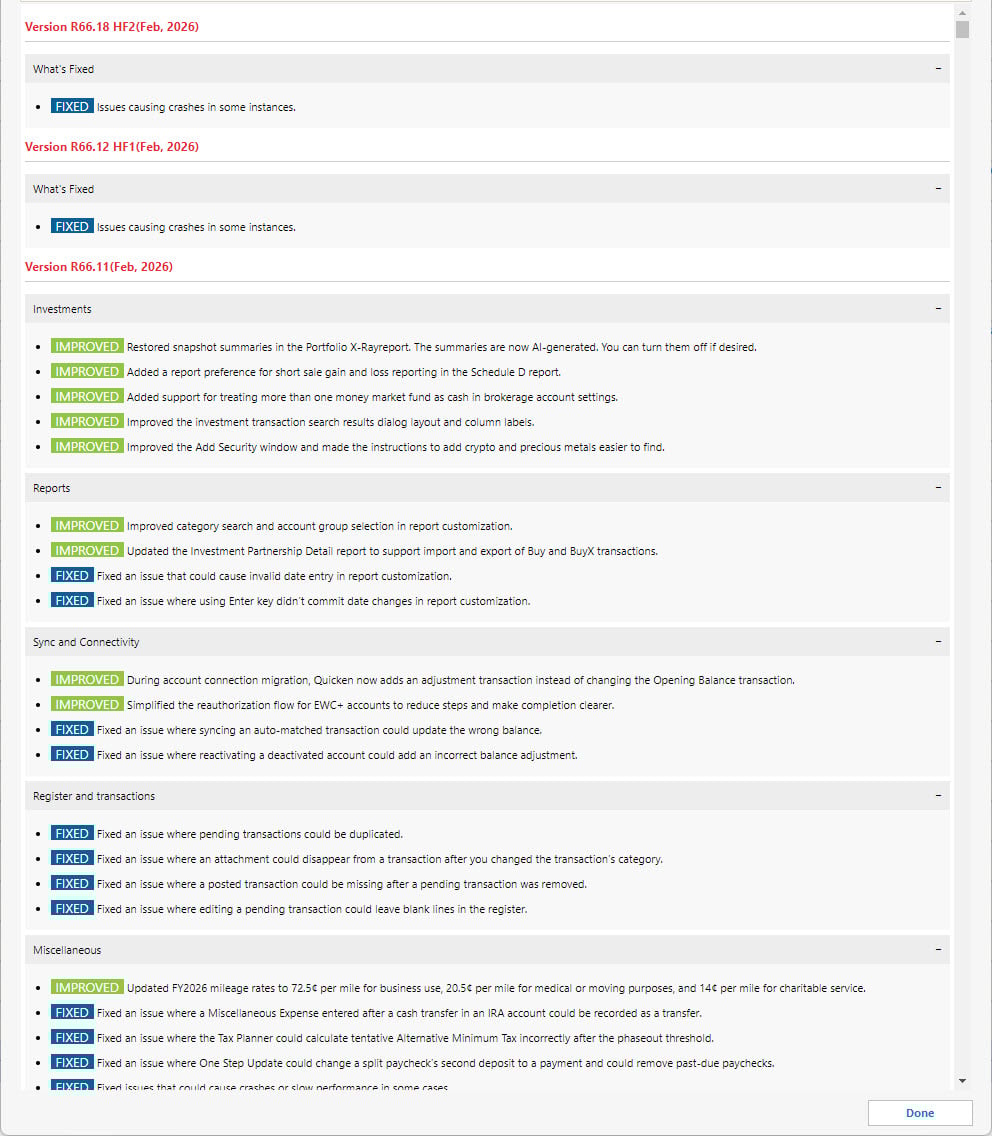
I was just offered R66.18. I wonder if 66.11 actually did create the problem you are seeing with the balance. Maybe the latest HF R66.18 helps?
0 -
Weirdest thing just happened when I ran OSU this evening.:
- Contradiction 1: PNC showed up in OSU as updating successfully via DC but in the OSU Summary report PNC was not listed.
- Contradiction 2: 5 newly posted transactions downloaded via DC into checking but the account register directly beneath the Account Name is blank (should show the date/time of the last download and the DC connection method) and Account List shows "Not available" for the last download date.
- Contradiction 3: The checking acct online balance was correctly updated (first time since the morning of 2/20) and no longer shows the last statement balance but the last date/time of the data download is not found anywhere. At least happily I was able to successfully reconcile to the online balance for the 1st time since last Friday morning.
- Contradiction 4: I sent 3 different test transfers between accounts but I could not do that from within the accounts. Instead I needed to do that from Online Center. Those transfer transactions show in the register as being completed (lightning bolts) but there is no Status information for them. (I may have missed the cut off time for sending these transfers today so I might not know until Thursday if they were successful.)
Running OSU earlier this morning did not produce any of these improvements. And I did no troubleshooting today so this all was the result of simply doing OSU this evening. These apparent results contradictions are causing me to scratch my head. I don't think I've ever seen them happen like this before. Should be an interesting watch over the next couple of days.
I did get the prompt to update to R66.18, as well, but I did not do the update. It says it is to fix an issue that can cause Quicken to crash (without saying what might be causing the crash) but I have not experienced that…at least not yet. So, I'll sit tight for now.
UPDATE REGARDING CONTRADICTION 4: I just logged into my online PNC account and saw that each of the 3 transfers (1 from each of my 3 accounts) all have "pending" status. So it does look like the DC Bill Pay process is working, again, after 4 days of not working.
Quicken Classic Premier (US) Subscription: R66.12 on Windows 11 Home
0 -
I think I’ll hold off on updating too, if you are. I haven’t had a crash either. Please keep us updated. Hopefully things will get more normal.
0 -
I forgot that Quicken for Windows doesn't allow a user to hold off on updating (perhaps holding off on updates is a setting I haven't tweaked). As soon as I opened Quicken today, the program updated with no opportunity to cancel. I am not on R66.18. :-(
Regardless of how I got it….. the results are OK. After the update I downloaded 6 items via PNC DC and processed two BillPay items. All the online balances match and I was able to reconcile.
Fingers remain crossed…….
0 -
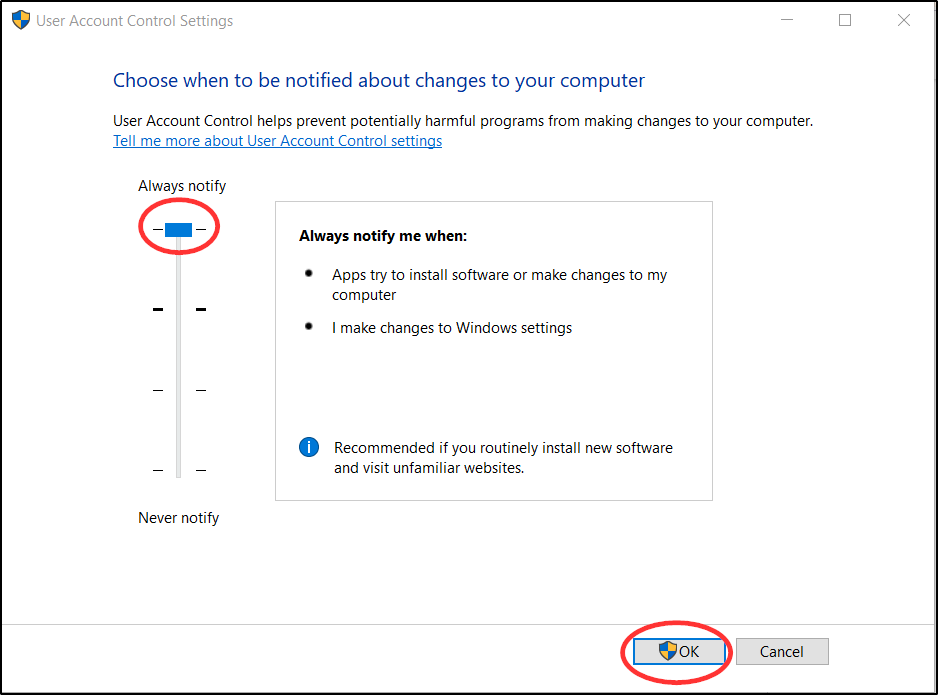
You are right that there is no way in QWin to stop from be force updated. But you can change your Windows UAC settings as shown in the following picture. Then when QWin tries to update your installation you will be prompted to decide whether or not the update can proceed.
Quicken Classic Premier (US) Subscription: R66.12 on Windows 11 Home
0 -
Great idea. I have always left my UAC at "never notify", but maybe I'll change that.
0 -
Well apparently their are issues again with transactions downloading. Just was online with bank account and 6 transactions cleared from 2/23 thru 2/26. When I did OSU in Quicken only 1 transaction downloaded (the 1 from 2/23). Why are we having issues again, I really haven't had any that I noticed until today. This is getting old, I need to do my end of month on that account and can not since these transactions haven't cleared. UGH
0 -
I haven’t seen any missed PNC DC transactions downloading so far. But, what I have seen is that the PNC DC updates much later in the day now. Sometimes I’ll get 1 item in the morning (which was probably from the day before) and then the rest after 2PM EST.
0 -
Yeah, that's what I was reporting here starting on 2/20 but the DC download issues started about a week prior to that. I had one day since the morning of 2/21 where transactions downloaded and the online balances updated correctly but other than that neither was happening.
However, I was still able to send DC Bank Bill Payments and transfers that have been executing properly. So, DC was only working 1-way.
I've finally decided to give up on PNC and will be switching to another bank in about a week. I need more DC stability that PNC has been able to provide these last 4 months.
What you can do to get your missing downloaded transactions so you can reconcile your accounts (backup your data file before proceeding):
- Manually enter the missing transactions.
- Or, manually download/import transactions from your online PNC account. (Make sure to select only the date range for the missing transactions to avoid having duplicate transactions entered into the registers.)
- Or, do as I have, deactivate DC for each account and set up downloading with PNC Bank - Web Connect which will set up EWC+ for downloading.
#2 and #3 have worked very well for me. Unfortunately, this requires me to set up Bill Payments from within my online PNC account instead of from within Quicken. If you have any questions about how to do #2 or #3, let me know.
Quicken Classic Premier (US) Subscription: R66.12 on Windows 11 Home
0 -
@Boatnmaniac thanks, I will see what happens this week when they finally come thru on OSU. I manually enter all transaction and match after OSU anyways, I will just make notes about it for the account in my record keeping about the online balance not matching my end of month balance. I just hope when they finally come thru OSU the posting date in the register is their actual posting date. I keep those columns on now in my register. Was just about to turn them off LOL.
0 -
Well it appears to be an issue with my other accounts as well. I didn't have time over the weekend to check those and I just did OSU and all 4 accounts have no transactions that came thru OSU after 2/23/26 and I know that there are plenty that should of. So is it a PNC issue or a Quicken issue and when I opened up Quicken on 2/28 there was an update. I am now running version 66.18 build 27.1.66.18 on Quicken Classic Deluxe. So has anyone had OSU issues after the latest update to their software? I will start doing OSU's after 9 am today and throughout the day thru tomorrow after 9 am. If my transactions don't update thru OSU I guess I am going to start with Quicken as it seems only a few of us are seeming to be having issues again that issue had been resolved for until recently. I just seen the posts about updating and version. I would love to restore it to a version prior but I did some major bookkeeping right before the update and it was not part of the recent backup because I have mine set at backup after 3 uses of Quicken and I don't want to loose all that work. So may the lastest build did something.
0 -
I am still running R66.12 and decided not to update to R66.17 nor R66.18 since they both describe fixing crash issues that I am not experiencing.
My PNC DC update issues began the evening of 2/19 right after I updated from R65.29 to R66.12 so that makes it look suspiciously like the PNC issues might be related to the R66.12 update. But only PNC is having this issue so I think (not sure) that is merely coincidence. Also, this latest PNC DC updates issue is very similar to the very long history of PNC DC updates issues going back to last October so it does make me think that this is just a continuation of the issues PNC is having with DC. Still, I'm thinking I might revert back to R65.29 so see if the PNC DC issues no longer exist.
Quicken Classic Premier (US) Subscription: R66.12 on Windows 11 Home
0 -
I did update to R66.23. Yes, ".18" did change my backup routine (just like the release note said) and ".23" has not. To date (fingers crossed), I have not had any issues with either version using PNC DC. Downloaded items using OSU seem to be happening in the time frame they always have (aproximately 24 hours after the transaction appears in my register as nolonger "pending"). Bill Pays are happening on the date they are supposed to. The only issue I have seen in the last month is that DC downloaded items aren't always available until late in the day. Some days 10AM … some days 3PM.
I haven't seen the PNC DC connection issues I saw October-January. In my case, I think the issue(s) were specific to my account(s). Once fixed by PNC, it seems to be staying that way (….. until it doesn't!).
Charlie
0 -
Well it just updated me to R66.23 and still no transaction coming thru since 2/23. Everything has been working fine for all my accounts till just recently. Was busy the last 2 days so no clue when I will be able to get ahold of the bank to see what is going on. This is ridiculous.
0 -
I am curious. I’m sure you have done this …. but have you logged in to your PNC account at PNC.COM and seen everything that should be DC downloading is there and not “pending”? If it’s all there, I’m sure (from experience) the first thing PNC Tier 3 support will ask you to do is disconnect and reconnect using DC…. and see if it all comes down with the reconnect.
0 -
@charlieo.Hemlock Yes I have close to 45 or more transactions that are not importing via OSU. I have done all that and I just spent over 40 minutes on the phone with Quicken now on hold for PNC Tier 2, they wouldn't connect me directly to tier 3. That wait is 20 minutes. So the wait time tells me this is another major issue with a wait time that long.
0 -
Right now the tech is saying they are aware of issues with 2 routing numbers, hasn't confirmed if my routing number is one of them. I will keep you all updated, I actually got someone to pickup a lot sooner then 20 minutes.
0 -
Apparently it is affecting more then 2 routing numbers, he said they are aware of the situation and they are working on correcting it with no ETA, so I asked for a Manager as not being informed about the issue and wasting time calling is unacceptable. The manager said they were just notified of the issue 3/3 and when I told him I discovered the issue on 2/27 he was like I should of notified them then. So going forward my advice to anyone if your OSU with PNC does not work right, call them and let them know! He did agree PNC customers some how should of been notified of the issue. I have been a customer of theirs for like close to 35 years, so when I **** and complain it gets attention I find out. He connected me to Tier 3 she is like Quicken is not cooperating so if you have an issue you need to call in an make a report with tier 3 and if tier 2 refuses to connect you insist on mgr so you can get connected to tier 3.
0 -
Well, I can only go by my 5 month experience with PNC support and the PNC DC problems I had that did eventually get fixed.
My experience is …. make sure you only speak to tier 3 because they are the only ones that even know what Direct Connect is. Make sure you have them open a case and give you the case number. Your case will get assigned to to a resolution specialist and they will give you their telephone number … and you can call them if you don’t hear back. Don’t hesitate to call them on a regular basis. The other thing I did was complain to my local PNC branch manager. He didn’t really know anything about the issue(s), but he supposedly was able to make sure my case was being worked on by contacting HQ. I think the local branch really does care about losing customers.
Please do let me know what happens.1 -
March 5, 2026: Issue still not resolved for me. Resolved for anyone? It's also crazy that you have to go to page 20 in this community to get the latest info. Maybe they should put new items at top? It worked for me on Feb 27.
0 -
Have you contacted PNC TIER 3 support and opened a case? Some folks also report that disconnecting their PNC DC accounts and reconnecting to DC helps.
0 -
I haven't. Surely they don't need more reports - how many is enough? I'll try disconnect/reconnect.
0 -
My experience has been that opening a PNC case and getting the case number does help. It still might take a while to resolve … but eventually someone technical will look at the problem. They usually call you before they close the case too.
1 -
Doesn't fix it. No change.
0 -
If or when you do contact PNC Tier 3 support, that is one of the first things they will tell you to try. They will also ask if you are getting any errors when you do the OSU. You can say “no” to both. If you ask them to open a case…. they should assign you to a PNC resolution specialist that you can follow up with.
Charlie1
Categories
- All Categories
- 16 Product Ideas
- 34 Announcements
- 248 Alerts, Online Banking & Known Product Issues
- 20 Product Alerts
- 516 Welcome to the Community!
- 680 Before you Buy
- 1.5K Product Ideas
- 55.6K Quicken Classic for Windows
- 16.8K Quicken Classic for Mac
- 1K Quicken Mobile
- 834 Quicken on the Web
- 126 Quicken LifeHub