See below, Where does Quicken keep FX Rates used for daily valuations

Tealeaf3
Tealeaf3 Quicken Canada Other Member ✭✭✭

Using Quicken Classic but not downloading from TD or any other bank, there seems to be no location where you can see the Exchange Rates they use. My account is based on C$, but I find that in order to figure out the C$ value of US$ items, I have to deduct all the C$ items to come out with the C$ value of the US$ items.

And this is just my Investing accounts which I keep/show separately. Heaven knows if I look into my other foreign exchange accounts. Thanks goodness I keep separate Xcel records.

Anyone know anything? I find call centre Staff, usually not v. knowledgeable.

Answers

  • Arctic Hare
    Arctic Hare Quicken Windows Subscription SuperUser ✭✭✭✭

    I swear I responded to this post a few days ago, but I don't see that previous exchange and the original post just reappeared. Not sure what happened, but…

    Quicken obtains currency exchange rates from a third party provider. Those rates get downloaded when you run One Step Update or have OSU run automatically on a schedule. If you are never running OSU, that is the problem - you aren't downloading the F/X rates.

    You can see the F/X rates that Quicken has saved and is using from: Tools—>Currency List. From there, you can also see historical rates.

    The Canadian version of Quicken does a great job of handling exchange rates. I'd say that is one of its strengths. I have not found any requirement to keep anything externally in Excel or otherwise.

  • Tealeaf3
    Tealeaf3 Quicken Canada Other Member ✭✭✭

    Thanks for trying to explain to me.

    BUT, in my viewing F/X rates as you describe, (noting that you have to highlight the currency concerned, in this case US$), I had the following appear. Just now, as of Nov 1, I updated the FX rates inc of course US$. It showed 0.71693 to C$. What I find is that this rate backdated to October 6??!!! Clearly the rates do not stick or do indeed backdate if you are not running daily. That begs the question, even if you run daily, does it not back date as well?

    Previous FX update for the US$ to C$ on October 13 showed as 0.71272.

    I am now in process of verifying using my separate Excel spreadsheet based on this.
    Highly dubious of Quicken. I do have a pair of unanswered Case #s around this subject. Why they bother checking back later on these case#s beats me as actual human answering staff said that they just pass on the info.

    Can you explain the great job in this circumstance?

    Can you check any of yr data?

  • Arctic Hare
    Arctic Hare Quicken Windows Subscription SuperUser ✭✭✭✭

    My original response was based on my long running experience with exchange rates in Quicken; however, your most recent response caused me to go look at what Quicken has been doing recently with F/X rates. And, what I discovered is that the F/X rates are not working correctly at present. I found the same thing you reported - the recent data is wrong and incomplete. This is a very serious problem that I was not aware of. This should definitely be brought to the attention of Quicken. I wonder whether this is also happening in the US version? Note: if I go back further in time, the data looks good. After a quick glance, it looks like the onset of this problem may have been around b

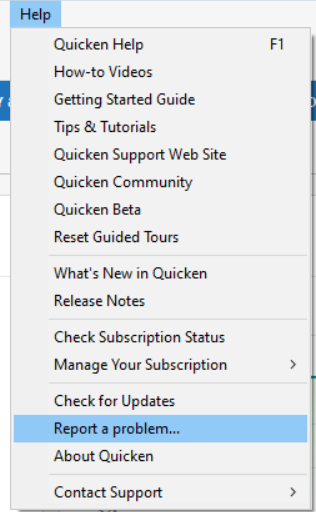
    I recommend using Report a Problem under Help and calling Quicken Phone Support.

  • Quicken Kristina
    Quicken Kristina Quicken Windows Subscription Moderator mod
    edited November 4

    Hello All,

    Thank you for taking the time to visit the Community to report this issue, though we apologize that you are experiencing this.

    We have forwarded this issue to the proper channels to have this further investigated. In the meantime, we request that you please navigate to Help > Report a problem and submit a problem report with log files attached and (if you are willing) a sanitized copy of your data file in order to contribute to the investigation.

    Report a Problem QWin.png

    While you will not receive a response through this submission, these reports will help our teams in further investigating the issue. The more problem reports we receive, the better.

    We apologize for any inconvenience!

    Thank you.  

    (CTP-15108)

    Quicken Kristina

    Make sure to sign up for the email digest to see a round up of your top posts.

  • Tealeaf3
    Tealeaf3 Quicken Canada Other Member ✭✭✭

    Thought I did respond to yrs Kristina, but it doesn't appear here.

    So I reiterate what I wrote.

    I used the "report a problem" but I, as I did not make a screenshot, I did not get a file/case# or any acknowledgement so have no proof. Another appalling shortcoming. Nothing in my profile??!!

    I will now report again and keep a copy somehow.

    Arctic did you also report??

  • Arctic Hare
    Arctic Hare Quicken Windows Subscription SuperUser ✭✭✭✭

    Yes. I filed a “Report a Problem” from with Quicken for this issue.

  • Quicken Kristina
    Quicken Kristina Quicken Windows Subscription Moderator mod

    Thank you for sending logs,

    It will help our teams investigate the issue!

    Quicken Kristina

    Make sure to sign up for the email digest to see a round up of your top posts.

  • Tealeaf3
    Tealeaf3 Quicken Canada Other Member ✭✭✭

    Please explain how I may make "logs"

  • Arctic Hare
    Arctic Hare Quicken Windows Subscription SuperUser ✭✭✭✭

    To create logs, you don’t have to do anything other than use Quicken. Quicken continuously creates logs, which can be included with a Problem Report and can be viewed by Quicken support and development teams to diagnose issues.

  • Tealeaf3
    Tealeaf3 Quicken Canada Other Member ✭✭✭

    To clarify, when you send the "Report a Problem", I see that various logs are ticked, but you have to hit the "attach Additional Files" button??

    Sorry if I am stupid, but that's me. Did you send log files?

    I am now digging around on another issue being location of where data files are kept after closing as this whole episode has made me more wary. I am mostly unable to access them at the 4 list at the bottom of "File", but will raise a separate query

  • Arctic Hare
    Arctic Hare Quicken Windows Subscription SuperUser ✭✭✭✭

    As long as there are check marks beside the log files then the log files will be submitted. The “attach other files” is if you want to provide something non-standard like a screenshot of the issue.

  • Tealeaf3
    Tealeaf3 Quicken Canada Other Member ✭✭✭

    Thanks,

    so it seems that the log files are automatically sent.

    Now we wait to see if they fix the issue AND/OR Advise everyone or at least us.

    Cheers

  • Arctic Hare
    Arctic Hare Quicken Windows Subscription SuperUser ✭✭✭✭

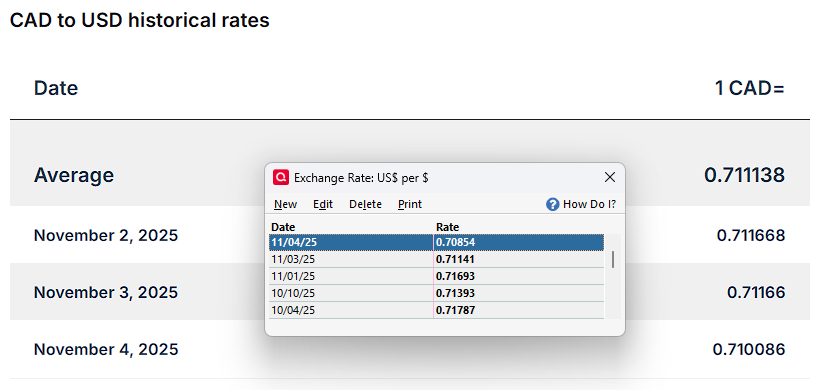
    The problem persists. The screenshot below compares Quicken's F/X rates with those from OFX.com.

    image.png
  • Chris_QPW
    Chris_QPW Quicken Windows Subscription Member ✭✭✭✭

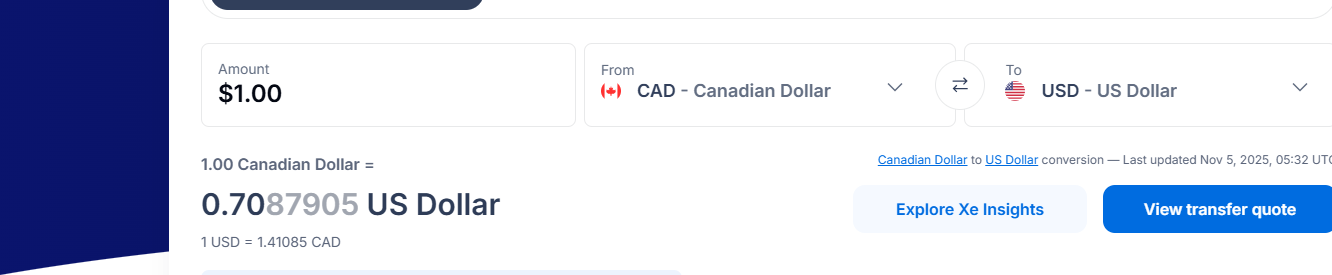
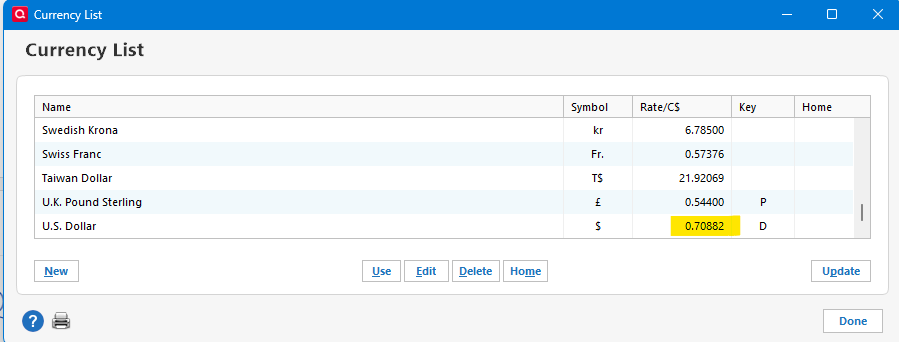
    Out of curiosity I looked at what the US version is getting for the current rate. Note that the US version doesn't save these and as such has no concept of "day" and I'm not even sure that that would be since the "end of day" would depend on where you are in the country and currencies don't close for the day like stocks.

    Anyways I'm using this site:

    I refreshed its webpage and then did an update of the Currency List in Quicken.

    image.png image.png

    Signature:
    This is my website (ImportQIF is free to use):

    http://www.quicknperlwiz.com/

  • Arctic Hare
    Arctic Hare Quicken Windows Subscription SuperUser ✭✭✭✭

    I appreciate the comment/observation. It is not entirely clear to me - for the reasons you cite - what rate is recorded as the "day rate" in the sites that provide historical F/X rates; however, some of the rates that Quicken has recorded recently appear to be well outside the range of variation for the day. Furthermore, it appeared that it was mapping rates to the wrong date. So, I do believe there was/is a problem; however, this is a case where we don't exactly know the "correct" answer unless Quicken were to divulge which service provides the rate quotes. Then we could do some more specific checks.

    I think it is also worth mentioning that the rate table essentially works in a placeholder capacity. When you record transactions that involve F/X, the transaction F/X rate is always recorded with the transaction and that is what is used for valuation. So, these placeholder rates only serve to do valuations where confirmed rates aren't in place. Then, when the "placeholder" rates are inaccurate, it doesn't - at least the way I use Quicken - cause any permanent issue with valuation because all confirmed transactions have and use their specific, actual F/X rates. And, to your point, two transactions made on the same day could have different specific rates. Nonetheless, it is my expectation that Quicken provides F/X rates every day that accurately track the markets.

  • Chris_QPW
    Chris_QPW Quicken Windows Subscription Member ✭✭✭✭
    edited November 5

    Let me say that I certainly don't want anyone to take my post as any kind of suggestion that there isn't a problem. I was just curious of what Quicken Windows US would come up with. Quicken Windows Canadian has (had) the best multiple currency support of any version of Quicken. It is the gold standard in this case, not Quicken Windows US.

    Signature:
    This is my website (ImportQIF is free to use):

    http://www.quicknperlwiz.com/